Uninstalling a program on Windows is simple, but anyone who has used the "Apps & Features" tool knows it often leaves the job half done. Leftover files, folders, and registry entries can remain behind, while stubborn programs may refuse to uninstall altogether. Manually cleaning up these remnants is both time-consuming and tedious.
The good news is that you don’t need premium software to fix it. A range of free uninstaller software can go beyond Windows’ built-in tool—scanning leftovers deeper, handling bulk removals in one go, and force-removing apps that won’t budge, all without costing a penny.
In this guide, we'll walk through the best free PC uninstallers available, compare what sets each one apart, and help you find the right fit for your needs.
What Should the Best Free Uninstaller Software Offer?
Before comparing specific tools, let’s set a clear benchmark. The best free uninstaller software does far more than simply delete a program's main executable file. Here is what separates top-tier free tools from ordinary ones:
Force removal. The ability to forcibly remove corrupted, broken, locked, or stubborn programs that standard Windows methods fail to uninstall.
Post-uninstall cleanup. Scan hard drives and the Windows Registry for leftover files, folders, temporary data, and settings after an app is removed.
Batch uninstall. The option to select and remove multiple programs in one pass, rather than uninstalling them one by one.
Broader app coverage. Support removing Windows Store apps, browser extensions, and preinstalled bloatware.
Automatic system restore. A reliable free uninstaller allows you to create a system restore point before major removals.
Clear program details. Display information such as installation dates, program sizes, or security ratings to prevent accidental deletion.
Portability. Offer a portable version that runs as a standalone executable without requiring a traditional installation.
Truly free service. Core removal and cleanup features shouldn't be locked behind a paid upgrade.
5 Best Free Uninstaller Software for Windows in 2026
Here is an overview of the free uninstaller tools we've selected. You can first take a quick look at the comparison table below to see what each one offers in its free version:
| Features |
Force Uninstall |
Leftover Cleanup |
Batch Uninstall |
Install Monitoring |
Software Health |
| IObit Uninstaller |
✅ |
✅ |
✅ |
✅Basic |
✅ |
| Revo Uninstaller |
❌(Pro only) |
✅ |
❌(Pro only) |
❌ |
❌ |
| Geek Uninstaller |
✅ |
✅ |
❌(Pro only) |
❌ |
❌ |
| BCUninstaller |
✅ |
✅ |
✅ |
❌ |
❌ |
| Wise Program Uninstaller |
✅ |
✅ |
✅ |
❌ |
❌ |
Now let's take a closer look at each free uninstaller program in detail.
IObit Uninstaller: Best Free Solution for Stubborn Software Removal
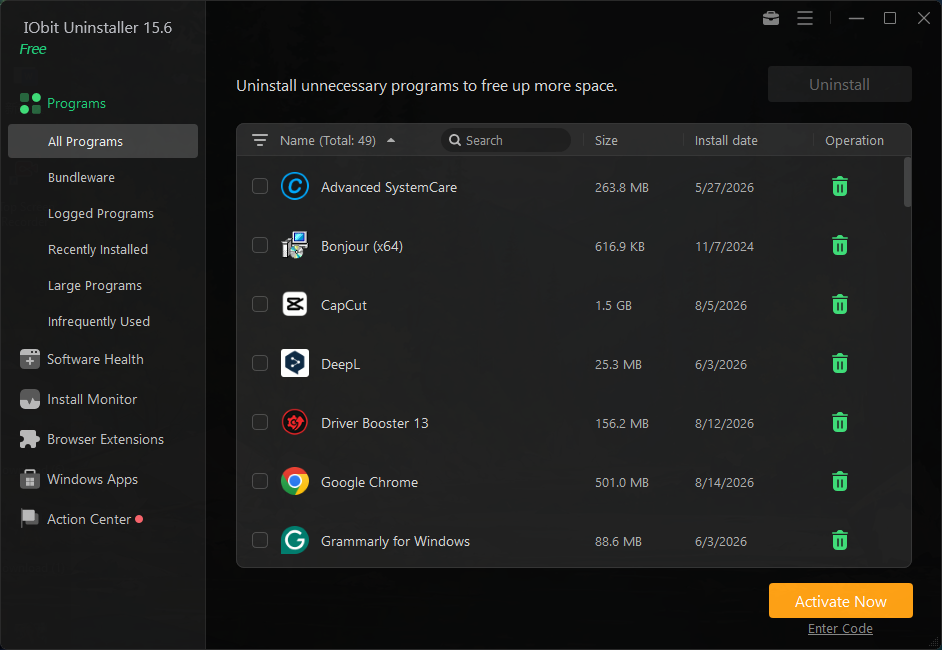
IObit Uninstaller earns its spot at the top of this list for one simple reason: it packs Pro-level power into a genuinely free package. It supports Force Uninstall, one-click batch uninstall, deep scanning for leftover files, folders, and registry entries, and removal of unwanted browser extensions and built-in Windows apps. With these features available at no cost, IObit uninstaller offers a practical way to keep your PC clean without paying for essential uninstall and leftover cleanup.
As one of the best Windows uninstallers, it also doubles as a broader toolkit, combining system health checks and software update management in one place, making it a versatile, high-value pick beyond just uninstalling programs.
Pros:
Free core uninstall and cleanup features without a paywall
Software Health scans for junk, outdated apps, and system issues
Supports Windows apps removal in batch
Force Uninstall+ removes programs that fail to uninstall normally
Cons:
IObit Uninstaller Free
- Complete forced uninstallation for stubborn programs.
- Uninstall a batch of programs at once.
- Scan and remove leftover files, folders, and registry entries.
- Support the management of Universal Windows Platform apps.

Revo Uninstaller Free: Deep Leftover Scanning & Cleanup at No Cost
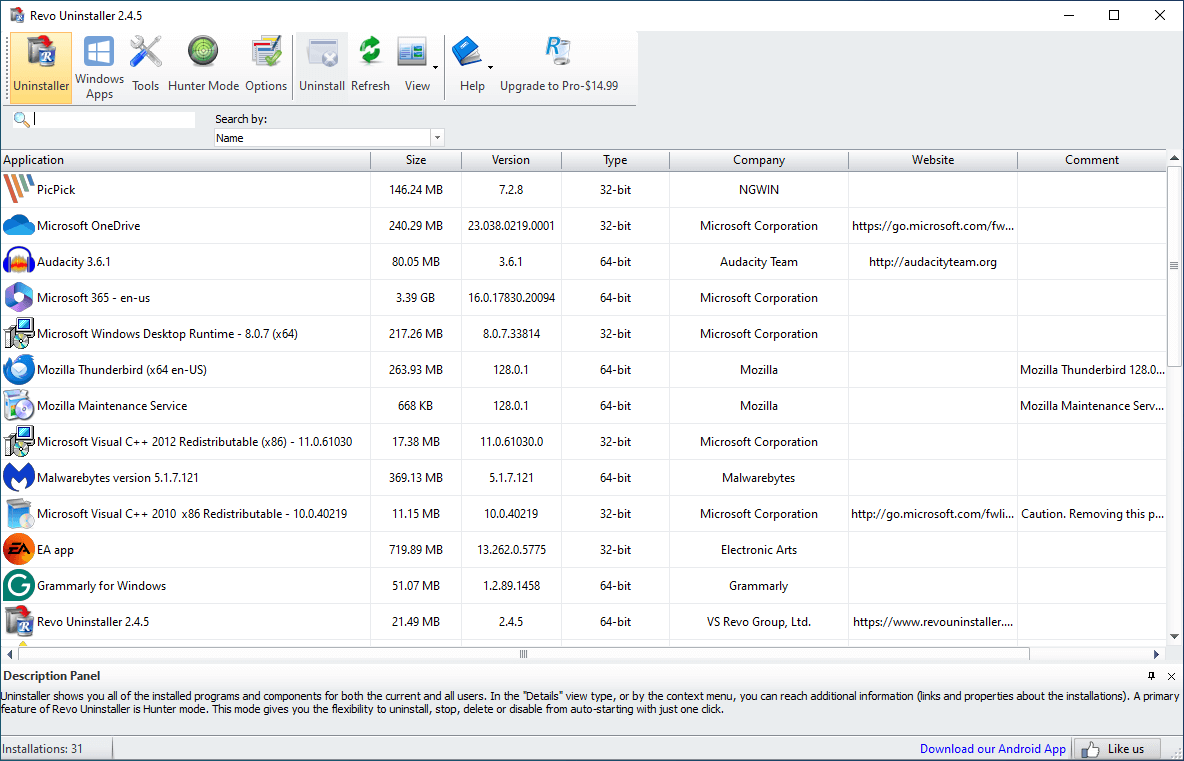
Revo Uninstaller Free built its reputation on its deep leftover scan and thorough cleanup, all at no cost. After running a program’s standard uninstaller, it scans your hard drive and registry deeply for orphaned files and entries most tools miss, plus a unique Hunter Mode lets you target running apps directly from the desktop. While some advanced features are reserved for Pro, its free version remains a practical, no-cost option for everyday Windows users.
 Pros:
Pros:
Thorough leftover file and registry scanning, completely free
Hunter Mode for quick, targeted removal
Separate portable edition available
Cons:
You May Like: Revo Uninstaller vs IObit Uninstaller Guide >>
Geek Uninstaller: Best Lightweight Tool With No Installation Required
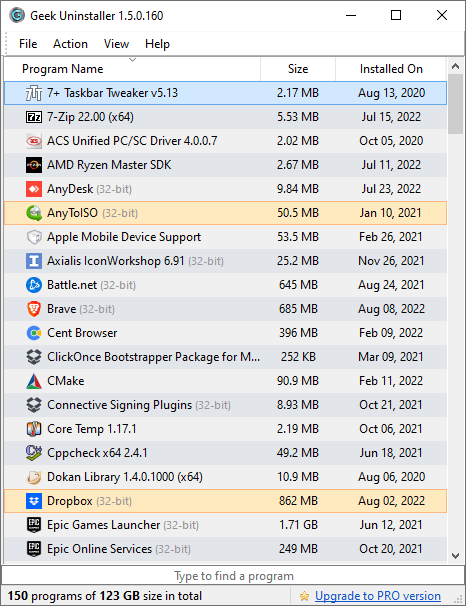
Geek Uninstaller is a lightweight free uninstaller software that stands out for its simplicity and portable design. It handles the essentials well: force removal for stubborn programs, deep leftover scanning, and support for removing Windows Store apps. While it lacks some advanced features found in paid alternatives, Geek Uninstaller's free service still delivers a fast, straightforward way to keep Windows clean, with no installation required.
For more detailed information, read the full review here.
Pros:
Lightweight and portable, zero installation required
Performs quick scans for leftover files and registry entries
Handles forced removals at no cost
Cons:
Relatively basic interface
No batch/multiple uninstall support
Limited program details compared to competitors
Bulk Crap Uninstaller: Open-Source and Truly Free Batch Uninstaller
Bulk Crap Uninstaller (BCUninstaller) is one of the few completely free, open-source uninstallers for Windows. It offers silent batch uninstalls, leftover detection, and forced removal—with no ads, nag screens, or hidden paywalls. Although the interface may appear somewhat complex at first glance, BCUninstaller is genuinely valuable for users who want extensive functionality without hidden upgrade prompts or usage restrictions.
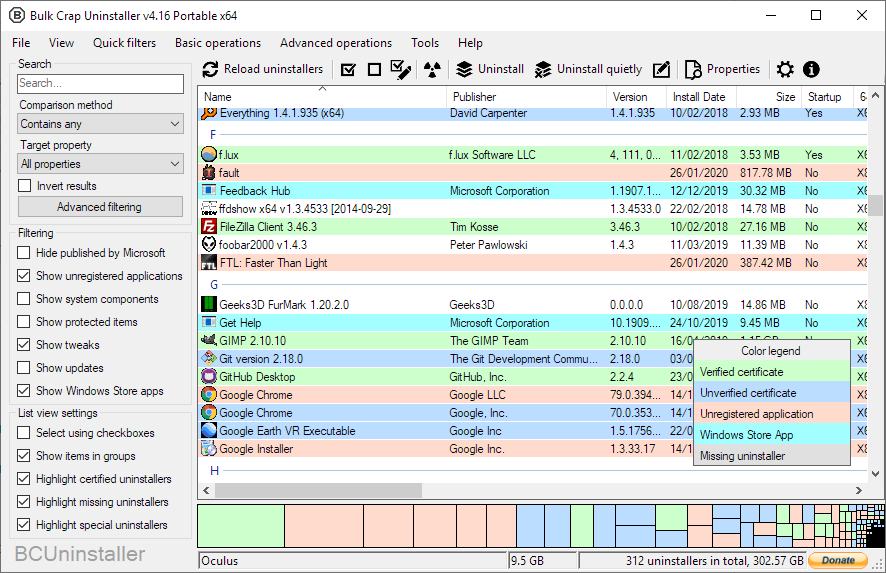
Pros:
Completely free and open-source, no Pro version
Supports silent, unattended batch uninstalls with ease
Broad coverage: Store apps, Windows features, and updates
Cons:
Wise Program Uninstaller: Free One-Click Removal via Right-Click Menu
Last on our free uninstaller software list is Wise Program Uninstaller, as it wraps a solid set of core features into a simple, no-cost package. It handles forced removal of stubborn programs, deep leftover cleanup across files and the registry, and offers a portable version for installation-free use. With its clean interface and useful free features, this tool is a practical choice for users who want straightforward software cleanup without unnecessary complexity.
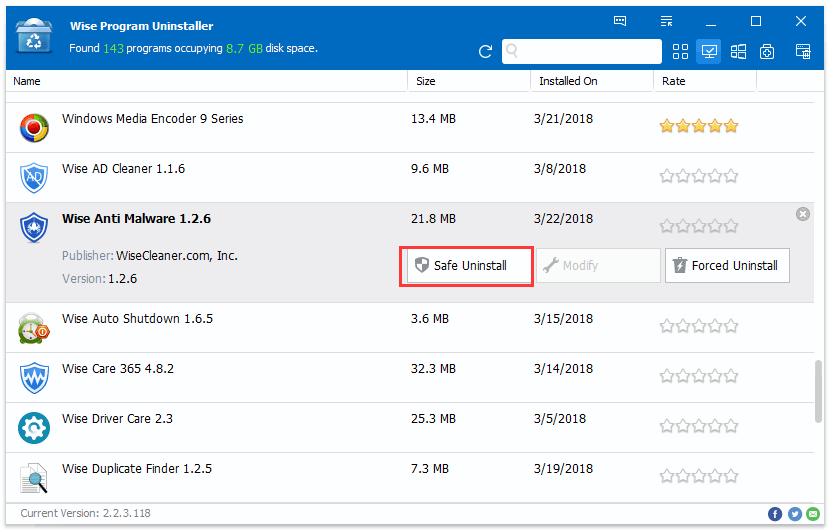
Pros:
Essential uninstall features available for free
Portable, installation-free design
Clean, beginner-friendly interface
Cons:
How to Completely Uninstall a Program for Free?
Once you've picked the best free uninstaller for Windows, the next step is putting it to work by removing the unwanted programs completely. Most free uninstallers follow a similar workflow, and IObit Uninstaller is one of the more intuitive options out there, making the process nearly effortless. We'll use it as a reference to walk you through exactly how it works:
Step 1. Click the button below to download this free uninstaller software on your Windows PC.
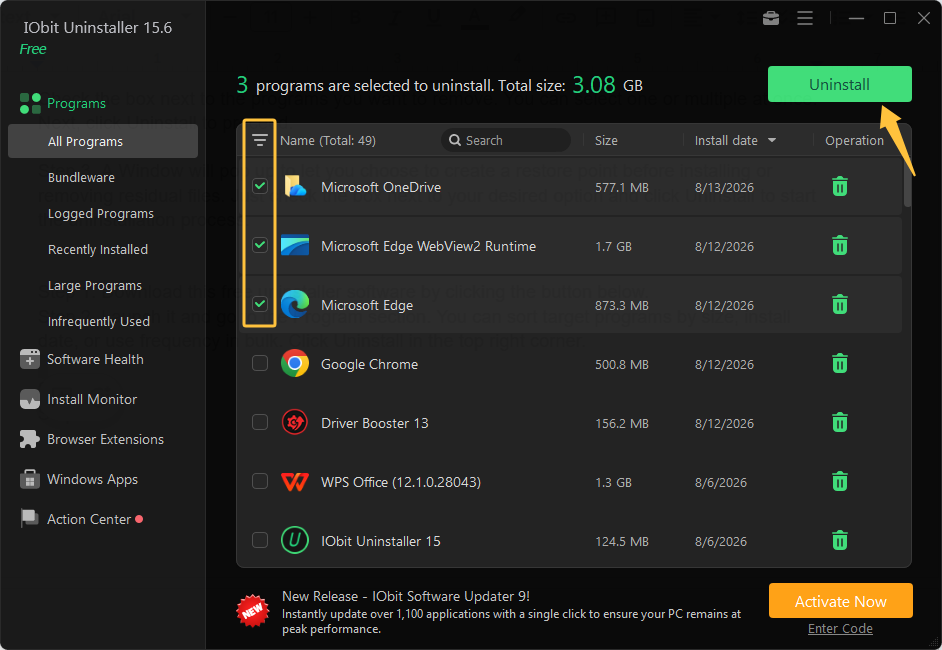
Step 2. Launch it and head to the Programs section. From here, you can sort your installed programs by size, install date, or storage drive to quickly locate what you're looking for. Select the target programs and click Uninstall in the top-right corner.
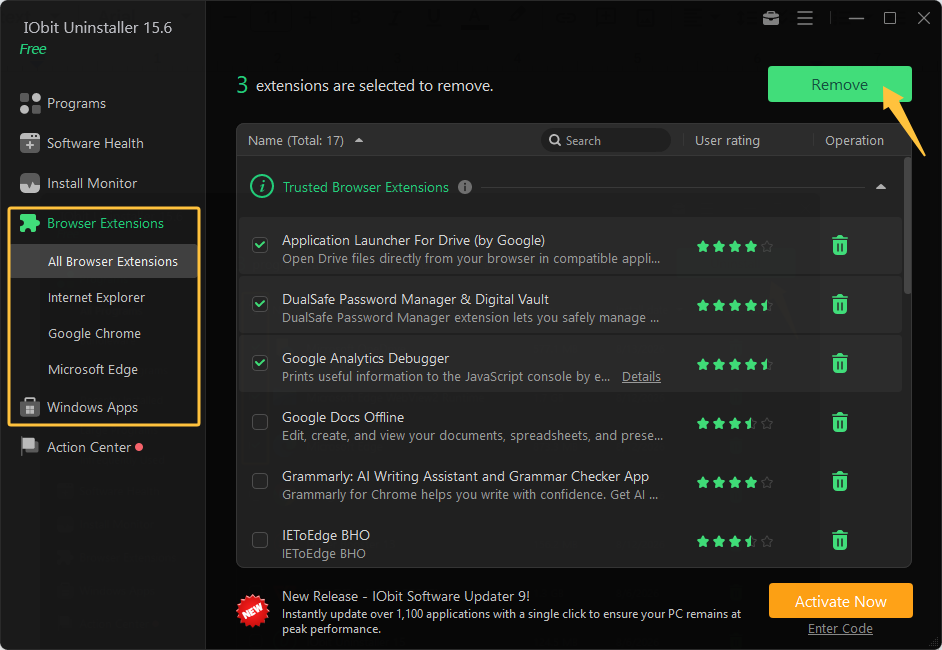
Alternatively, go to the Browser Extensions tab to manage add-ons across your major browsers. Tick the boxes next to the extensions you want gone, then click Remove in the top-right corner. Removing unwanted Windows built-in apps follows a similar process.
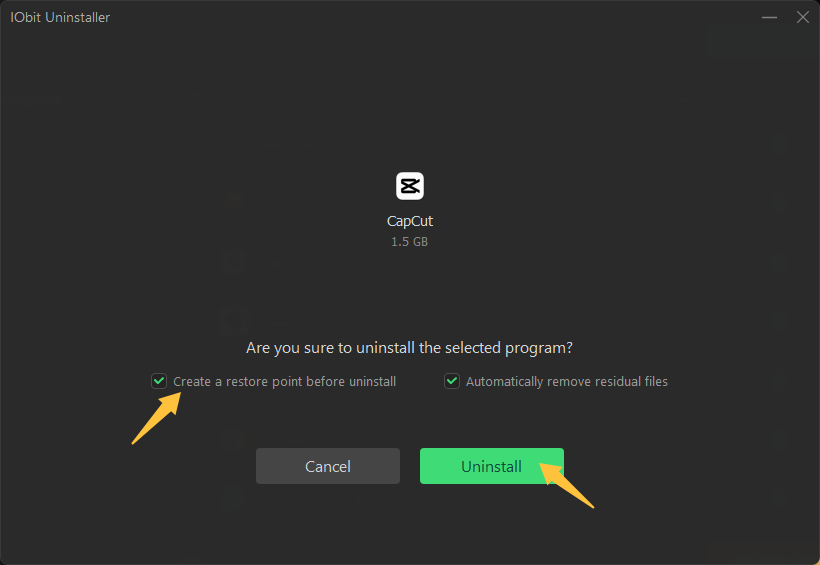
 Step 3. A confirmation window will appear before the removal begins. Check the available options to create a system restore point and automatically remove residual files after uninstalling. It’s all up to you.
Free vs. Paid Uninstallers: When Upgrading is Actually Worth It
Not every user needs to pay for an uninstaller. Free tools like IObit Uninstaller and Geek Uninstaller cover the essential removal and cleanup features at no cost, which is more than enough for most users who only uninstall software occasionally. However, paid uninstallers may be worth considering in a few situations:
You manage multiple PCs. Paid plans may offer multi-device licenses and centralized management, ideal for maintaining several machines rather than just your own.
You need more automation. Some Pro versions deliver scheduled scans, batch uninstalls, or automatic startup and browser removal, reducing the need for manual maintenance.
You want deeper leftover detection. Paid tiers may provide more advanced scanning or larger databases to identify files, folders, and registry entries that free scans might miss.
You need advanced features. Premium tools unlock extras like Hunter Mode and malicious plugin removal, making them a better fit for users who want more than basic uninstalling.
FAQs About Free Uninstaller Software for Windows
1. What is the best free uninstaller for Windows 11?
No single tool is the "best" choice for everyone. IObit Uninstaller stands out as a strong all-round pick that offers force uninstall, batch removal, and Software Health in its free version.
2. Is there a completely free uninstaller for Windows?
Yes. Several tools such as IObit Uninstaller, BCUninstaller, and Wise Program Uninstaller offer core uninstall and temp files cleanup features for free, with no trial period or expiration.
3. Does uninstalling remove everything?
Not by default. Windows’ standard uninstall can leave behind files, folders, registry entries, and other residual data. That is the gap that free uninstaller tools can help close.
4. Can I force uninstall a program for free?
Yes. IObit Uninstaller's free version includes the Force Uninstall+ feature, enabling you to remove corrupted, broken, or stubborn programs that resist a normal uninstall.
Conclusion
If you're looking to remove software without paying a cent, free uninstaller software has proven it gets the job done. Options like IObit Uninstaller, BCUninstaller, and Geek Uninstaller deliver core uninstall features and deep leftover cleanup in their free tiers. Match the tool to your needs, and keep your Windows PC clutter-free easily.
IObit Uninstaller Free
- Complete forced uninstallation for stubborn programs.
- Uninstall a batch of programs at once.
- Scan and remove leftover files, folders, and registry entries.
- Support the management of Universal Windows Platform apps.