It happens. After uninstalling a program, you surprisingly discover that leftover registry entries remain behind, or that some stubborn software refuses to disappear completely. While Windows’ built-in uninstaller can remove the main application, it often leaves behind traces that take up valuable space and may cause software conflicts over time. That’s where a dedicated third-party uninstaller comes in handy.
 Among the many options available, Revo Uninstaller and IObit Uninstaller are two popular choices. So, Revo Uninstaller vs IObit Uninstaller: which one is better? The answer depends on your specific needs and priorities. This article provides a complete side-by-side comparison of both tools, covering the key features and differences that matter most. Keep reading to find out which uninstaller is the right choice for your Windows PC.
Revo Uninstaller vs IObit Uninstaller: Quick Comparison
Which is better, Revo Uninstaller or IObit Uninstaller? Generally, IObit Uninstaller is great for users who need quick and routine cleanups. Revo Uninstaller, on the other hand, excels at deep residual scanning and handling truly stubborn programs. Before looking into the specifics, let’s have a brief comparison of the two uninstallers.
| Features |
Revo Uninstaller |
IObit Uninstaller |
| Ease of Use |
Straightforward but more technical |
Highly intuitive, modern workflow |
| UI Design |
Functional, somewhat dated |
Clean, modern, easy navigation |
| Deep Scan |
Three-level (Safe/Moderate/Advanced) |
Strong one-click leftover scan |
| Force Uninstall |
Powerful (Pro) |
4000+ stubborn program database |
| Batch Uninstall |
Available (mainly Pro) |
Strong free and Pro support |
| Browser Extension Removal |
Solid (Pro stronger) |
Excellent free and Pro |
| Uninstall Windows Apps |
Yes |
Yes |
| Startup Manager |
Yes |
No |
Software Updater
|
No |
Built-in (stronger in Pro) |
| Restore Point Support |
Yes |
Yes |
| Platforms |
Windows Vista, 7, 8, 10, 11 |
Windows XP, Vista, 7, 8, 8.1, 10, 11 |
| Portable Version |
Yes (Pro Portable) |
No |
Revo Uninstaller and IObit Uninstaller: Features Breakdown
Revo Uninstaller and IObit Uninstaller are far more capable than Windows’ built-in features. Despite serving the same purpose, they differ significantly. In this part, let’s dive into the Revo Uninstaller vs IObit Uninstaller comparison and explore their key features in detail.
1. Leftover Scanning
Revo Uninstaller is well known for its three-level scanning modes: Safe, Moderate, and Advanced. It gradually searches deeper into leftover files, folders, and registry entries and finds leftover data to delete. This gives users greater control over how aggressively they want to clean their systems.
IObit Uninstaller takes a simpler approach. It offers a one-click leftover scan that quickly detects and removes remaining files and registry traces with its automated cleanup algorithms. This makes it more suitable for average users who want fast results without advanced adjustments.
Verdict: There is no declared winner in this IObit Uninstaller vs Revo Uninstaller comparison. While Revo’s deep scanning is ideal for advanced users, IObit offers more convenient cleanup for easy uninstallation.
2. Force Uninstall
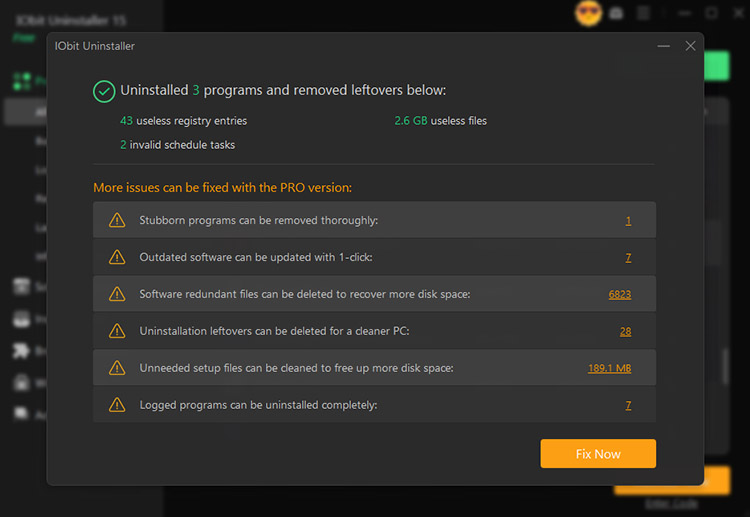
Revo’s Forced Uninstall feature (available in Pro) helps remove applications even when their original uninstallers are damaged or no longer functional. It scans the system for related files, folders, and registry entries to ensure a more complete removal.
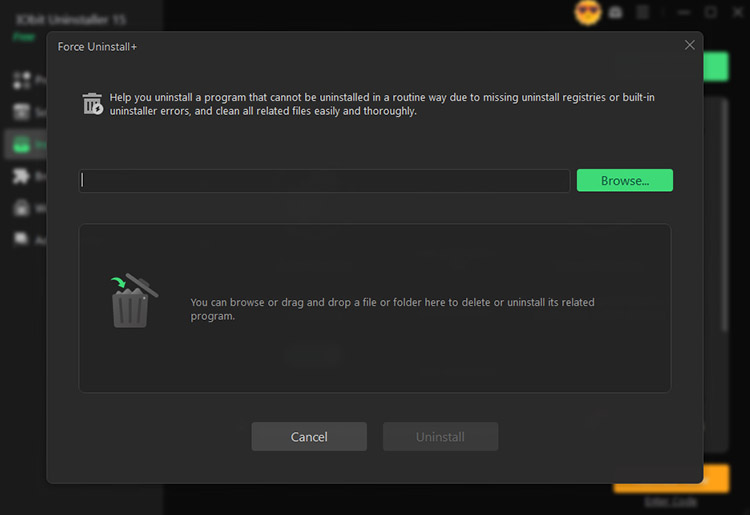
IObit Uninstaller’s Force Uninstall+ feature can locate related program folders and registry entries, which helps users force remove programs that refuse to uninstall normally. With an extensive database covering more than 4,000 stubborn programs, it can quickly identify problematic applications for thorough cleanup.
Verdict: Both tools excel at Force Uninstall. Revo offers deeper control, and IObit provides a larger database and simpler automation.
3. Batch Uninstall
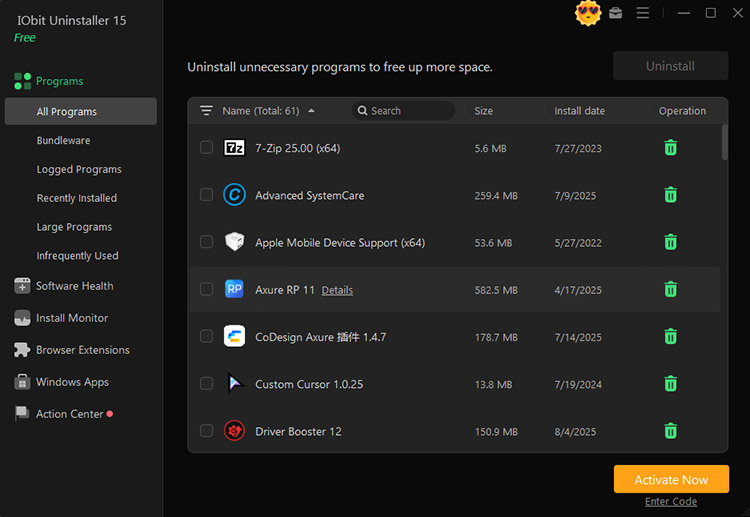
Both uninstallers allow users to select and remove multiple programs at once. IObit’s batch uninstall feature is simple and accessible, and it is even available in the free version. Users can quickly clean multiple applications with minimal effort.
Revo also supports batch removal through its Multiple Uninstall. However, the feature is only available in the Pro version. The entire process remains quick and straightforward.
Verdict: When it comes to Revo Uninstaller vs IObit Uninstaller in terms of batch processing, both tools are highly capable. However, IObit offers this feature in its free version, which makes it a more convenient choice to batch remove apps frequently.
4. Browser Extension Removal
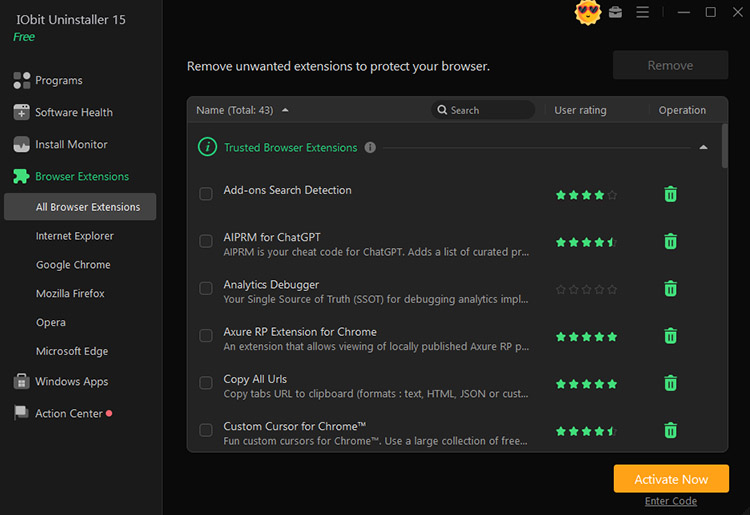
Both Support Google Chrome, Mozilla Firefox, Microsoft Internet Explorer, and Microsoft Edge. IObit provides a clear management interface with user ratings for extensions. Users can quickly identify suspicious or potentially harmful extensions and remove them more easily.
Revo’s Browser Extensions module focuses on detailed information display and organization. It groups browser extensions by browser and provides information like Name, Type, Version, Publisher, and Description. Users can understand what kind of extension is installed and perform easy management.
Verdict: For this IObit Uninstaller vs Revo Uninstaller comparison, IObit provides a more complete browser cleanup experience, while Revo offers better detailed information management.
Also Read: A Complete Guide to Remove Extensions for All Major Browsers >>
5. Uninstall Windows Store Apps
With an interface similar to its extension management module, IObit Uninstaller provides a simple way to manage installed Store apps. It displays user ratings to help evaluate applications and supports quick batch removal with just a few clicks.
Revo Uninstaller offers a more detailed view of installed Windows apps. Its main window displays useful information, including Name, Size, Install Date, Version, Publisher, and Description. In addition, Revo provides a Reset the App option, which can restore apps to their initial state with default settings.
Verdict: IObit is more user-friendly with quick identification and simple removal options. Revo offers more detailed app information and additional control.
6. Installation Monitor
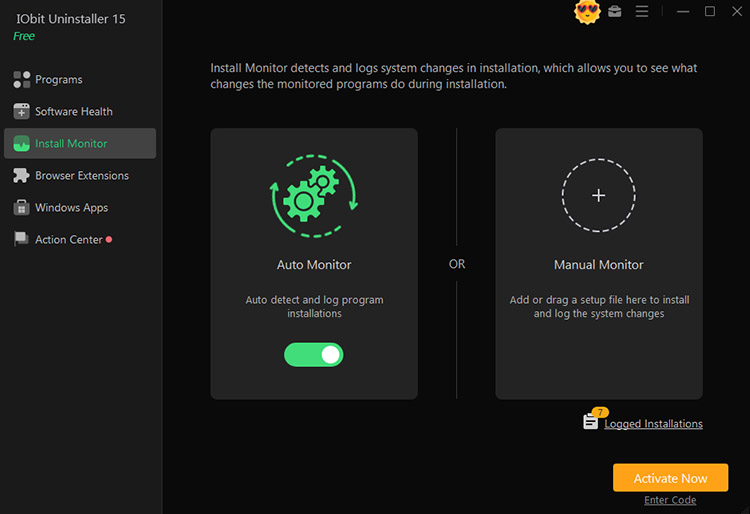
IObit Uninstaller’s Install Monitor tracks changes made during software installation and records system modifications for future removal. It provides two monitoring methods: Auto Monitor to automatically detect and log program installations, and Manual Monitor, which allows users to add or drag a setup file into the tool to monitor the installation process and record related system changes.
Revo Uninstaller’s Real-Time Installation Monitor takes a more detailed approach. It tracks changes made to the system while a program is being installed and saves them as a trace log. This log can later be used during uninstallation to perform a more precise cleanup, which helps remove leftover files and registry entries that traditional leftover scans may not detect.
Verdict: In terms of installation monitor for Revo Uninstaller vs IObit Uninstaller comparison, Revo Uninstaller has an advantage for users who want detailed trace logs and highly accurate removal. IObit Uninstaller offers a simpler and more accessible monitoring experience.
7. Hunter Mode
Revo Uninstaller’s Hunter Mode is an innovative interactive feature. After activation, the main window minimizes, and a targeting crosshair appears on the desktop. Users can drag the icon over a program window, desktop shortcut, or system-tray icon. It contains a context menu with options, including Uninstall, Stop Auto Starting, Kill the process, Kill and Delete, Open Containing Folder, and a quick Google search. This makes Hunter Mode particularly useful for unknown or hard-to-locate programs.
IObit Uninstaller offers a similar interactive tool called Easy Uninstall, which works like a Hunter Mode feature. Once enabled through the Tools menu, a targeting icon appears. Users can drag it onto an open window, desktop icon, or system-tray icon to quickly uninstall, end processes, and open files. It is especially convenient for identifying and removing pop-up ads and unknown software without manually searching.
Verdict: Revo Uninstaller’s Hunter Mode is more versatile thanks to its broader set of management actions. IObit Uninstaller’s Easy Uninstall is simpler and faster for quick uninstall and process-management tasks.
Revo Uninstaller vs IObit Uninstaller: what are their distinct features?
While Revo excels at deep scanning, detailed traces, and granular control over the removal process, IObit Uninstaller features a simpler interface, faster workflows, and more balanced uninstallation capabilities.
Free vs. Pro Version: What Do You Get with IObit and Revo Uninstaller?
When comparing Revo Uninstaller vs. IObit Uninstaller, we also look at their free versions and check what each paid plan adds. The differences can help you decide whether the extra features justify an upgrade.
Revo Uninstaller Free: It gives you solid core scanning, Windows Apps support, full Hunter Mode, eight extra cleaning tools, and free professional technical support.
Revo Uninstaller Pro ($12.47/year/1PC): Unlocks Forced Uninstall, Quick/Multiple Uninstall, extended leftover scanning, Real-Time monitoring with the Logs Database, and the multi-level Backup system.
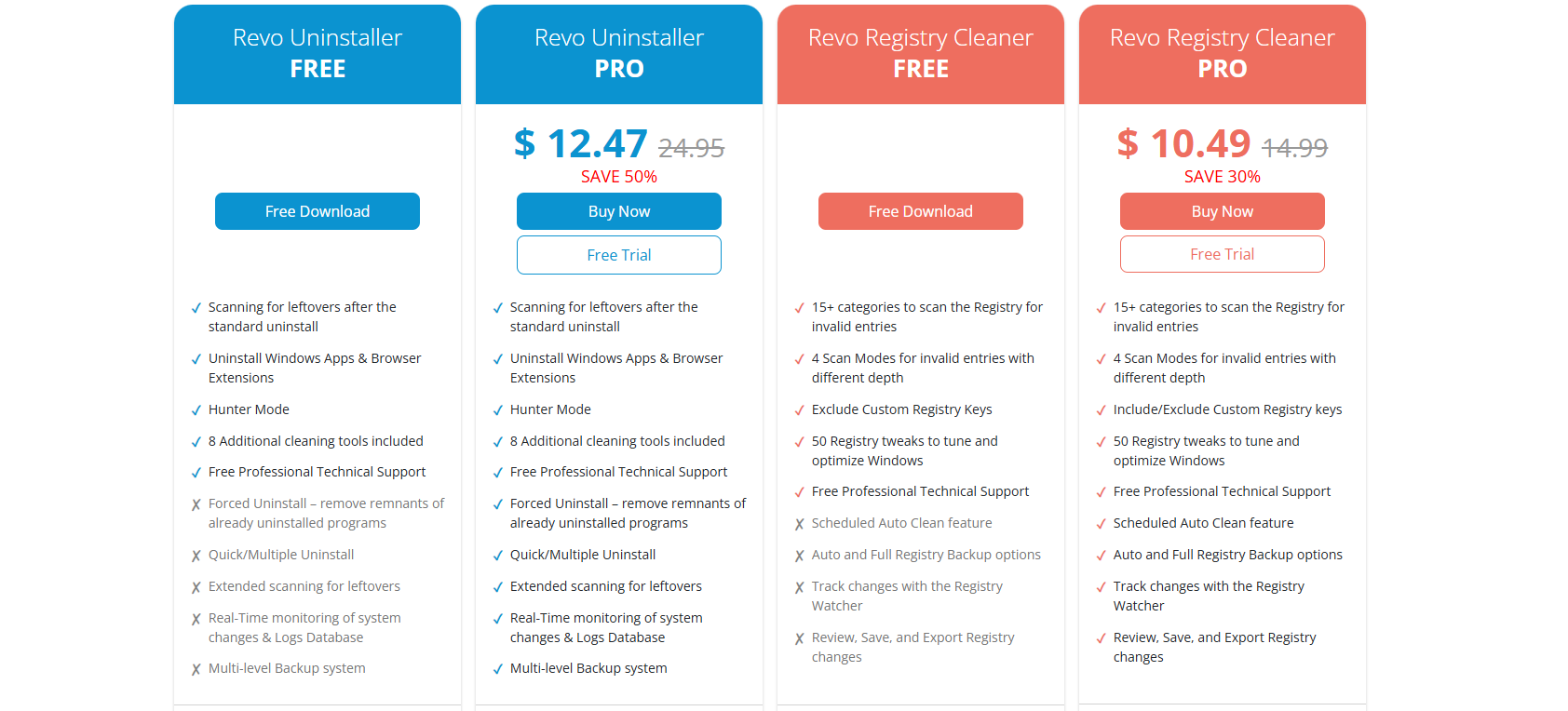
IObit Uninstaller Free: Includes batch uninstall, Windows app removal, drag-and-drop Easy Uninstall, and auto leftover cleanup.
IObit Uninstaller Pro ($14.77/year/1PC + 2PC free): Adds automatic residual removal from every uninstall, support for 4,000+ stubborn programs, deeper hidden leftover scanning, bundleware and preinstalled app removal, incomplete-uninstall fixes, malicious extension cleanup, real-time monitoring, 1-click software updates, and premium support.
 When it comes to Revo Uninstaller Free vs IObit Uninstaller Free, IObit offers better value for most home users thanks to its broader set of free features. For the paid versions, IObit Uninstaller Pro also provides more everyday utilities and convenience features. Overall, IObit delivers a more balanced package for both versions.
IObit vs Revo Uninstaller: Pros & Cons
The previous sections covered a detailed Revo Uninstaller vs. IObit Uninstaller comparison, including their features and free vs. Pro versions. In this section, let’s take a closer look at the key advantages and drawbacks of each uninstaller.
Revo Uninstaller
Pros:
Offers multiple scan levels for thorough leftover file detection.
Creates backups and restore points for safer software removal.
Provides a portable edition without requiring traditional installation.
Hunter mode to identify and remove programs directly from the desktop.
Cons:
Uses a slightly dated interface compared with modern uninstallers.
Advanced removal tools may confuse inexperienced users during cleanup.
The free version lacks several powerful features available in Pro.
IObit Uninstaller
Pros:
Removes multiple unwanted programs quickly with one-click batch uninstall.
Detects leftover files and issues through sophisticated health scans.
Removes unwanted browser extensions, toolbars, and annoying add-ons easily.
Offers advanced tools like File Shredder, Software Updater, and Windows Update removal.
Cons:
Final Verdict: Which Uninstaller Should You Choose?
If you have read this far, you might still be wondering: Revo Uninstaller or IObit Uninstaller, which one is the best uninstaller for Windows? The answer depends on your specific needs.
For everyday home users who want fast routine cleanup, easy batch removal, a modern interface, and strong free features, IObit Uninstaller is the better fit. Its one-click leftover cleanup, convenient batch control, browser extension management, and extra utilities like Software Health and Easy Uninstall/Hunter Mode make regular PC maintenance simple and efficient. For technical users or anyone dealing with stubborn programs, Revo Uninstaller offers great control and precision. Its multi-level scanning, Forced Uninstall, Real-Time Installation Monitor with Logs Database, backup system, and versatile Hunter Mode provide deeper cleanup capabilities and advanced management options.
Overall, IObit Uninstaller is the more practical choice for most Windows users who value convenience, speed, and strong value, especially with its feature-rich free version. While Revo Uninstaller offers advanced scanning and detailed control for experienced users, IObit provides a more balanced combination of powerful removal features and user-friendly operation.
IObit Uninstaller Free
- Complete forced uninstallation for stubborn programs.
- Uninstall a batch of programs at once.
- Scan and remove leftover files, folders, and registry entries.
- Support the management of Universal Windows Platform apps.

Conclusion
Revo Uninstaller vs IObit Uninstaller? Both tools offer powerful features for uninstallation on Windows. While Revo Uninstaller stands out with its deep scanning capabilities and advanced cleanup control, IObit Uninstaller delivers a more user-friendly experience with professional removal features, batch removal, and useful cleanup tools. For most Windows users who want an efficient and feature-rich way to keep their PCs clean, IObit Uninstaller is a more practical choice. Download IObit Uninstaller and enjoy effortless PC cleanup now!