Many Windows PCs gradually become slower because outdated registry entries remain behind after software is removed or system settings change. These leftovers may contribute to longer startup times, sluggish performance, or occasional freezes. Choosing a reliable registry cleaner can remove unnecessary entries without putting important system data at risk.
This guide reviews five of the best free registry cleaner options available and walks you through the correct way to clean the Windows Registry safely.

What is Registry Cleaner? How to Choose the Best?
A registry cleaner is a tool that identifies obsolete, invalid, or unused entries in the Windows Registry. A dependable free registry cleaner and Windows optimizer reduce unnecessary clutter and simplify routine system maintenance. A few key aspects are worth checking before choosing the right registry cleaner:
Ease of Use: A clean interface, clear scan results, and straightforward controls make maintenance easier for every experience level.
Safety: Automatic backups and restore options allow changes to be reversed.
Effectiveness: Look for accurate detection that removes unnecessary entries without flagging valid registry data.
Pricing: The free plan covers essential cleanup functions without making premium features feel mandatory.
Adaptability: Compatibility with the current operating system and regular updates helps ensure reliable performance.
Comparison of 5 Best Free Registry Cleaners 2026
Some registry cleaners focus solely on removing invalid registry entries, while others combine registry maintenance with broader PC optimization features, such as RAM optimizer Windows 11/macOS, system monitoring, security monitoring. The comparison below highlights the strengths and features of five best registry cleaners.
Registry Cleaner Name |
Ease of Use |
Effectiveness |
Registry Clean & Defrag |
Extra Features |
Best for |
CCleaner |
Easy |
Deep Scan |
Only Registry Clean |
System optimization, hard drive cleaner |
PC cleanup, startup & app management |
IObit Advanced SystemCare |
Very Easy |
Deep Scan |
Registry Clean +Defrag |
AI Mode, junk file cleanup, startup optimization, privacy protection |
One-click PC optimization |
Wise Registry Cleaner |
Easy |
Deep Scan |
Registry Clean + Registry Defrag |
Automatic cleanup and registry backups |
Dedicated registry maintenance |
Revo Registry Cleaner |
Moderate |
Deep Scan |
Registry Clean Only |
Registry Tuner, Watcher, Backup |
Registry repair & cleanup |
Iolo System Mechanic |
Easy |
Moderate |
Registry Clean + Disk Defragmenter |
Junk file removal, memory optimization, performance repair |
Older or slow Windows PCs |
1. CCleaner - Excellent for Basic Windows Registry Clean
Available on: Windows/Mac/ Android/ iOS
Pricing: Pro starts at $44.95/year
User Rating: ★★★★☆
System Safety: Good
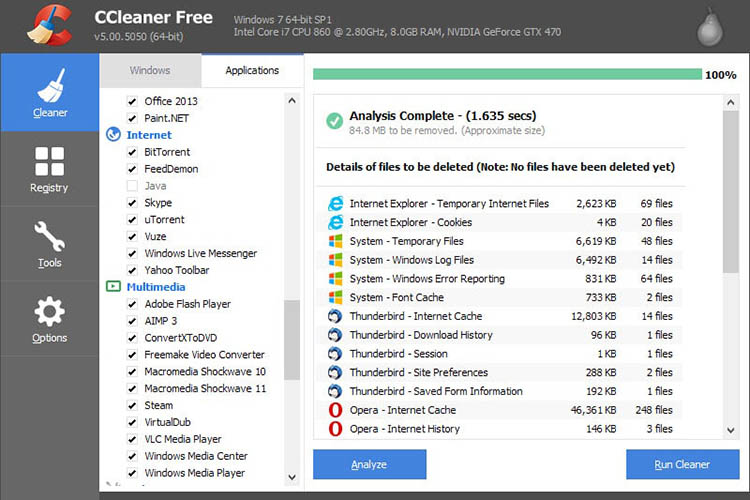
CCleaner is one of the longest-running PC maintenance programs. As a top-rated registry cleaner, CCleaner can check the Windows registry for issues such as broken associations, orphaned DLL references, leftover software information, and other entries that no longer serve a purpose.
Key Features
Cleans invalid registry entries and automatically creates a backup before applying fixes.
Removes temporary files, browser cache, cookies, and other unnecessary system data.
Manages startup programs to reduce boot time and improve responsiveness.
Includes tools for uninstalling software, analyzing disk usage, and locating duplicate files.
What Users Like
What Users Dislike
2. IObit Advanced SystemCare - Best Free Registry Cleaner Windows 11
Available on: Windows 11/10/8/7/Vista/XP
Pricing: Free; Pro starts at $29.99/year (3 PCs)
User Rating: ★★★★☆
System Safety: Excellent
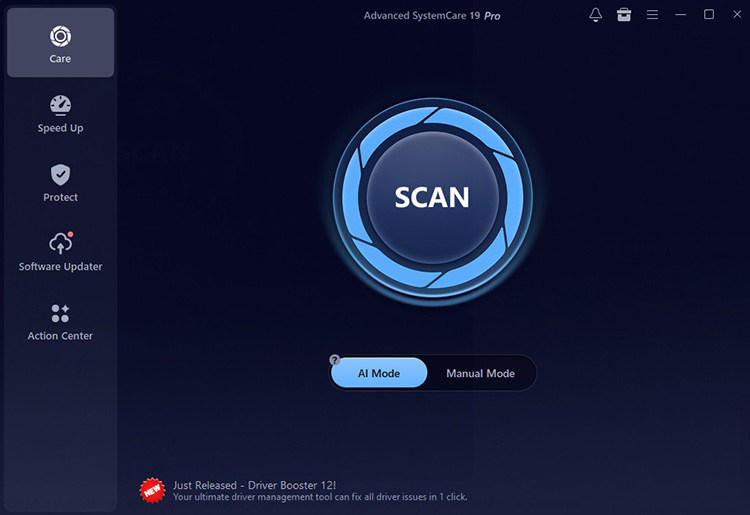
IObit Advanced SystemCare Free shows a complete PC maintenance toolkit in a single application. Alongside registry cleanup, the Windows registry cleaner handles junk file removal, startup management, large file cleanup, and system optimization without requiring technical knowledge.
AI-assisted cleanup handles common digital clutter, including temporary data, cached files, system logs, and other leftovers, while the manual option lets you decide which optimization tasks should run. Before modifying the registry, IObit Registry Cleaner creates a backup to improve recovery. The free edition remains a capable solution to free up disk space, keep Windows clean, responsive, and well-maintained.
Advanced SystemCare Free
- Clean: 420 billion traces removed & 85 EB junk files cleaned
- Protect: 80 million unauthorized access blocked & 20 million bugs fixed
- Speed Up: 6 million hours of startup time saved & Turbo boost
- Optimize: Auto clean and auto care your PC with AI mode

Key Features
Finds and removes invalid, obsolete, and unnecessary registry entries while creating a backup before applying changes.
Scan and clean registry issues across all administrator accounts in one go.
Set daily, weekly, or monthly cleanup tasks to keep the registry optimized without requiring manual scans.
Automatically clears junk files, caches, logs, browser data, leftover application files, and fix 100 disk usage Windows 11 issues.
Switch between Fast Scan and Deep Scan modes smoothly.
Improves system responsiveness through startup management, Turbo Boost, and real-time resource optimization.
What Users Like
Comprehensive toolkit covering registry cleaning, junk removal, performance optimization, privacy protection, and storage management.
Simple interface with one-click maintenance that's easy for beginners to use.
Automatic registry backups provide extra protection before any registry changes are made.
AI-assisted cleanup streamlines routine PC maintenance with minimal effort.
What Users Dislike
3. Wise Registry Cleaner - Automatic Registry Cleaning
Available on: Windows (32-bit & 64-bit).
Pricing: Free; Pro starts at $17.97/year (3 PCs).
User Rating: ★★★★☆
System Safety: Good
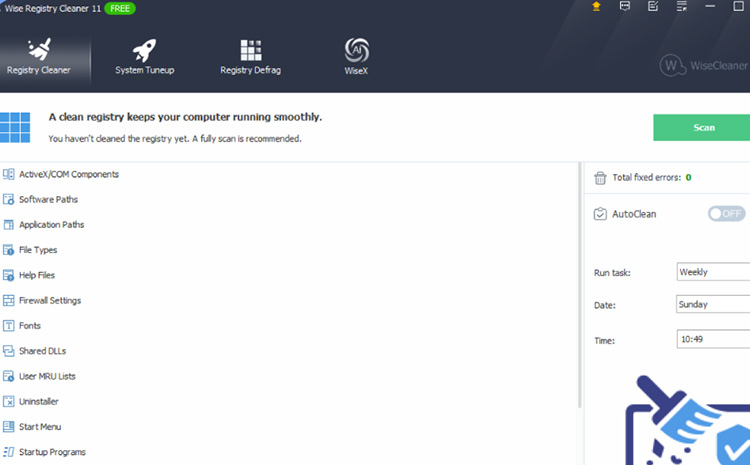
For a registry cleaner Windows 11 compatible tool with minimal system overhead, Wise Registry Cleaner remains the best registry cleaner option. The scheduled Windows registry clean feature and multiple scan modes in the registry cleaner are also appealing.
Key Features
Removes registry entries with Safe, Normal, and Deep scan modes.
Defragments and compacts the Windows Registry after cleanup.
Schedules daily, weekly, or monthly registry scans.
What Users Like
What Users Dislike
4. Revo Registry Cleaner - Overall Registry Cleaner
Available on: Windows 11/10/8.1/8/7
Pricing: Free; Pro starts at $14.99/year (1 PC)
User Rating: ★★★☆☆
System Safety: Good
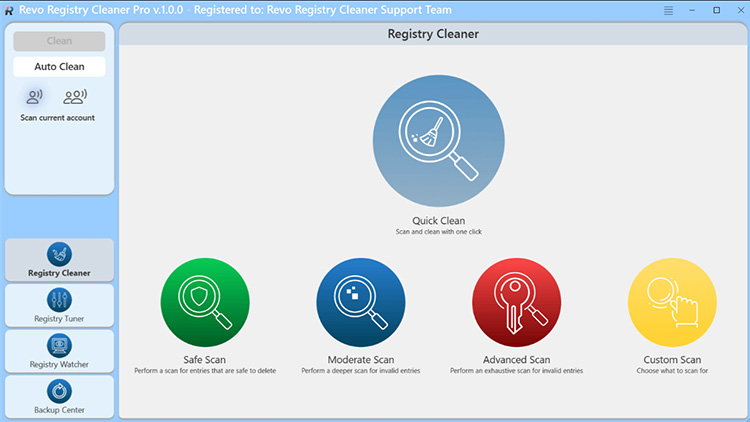
Revo Registry Cleaner concentrates on finding obsolete, invalid, and unnecessary registry entries with multiple layers of protection. Every Windows registry clean operation is backed up automatically with advanced scan modes.
Key Features
Scans more than 15 registry categories with four selectable scan-depth modes.
Includes Registry Watcher to monitor changes.
50 built-in Registry tweaks for customizing system settings.
What Users Like
What Users Dislike
5. Iolo System Mechanic – Best for System Optimization
Available on: Windows 11, 10, 8.1, 8, 7
Pricing: Starts at $43.94/year.
User Rating: ★★★☆☆
System Safety: Good
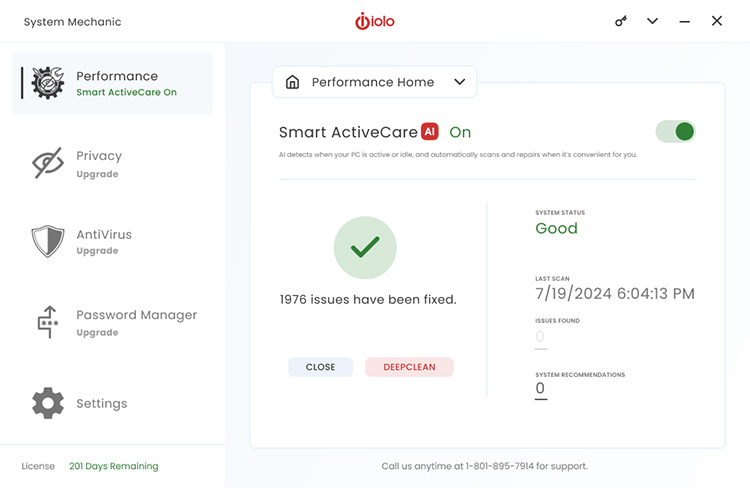
Iolo System Mechanic combines junk file removal, startup optimization, memory management, internet tuning, and automated maintenance in one package. For a registry cleaner best suited for registry repairs and complete Windows maintenance, System Mechanic deserves a spot on the PC.
Key Features
Cleans invalid registry entries together with 50+ types of junk files.
ActiveCare automatically performs maintenance.
Includes Startup Optimizer, NetBooster, and Program Accelerator.
What Users Like
What Users Dislike
How to Clean up Registry on Windows for Free (Easiest)
Running the Windows 11 registry cleaner best free solution correctly on IObit is just as important. Follow these steps to perform a safe registry cleaner scan on your Windows PC.
Step 1. Download the latest version of Advanced SystemCare and complete the installation. Launch the program after setup finishes.
Step 2. Open the Care tab and choose Manual Mode to select which maintenance tasks will run. Check Registry Clean and Registry Defrag options.
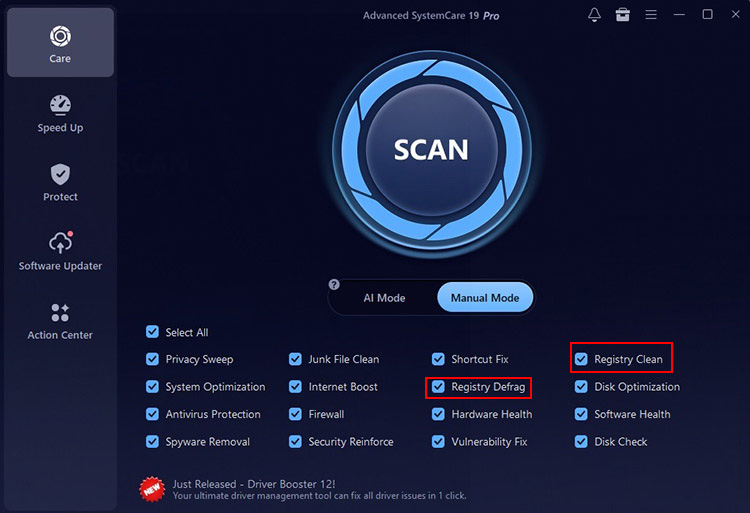
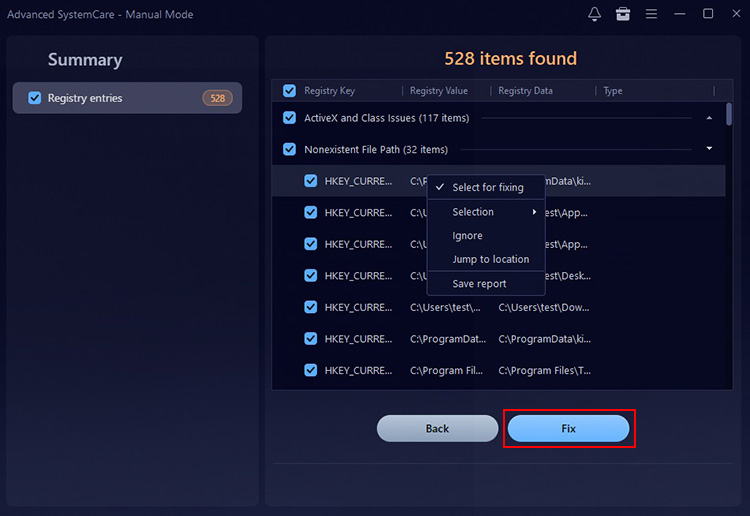
Step 3. Click Scan to analyze your system. After the scan completes, review the results if needed, then select Fix.
Tips: Speed Up Your PC with Additional Optimization Tools
Turbo Boost: Temporarily disables unnecessary background services and applications to free up system resources.
Startup Optimizer: Identifies startup programs that slow boot time and helps you disable unnecessary entries.
Real-Time TuneUp: Continuously monitors memory and system performance to keep Windows running smoothly.
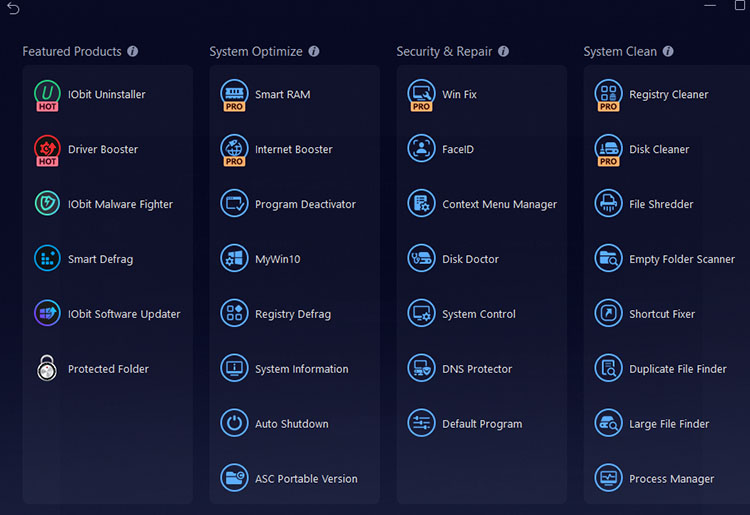
More Advanced Tools: Explore Smart RAM, Internet Booster(learn how to boost internet speed on PC), Registry Defrag, and Program Deactivator to further improve overall system performance.
More You May Want to Know About Registry Cleaners
Q: Does Microsoft Have a Free Registry Cleaner?
A: No. Microsoft does not include an official Registry cleanup tool for Windows. The company generally recommends leaving the Registry alone unless you are troubleshooting a specific problem. But Microsoft provides a free app called PC Manager that has registry cleaning tools.
Q: What Are the Risks of Using a Registry Cleaner?
A: Most reputable registry cleaner programs create automatic backups before applying repairs, but deleting the wrong Registry entries can occasionally cause software to malfunction or Windows settings to behave unexpectedly.
Q: What's the Best Free Registry Cleaner Windows 11?
A: IObit Advanced SystemCare Free is a highly praised all-around choice thanks to its one-click maintenance and additional optimization features. While CCleaner remains a good option for users who want Registry cleanup alongside general PC cleaning.
Q: How Often Should I Run a Registry Cleaner?
A: For most users, running a Registry scan once every month or two is more than sufficient. There's little benefit in cleaning the Registry every day. Running a scan after uninstalling large applications or resolving system issues is usually more practical.
The Bottom Line
A good registry cleaner should prioritize safety, accurate detection, and reliable backups instead of simply removing the largest number of Registry entries. What is the best registry cleaner for Windows 11? Among the tools reviewed above, IObit Advanced SystemCare offers the best overall balance of Registry maintenance, automated cleanup, and system optimization.
Advanced SystemCare Free
- Clean: 420 billion traces removed & 85 EB junk files cleaned
- Protect: 80 million unauthorized access blocked & 20 million bugs fixed
- Speed Up: 6 million hours of startup time saved & Turbo boost
- Optimize: Auto clean and auto care your PC with AI mode