High memory usage can make a computer feel sluggish, especially when you have many browser tabs, games, productivity programs, and background processes running simultaneously. A memory optimizer can help manage memory usage, free unnecessary occupied RAM, and reduce resource pressure.
If you are searching for Wise Memory Optimizer, you may also want to compare it with other options before downloading. Some tools focus entirely on RAM, while others, such as Advanced SystemCare, combine memory optimization with startup management, system cleanup, and broader performance improvements.
Below, we compare 3 useful options based on features and performance, ease of use, pricing and availability, and compatibility.

What Should You Look for in a RAM Optimizer?
Choosing a RAM optimizer should not be based only on how much memory it claims to free. Modern Windows versions already manage RAM dynamically, so repeatedly emptying memory does not always translate into a faster PC.
A useful tool should make memory management easier without consuming excessive resources itself. You should also consider whether you need simple one-click RAM cleanup or a complete optimization suite that tackles background processes, startup programs, junk files, and other performance bottlenecks.
Here are 3 options worth considering.
Wise Memory Optimizer Review: A Lightweight RAM Booster for Everyday Use
Wise Memory Optimizer is a simple yet effective RAM memory optimizer designed for users who want quick performance relief without dealing with complex system tools. It focuses entirely on memory management, making it especially appealing for beginners, casual users, and those running older or low-spec Windows PCs.
From the moment you open the program, the interface feels clean and minimal. It displays real-time memory usage and offers a single-click optimization button that instantly frees up unused RAM. This makes it convenient when your system starts feeling sluggish during multitasking or after running heavy applications.
Beyond basic cleanup, the tool also includes RAM defragmentation, standby memory release, and an automatic optimization mode that can run in the background. WiseCleaner has also added an advanced view for users who want a deeper look at memory statistics, though most people will likely stick to the one-click option.
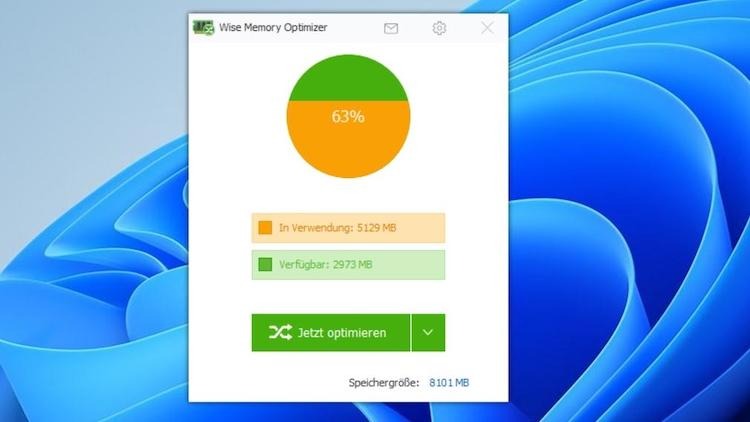
Key Features
One-click memory optimization
Automatic RAM optimization
RAM defragmentation
Standby-memory cleanup
Real-time memory monitoring
Lightweight and beginner-friendly interface
Pros
Completely free to use
Extremely easy to operate
Very small system footprint
Useful automatic optimization feature
Cons
Focuses only on RAM, not full system performance
Lacks broader PC cleaning or tuning tools
May not significantly improve performance if RAM isn’t the bottleneck
The Wise Memory Optimizer download is available for Windows systems, including Windows 11, Windows 10, and older versions such as Windows 7. However, since Windows 7 is no longer officially supported by Microsoft, upgrading is recommended for better security and stability.
It’s also important to clarify that there is no official Wise Memory Optimizer for Android. Android devices manage memory differently, so manual RAM clearing tools are generally less necessary compared to Windows PCs.
Advanced SystemCare: Best All-in-One Alternative to Wise Memory Optimizer
Sometimes, high RAM usage is only one part of a larger performance problem. Too many startup applications, unnecessary background processes, accumulated junk, and inefficient system settings can all contribute to a slow PC. In this situation, Advanced SystemCare provides a broader approach than a standalone memory optimizer.
Rather than focusing only on clearing RAM, Advanced SystemCare combines PC cleanup and performance optimization in one interface. Its current version includes PC cleaning and speedup functions, while tools such as Startup Optimizer and performance monitoring can help address unnecessary resource consumption.
Advanced SystemCare Free
- Clean: 420 billion traces removed & 85 EB junk files cleaned
- Protect: 80 million unauthorized access blocked & 20 million bugs fixed
- Speed Up: 6 million hours of startup time saved & Turbo boost
- Optimize: Auto clean and auto care your PC with AI mode

Key features
RAM and Process Optimization: Helps reduce unnecessary background resource usage so more system resources remain available for active tasks.
Startup Optimization: Manages unnecessary startup items that can consume memory and other resources immediately after Windows starts.
AI-Powered Scan: Automatically identifies areas that may need cleaning or optimization rather than requiring users to inspect everything manually.
Real-Time Performance Monitoring: Helps users observe system resource usage and identify potential performance bottlenecks.
Junk File Cleanup: Removes unnecessary files that accumulate over time and complements broader PC maintenance.
One-Click PC Optimization: Combines multiple maintenance tasks such as PC performance tests into a more convenient workflow for less experienced users.
Pros
More comprehensive than a dedicated RAM optimizer Windows 11/10
Combines cleanup, speedup, and optimization tools
Beginner-friendly one-click workflow
Useful when background programs and startup items contribute to high resource usage
Larger and more feature-heavy than Wise Memory Optimizer
Cons Some advanced functions require the paid edition
May be excessive if you only need a tiny standalone RAM-cleaning utility
Mem Reduct – Best Lightweight Alternative to Wise Memory Optimizer
If you prefer lightweight software with more technical memory information, Mem Reduct is another option to consider. It is an open-source, real-time memory-management application designed to monitor and clean system memory without becoming a full PC maintenance suite.
Its developer describes it as capable of clearing several system-memory areas, although the amount freed can vary substantially depending on system state. It supports Windows 7 SP1 and later.
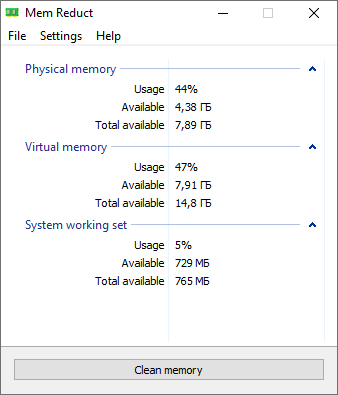
Key features
Real-time memory monitoring
System cache cleanup
Working-set and standby-list cleaning
Configurable memory-cleaning options
Lightweight design
Open-source availability
Pros
Free and open source
Lightweight resource footprint
Offers more control than basic one-click tools
Useful real-time memory statistics
Cons
Interface can feel technical for beginners
Uses low-level memory-management functions
Focuses primarily on memory rather than complete PC optimization
Tips: When choosing a memory optimizer, consider its performance, ease of use, price, and compatibility. A lightweight RAM optimizer is suitable for basic memory cleanup, while an all-in-one tool is better for tackling RAM usage alongside startup programs, background processes, and other PC performance issues.
How to Optimize Memory on Your PC?
If your PC feels sluggish or applications are using too much RAM, optimizing your memory can help improve system responsiveness. Advanced SystemCare provides a simple way to clean unnecessary memory usage and free up resources without manually managing processes. Follow the steps below to optimize your PC memory with Advanced SystemCare.
Step 1. Download and launch Advanced SystemCare on your Windows PC.
Step 2. Launch the software and click the Speed Up icon. Then, select More Optimization Tools.
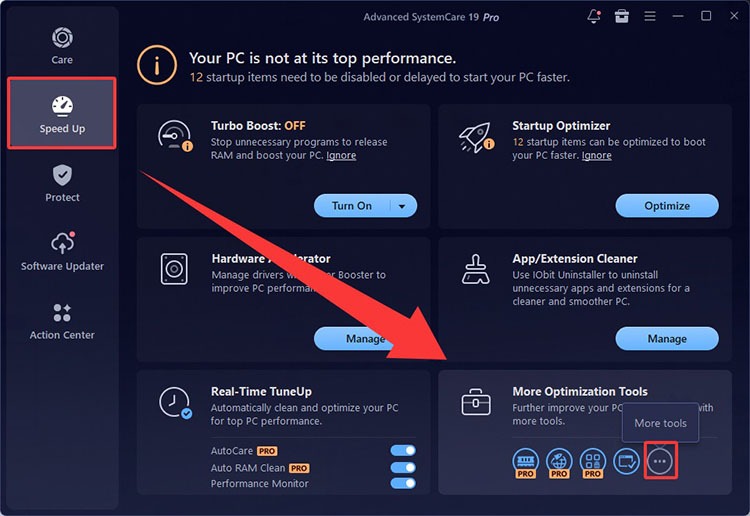
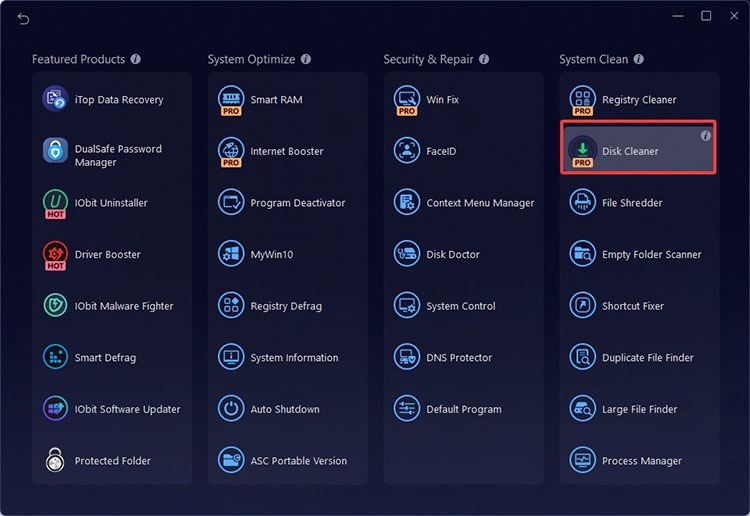
Step 3. Choose System Clean > Disk Cleaner to download this tool.
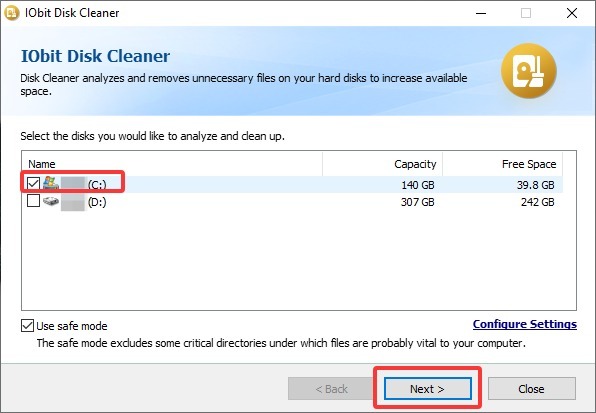
Step 4. Select the C drive, then check “Use Safe Mode” to exclude critical directories and help protect important system files. Click Next to begin cleaning the drive.
Which Is the Best Memory Optimizer for Your PC?
The 3 tools serve different needs rather than providing identical functions. If simplicity is your priority, Wise Memory Optimizer PC provides focused memory cleanup with minimal complexity. Mem Reduct offers more technical control.
For users experiencing broader PC slowdowns, Advanced SystemCare is the more comprehensive option, as it goes beyond RAM management. Its combination of resource optimization, startup management, system cleanup, and performance tools can address multiple causes of sluggish Windows performance through a single interface.
In short, choose based on the actual problem:
Wise Memory Optimizer: Best for straightforward, lightweight RAM optimization.
Advanced SystemCare: Best for all-in-one RAM-related and overall PC performance optimization.
Mem Reduct: Best for lightweight, open-source memory management.
FAQs About Wise Memory Optimizer
Q1. Is Wise Memory Optimizer free?
Yes. WiseCleaner describes Wise Memory Optimizer as a free memory cleaning and optimization tool for Windows. It provides one-click optimization as well as automatic memory-management options.
Q2. Where can I get a Wise Memory Optimizer download?
The safest choice is the official Wise Memory Optimizer page or another official distribution channel. Avoid unofficial download sites when possible, especially for system utilities.
Q3. Does Wise Memory Optimizer work on Windows 7?
Yes. WiseCleaner's documentation states that the program supports older Windows operating systems, including Windows 7. However, Wise Memory Optimizer Windows 7 users should remember that Microsoft's general support for Windows 7 has ended, making a supported Windows version a safer choice.
Q4. Can I download Wise Memory Optimizer for Android?
There is no equivalent Wise Memory Optimizer for Android version of this Windows utility. Android manages memory differently, and routinely forcing apps out of RAM can sometimes increase app reloads instead of producing meaningful performance improvements.
Q5. Is Advanced SystemCare better than Wise Memory Optimizer?
It depends on what you need. Wise Memory Optimizer is better suited to users who want a small, dedicated memory utility. Advanced SystemCare is more comprehensive because it combines PC cleanup and speedup functions with tools that can address startup programs and broader system-performance issues.
Final Words
The best memory optimizer depends on your needs. Wise Memory Optimizer, as one of the best Windows optimizers, is ideal for simple RAM management, while Mem Reduct, CleanMem, and RAMMap offer different levels of automation and analysis. If your PC suffers from broader performance problems, Advanced SystemCare provides a more complete solution by combining resource optimization with startup management, cleanup, and overall Windows performance maintenance.
Advanced SystemCare Free
- Clean: 420 billion traces removed & 85 EB junk files cleaned
- Protect: 80 million unauthorized access blocked & 20 million bugs fixed
- Speed Up: 6 million hours of startup time saved & Turbo boost
- Optimize: Auto clean and auto care your PC with AI mode