





Kevin Hart
Kevin is an experienced editor focused on tech blog writing. Familiar with all kinds of PC software on the market. All the topics he chooses are aimed at bringing more benefits to users.
Expert in
PC Health Solution

All-in-one PC health solution: clean, optimize and secure
Comprehensive PC cleaning, optimization and protection

Keep drivers always up-to-date
More stable performance with less system crashes

Protect millions of computers against malware
Top computer security with full-round protection

Protect against viruses & boost PC performance
Clean: 420 billion traces removed & 85 EB junk files cleaned
Protect: 80 million unauthorized access blocked & 20 million bugs fixed
Speed Up: 6 million hours of startup time saved & Turbo boost
Optimize: Auto clean and auto care your PC with AI mode

Discover how Net Optimizer improves internet performance. Learn key features, how it works, and why other Net Optimizer alternatives are also smart choices.

Kevin Hart


A slow internet connection can affect everything from online gaming and video streaming to downloads and daily browsing. While upgrading your internet plan may help, many connection issues come from inefficient system settings, background processes, or poor network management. A reliable net optimizer can help improve network performance by adjusting system settings and reducing unnecessary network usage.
In this guide, we will explain what an internet connection optimizer does, explore the features of the best network optimization tools, and compare several popular solutions to help you choose the right net speed optimizer for your PC.
A net optimizer is software designed to improve internet performance by optimizing network-related settings on your device. Instead of increasing your actual internet bandwidth, it focuses on making your existing connection work more efficiently.
A good internet connection optimizer can analyze network conditions, manage bandwidth usage, reduce unnecessary background traffic, and improve connection stability. These improvements can be especially useful for gamers, remote workers, and users who frequently stream or download large files.
Common problems a net optimizer can help solve include:
High ping and unstable connections during online gaming
Slow browsing caused by background applications
Network congestion from unnecessary processes
Poor Wi-Fi performance on PCs
Delayed downloads and uploads
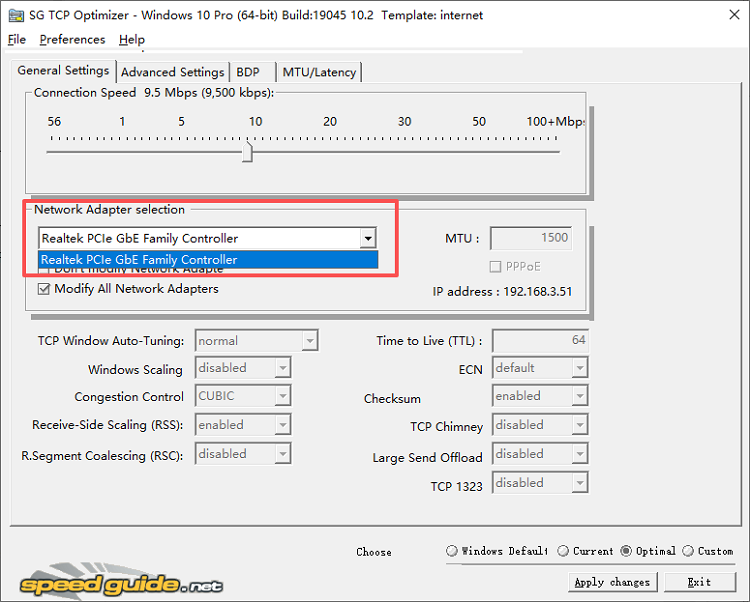
For users searching for a net optimizer PC solution, choosing a tool with system optimization features is often more effective than using a simple speed test application.
Not every network optimization tool provides the same results. A powerful net speed optimizer should include features that target different causes of slow internet performance.
1. Network Settings Optimization
A reliable net optimizer should adjust important network parameters, such as TCP/IP settings, DNS configurations, and connection priorities. These improvements can help your system communicate more efficiently with your network.
2. Bandwidth Management
Background applications often consume bandwidth without users noticing. A good net optimizer identifies unnecessary processes and helps reduce network usage from programs running in the background.
3. Gaming Network Optimization
For gamers, network stability is more important than just download speed. A gaming-focused net optimizer should help reduce ping spikes, minimize latency, and provide a smoother multiplayer experience.
4. Automatic Performance Scanning
Manually checking network settings can be complicated. The best tools should automatically scan your system, detect possible issues, and recommend optimization options with minimal effort.
5. Easy-to-Use Interface
A net optimizer should be suitable for both beginners and advanced users. One-click optimization features make it easier to improve network performance without changing technical settings manually.
Different users need different optimization features. Below are several popular tools that can help improve network speed and stability. Choosing the right tool depends on your goal. If you need a complete internet connection optimizer that improves both network performance and PC speed, Advanced SystemCare is the most balanced option. For gamers who only care about ping and latency, Smart Game Booster, WTFast, or ExitLag may provide more specialized improvements.
Quick Recommendation
Best overall net optimizer for PC: Advanced SystemCare
Best for gaming acceleration: Smart Game Booster
Best for Android users: Net Optimizer App
Best lightweight maintenance: CCleaner
Best for competitive gaming routes: WTFast and ExitLag
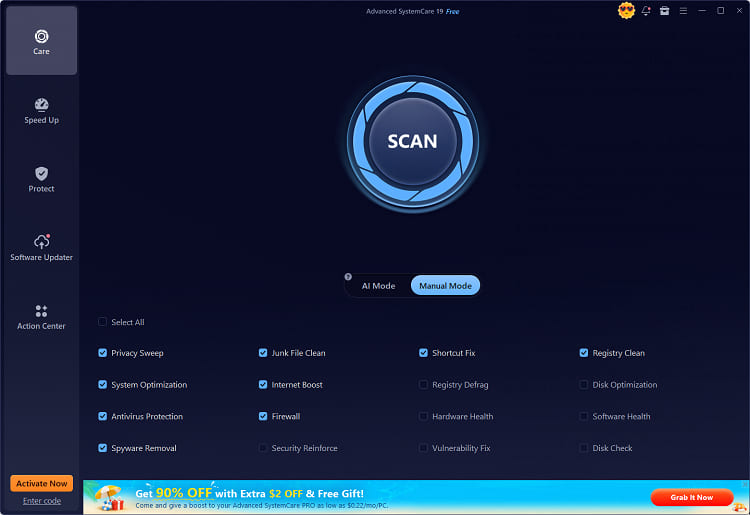
IObit Advanced SystemCare is more than a traditional cleaner. It combines system optimization, privacy protection, and internet improvement features, making it a comprehensive internet connection optimizer for Windows users.
Its Internet Boost feature analyzes network settings and applies recommended optimizations to improve connection efficiency. It can help optimize network configurations, reduce unnecessary resource usage, and create a smoother browsing and streaming experience.
Key Features:
Internet Boost Optimization
Automatically adjusts network settings to improve connection stability and responsiveness.
Network Performance Improvement
As a Windows optimizer, it optimizes Windows network configurations to help reduce delays and improve online performance.
Startup and Background Optimization
Stops unnecessary applications from consuming system and network resources.
Junk File Cleaning
Removes temporary files and system clutter that may slow down PC performance. You can also use it as a hard disk cleaner to clean junk files stored on the hard disk.
AI-Based System Optimization
Uses smart scanning technology to identify and fix performance issues automatically.
Network optimization with PC performance boost
Easy for beginners with one-click optimization
Includes multiple Windows maintenance tools
No gaming-only network acceleratio
For users looking for a reliable net optimizer app on Windows, Advanced SystemCare is a strong choice because it improves both network efficiency and system performance.
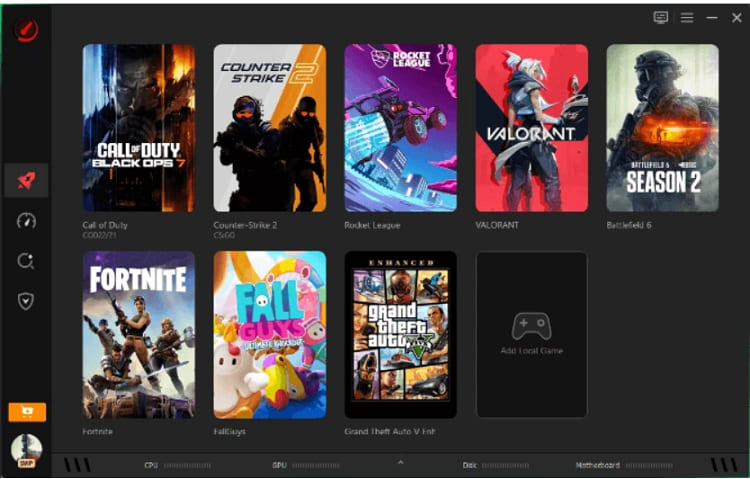
Smart Game Booster is designed specifically for gamers who want improved online gaming performance and a smoother overall experience. Unlike general optimization tools, it focuses on reducing lag, improving FPS, and optimizing gaming environments for demanding titles. It also helps free up system resources by closing unnecessary background processes during gameplay. Its network acceleration feature helps players find better connection routes, stabilize ping, and reduce latency during online matches, resulting in more responsive and competitive gameplay.
Key Features:
Game network acceleration for lower ping
Automatic game optimization
Driver updates for gaming hardware
FPS improvement tools
Background process management
Designed specifically for gamers
Helps reduce gaming lag and connection delays
Supports many popular PC games
Gaming-focused features may be unnecessary for casual users
Not designed as a complete PC maintenance tool
If your main goal is to make net optimizer boost internet performance while gaming, Smart Game Booster is a suitable option.
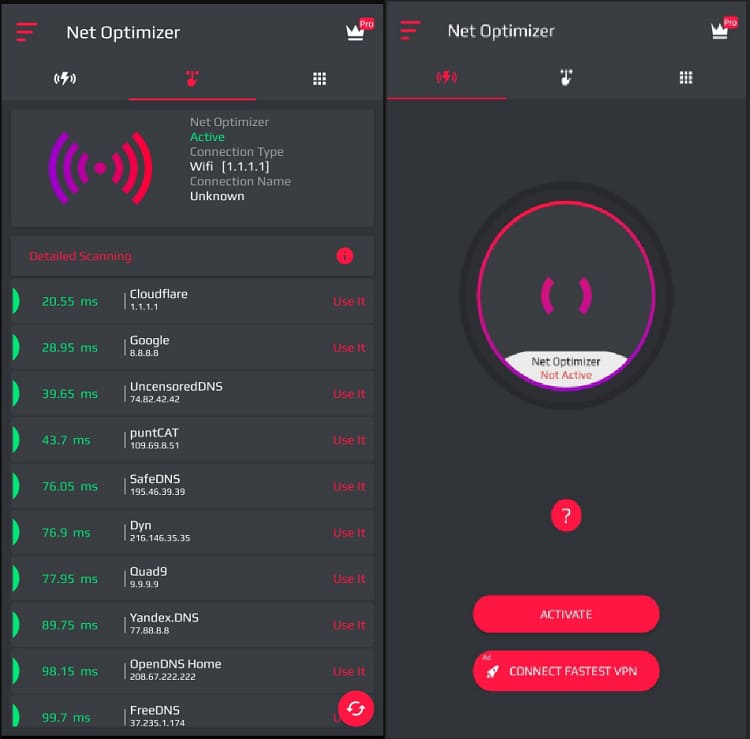
Many users searching for a net optimizer APK or net optimizer app are looking for Android solutions. These apps usually focus on improving mobile network responsiveness by changing DNS settings or selecting faster servers. Some also include features like network testing, latency reduction, and automatic switching between Wi-Fi and mobile data to maintain a more stable connection. This helps improve browsing, streaming, and gaming performance on smartphones in areas with weak or inconsistent signals.
Key Features:
DNS optimization
Faster network response
Simple one-tap optimization
Mobile connection testing
Easy to install and use
Suitable for Android users
Lightweight compared with PC optimization tools
Limited control over system optimization
Results depend heavily on network conditions
Mobile net optimizer apps can be useful for smartphones, but they usually cannot provide the same level of system-wide improvements as Windows optimization software.
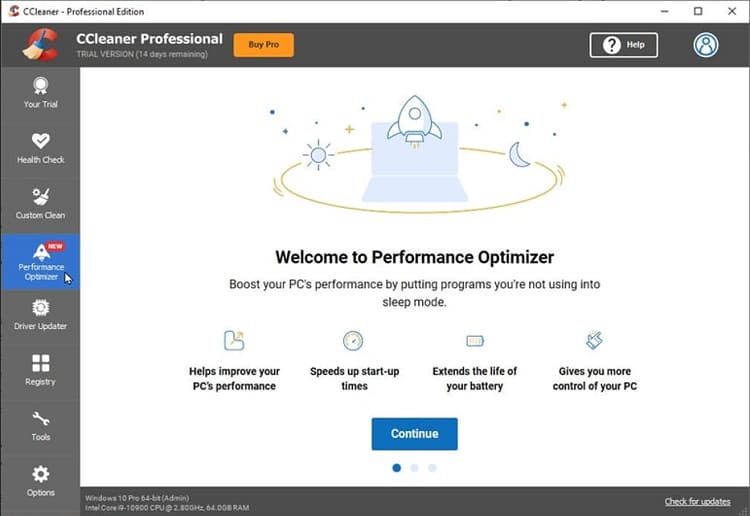
CCleaner focuses mainly on cleaning unnecessary files and improving system responsiveness. While it is not a dedicated network optimizer, removing system clutter and managing background resources can indirectly improve overall PC performance.
Key Features:
Junk file and cache cleaning to free up disk space
Startup program management to speed up boot time
Basic system performance optimization tools
Simple interface for quick maintenance tasks
Lightweight and easy to use for beginners
Helps improve overall system speed indirectly
Quick cleanup process with minimal configuration required
Not a dedicated network optimizer or internet booster
Limited tools for gaming or latency improvement
Advanced features may require a paid version
It is a suitable choice for users who want simple maintenance features without advanced network controls.
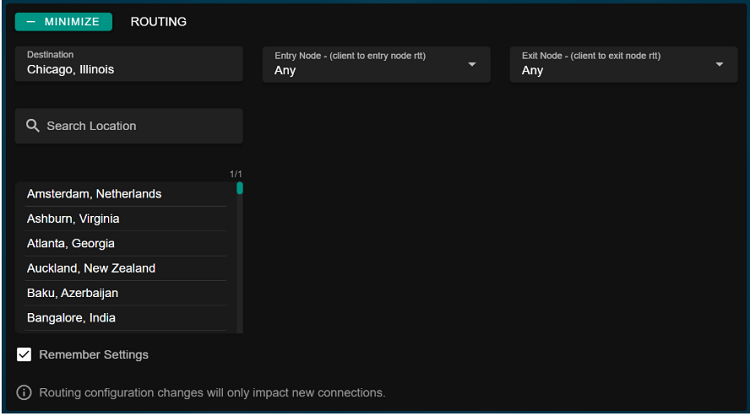
WTFast is built specifically for online gaming. Instead of changing system settings, it optimizes the connection route between your PC and game servers to help reduce latency and improve stability.
It can be useful for players experiencing inconsistent ping or connection delays in multiplayer games.
Key Features:
Game-specific network route optimization
Dedicated private gaming network infrastructure
Reduces ping spikes and connection jitter
Supports a wide range of online multiplayer games
Helps reduce latency in supported games
Improves connection stability during gameplay
Simple setup with minimal configuration required
Requires a paid subscription for full features
Not designed for general PC or system optimization
Performance improvements may vary depending on region and game servers
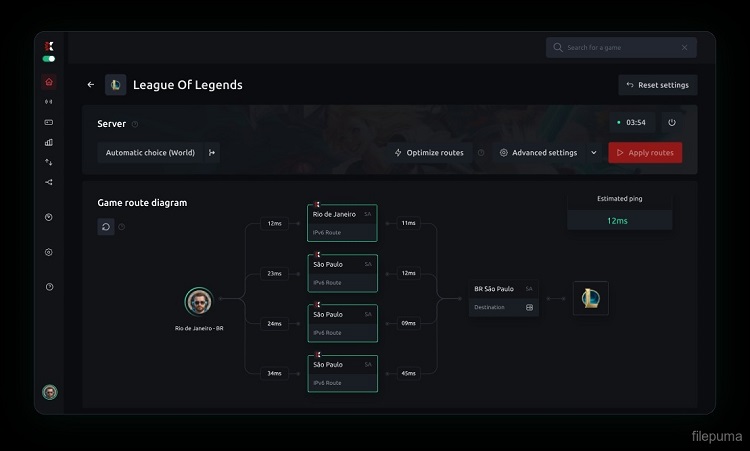
ExitLag uses advanced network route optimization technology to create more efficient and stable paths for game traffic between your device and game servers. It is specifically designed for competitive gamers who need consistent performance, reduced packet loss, and lower latency during online matches. By rerouting connections through optimized servers, it helps minimize lag spikes and improves overall gameplay stability in fast-paced multiplayer environments.
Key Features:
Multi-path routing optimization for game traffic
Real-time server path switching
Reduced packet loss and ping spikes
Game-specific optimization profiles
Noticeable improvement in connection stability for many online games
Easy to set up with automatic optimization
Works well for competitive multiplayer titles
Subscription-based pricing model
Limited benefits outside of gaming use cases
Performance gains may vary depending on region and ISP
Compared with general net speed optimizer tools, ExitLag focuses almost entirely on gaming network performance.
Before choosing the right solution, it’s important to compare the available net optimizer tools and understand which one fits your needs best.
| Tool | Best for | Main Advantage |
| Advanced SystemCare | PC users who want faster internet and better system performance | Complete internet and PC optimization |
| Smart Game Booster | Online gamers | Online gamers Gaming network acceleration and lower lag |
| Net Optimizer App | Android users | Simple mobile network improvement |
| CCleaner Performance Optimizer | Users who need lightweight PC maintenance | Cleans system clutter and improves overall PC responsiveness |
| WTFast | Competitive gamers | Focuses on gaming route optimization and latency reduction |
| ExitLag | Multiplayer gamers | Creates optimized network routes to improve connection stability |
Using a net optimizer to boost your network only requires a few steps, take Advanced SystemCare as an example:
Step 1.Download and install the latest version of IObit Advanced SystemCare. Launch the program and make sure it has permission to make system-level optimizations.
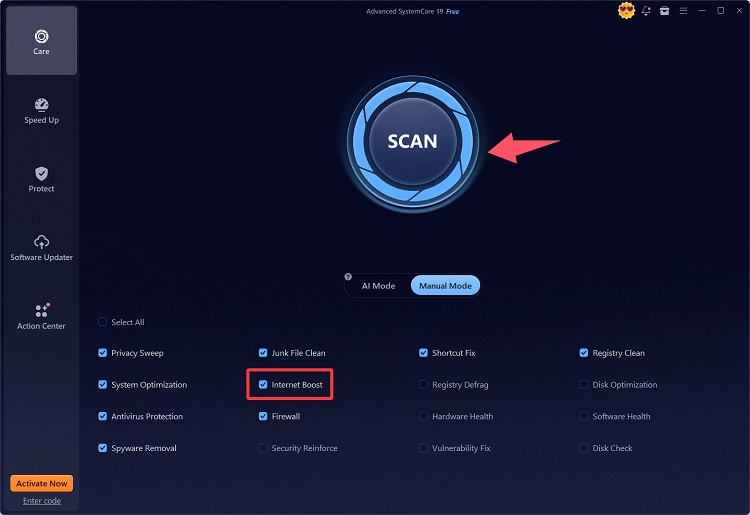
Step 2. From the Advanced SystemCare interface, look for Internet Booster feature. Check the box next to it and click SCAN to analyze your current Internet-related Windows settings.
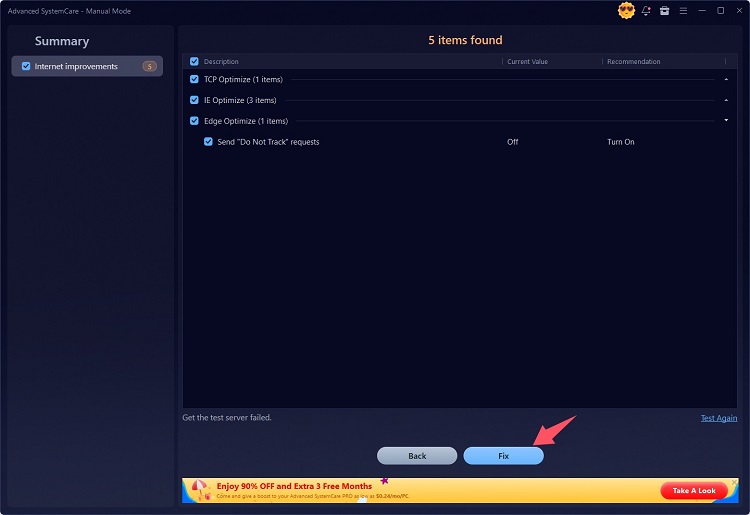
Step 3. Review the detected recommendations and click Fix to improve connection efficiency. After optimization, you can test your browsing speed, streaming quality, or gaming connection to check improvements.
A reliable net optimizer can help improve internet stability, reduce unnecessary network usage, and create a smoother online experience. While different tools serve different purposes, this ram booster for Windows 11 and 10 - Advanced SystemCare is a strong choice for users who want an internet connection optimizer with additional PC performance benefits.
For gamers, Smart Game Booster provides specialized network acceleration, while mobile users can try a lightweight net optimizer app. Choose the tool that matches your needs and make the most of your internet connection.

All-in-one PC health solution.
Free Download