How to stop spam mail in Outlook? Many users are bothered by flooding spam emails, and the emails clutter their Outlook inbox. Fortunately, Outlook includes built-in tools like Rules and Junk Email Filter to block unwanted messages, while third-party solutions offer even stronger protection. This guide explains how to stop spam mail in Outlook using the most effective methods to keep your inbox clean, organized, and secure.
How to Stop Spam Mail in Outlook? Junk Mail Settings/Filters
3 Free and default functions in Outlook help its users cope with spam emails, but most users don’t know.
The first feature to fight against spam emails is:
Taking good advantage of Rules to filter spam and phishing emails. Rules is the default function in Outlook; many users don’t know how to set up the options to automatically filter incoming emails. If they take some time learning the Rules, they can shut most of the spam emails out the door.
The second feature that is practical:
Using Junk Email Filtering. Outlook is advanced enough to detect suspicious spam emails.
The third feature to stop spam mail:
Manually report junk emails to Outlook to help it improve its capacity in identifying spam emails. Don’t overlook this feature; it reinforces your experience in the long run.
Note that if you are seeking automatic solutions to stop spam mail in Outlook, the default features provided by Outlook may fail to satisfy you. Read on to check other smart solutions, covering AI spam email detector, email manager, and phishing protection software.
How to Stop Spam Mail in Outlook with Clean Mail?
Instead of blocking spam before it reaches your mailbox, Clean Email automatically filters spam emails after they arrive, making it much easier to maintain a clean inbox in Outlook. This software allows users to customize more detailed rules to filter incoming emails. Users can set up parameters like sender, domain, subject, age, etc., to pinpoint and sift out spam emails. For those who demand more control over all the received emails, Clean Mail offers Smart Views to let its users sift, review, and delete emails in the same category. Another useful feature is called unsubscriber, which allows users to one-click unsubscribe bulk senders.
Unlike traditional spam filters that mainly focus on detecting malicious emails, Clean Email is designed to help you manage high volumes of unwanted messages efficiently. Its automation tools continuously keep your Outlook inbox organized, saving time and reducing the need for manual cleanup.
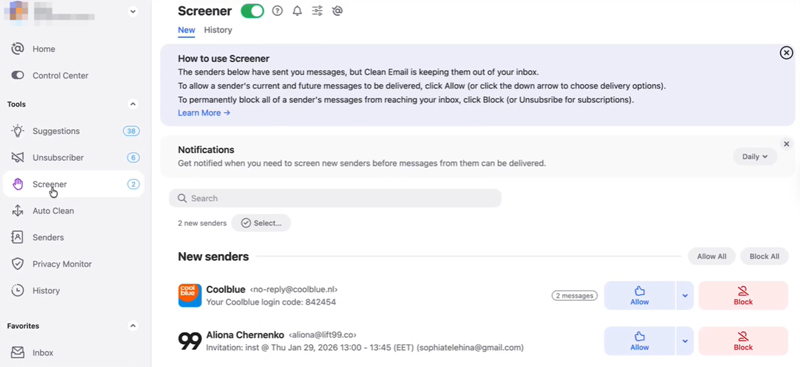
Here are the core features of Clean Mail:
Auto Clean
Create automation rules to automatically move, archive, delete, or label emails based on sender, keywords, age, domain, and more.
Unsubscriber
Unsubscribe from newsletters and promotional emails with one click to reduce future spam.
Screener
Hold emails from unknown senders for review before they reach your inbox, helping prevent unwanted messages from cluttering your mailbox.
Smart Folders (Smart Views)
Automatically group similar emails (newsletters, social notifications, shopping, etc.) so you can clean thousands of messages in bulk.
Pricing:
Free: Clean up up to 1,000 emails and access a limited feature set.
Premium: Starts at US$9.99/month or US$29.99/year for one email account. Multi-account plans are also available.
Supported Operating Systems:
Windows/macOS: No dedicated desktop application. Clean Email is a cloud-based web service, so there is no installation file size.
Android app: The download size varies by device and Google Play does not publish a fixed package size.
iOS app: The App Store also provides a device-dependent download size rather than a fixed installer size.
How to Stop Spam Mail in Outlook with Auto Email Protection Software?
IObit Advanced SystemCare is another free and practical method to block spam emails in Outlook. This software handles phishing emails, malicious ads and links, third-party redirects, and browser hijacking. You can use this software to protect your Outlook desktop app or online Outlook webpage. The monitor is real-time and gives instant responses.
The best part of this software is that its shield is automatic; just turn on the Email Protection button under the Browser Protection tab, and you don’t worry about scams, ads, spams, or phishing attacks. Combined with Outlook's built-in spam filters, Advanced SystemCare Email Protection helps create a safer and more secure email experience by reducing the risk of phishing attacks and other email-based threats.
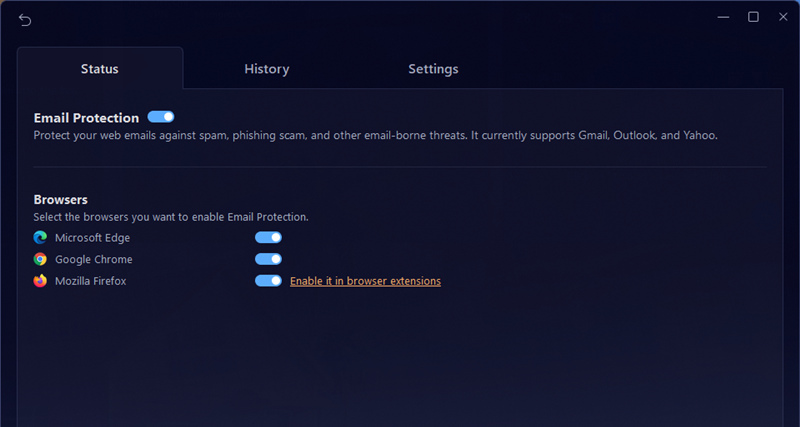
Here are the core features of IObit Advanced SystemCare:
Phishing Detection
Identifies phishing emails and fraudulent messages designed to steal passwords, financial information, or personal data.
Suspicious Sender Detection
Flags emails from suspicious or untrusted senders to help you avoid scams and spoofed identities.
Malicious Link Protection
Detects dangerous URLs embedded in emails, helping prevent users from visiting phishing or malware-hosting websites.
Real-Time Email Threat Protection
Continuously monitors for email-borne threats and works alongside Outlook's built-in spam filtering to provide an additional layer of security.
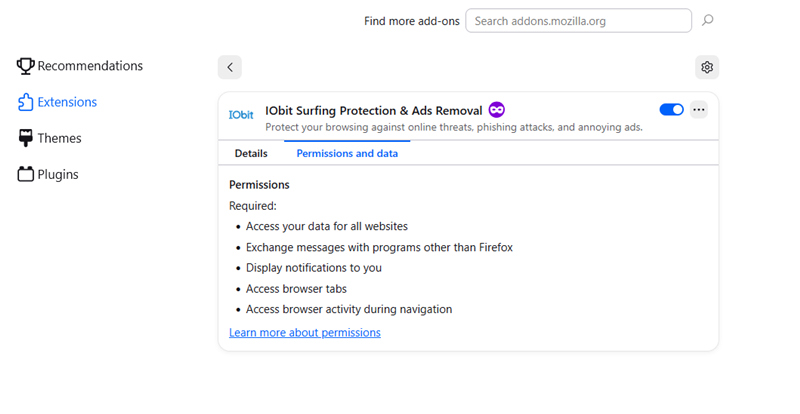
Root in Browsers to Monitor Spam Emails
You can activate IObit Surfing Protection on Microsoft Edge, Google Chrome, and Mozilla Firefox to monitor spam emails sent to your Outlook account.
Pricing:
Free
Supported Operating Systems:
Windows series
How to Stop Spam Mail in Outlook with An Email Manager SaneBox?
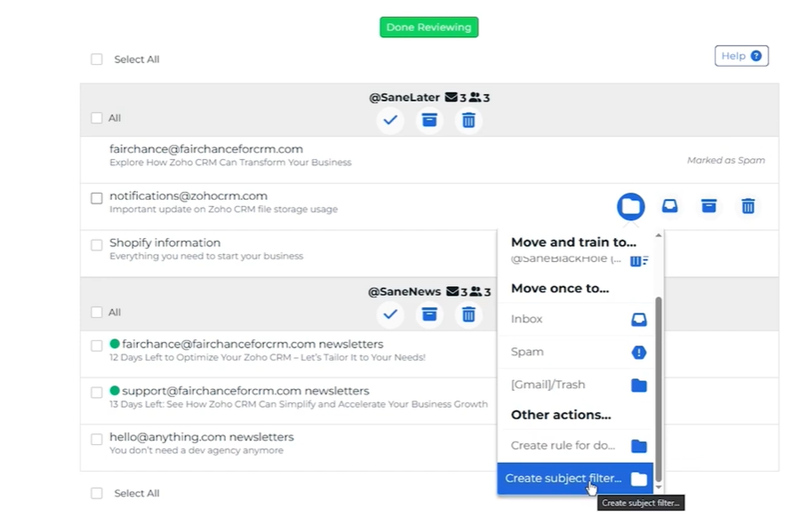
If your Outlook inbox is piled up with newsletters and promotional emails, SaneBox can help you regain control via AI. AI saves your time and energy in setting rules and sifting emails; it analyzes your daily habits and smartly manages your emails without your intervention. The longer you live with this AI Email manager, the more dedicated this software can be. Some may worry their important emails get lost, fret not, it is very unlikely that this will happen to SaneBox. It only reduces inbox clutter by identifying newsletters, marketing emails, and other distractions.
The core features of SaneBox:
AI Email Sorting
Uses machine learning to analyze your email behavior and automatically separate important emails from newsletters, promotions, and other low-priority messages.
SaneLater Folder
Automatically moves non-urgent emails out of your inbox into a dedicated folder, helping you focus on high-priority messages first.
Deep Clean & One-Click Cleanup
Finds old, unread, or bulky emails so you can archive or delete thousands of messages in bulk and reclaim mailbox space.
SaneBlackHole & Unsubscribe
Instantly sends unwanted senders to the BlackHole folder so future emails are ignored, and helps you unsubscribe from recurring marketing emails to reduce inbox clutter.
Pricing:
SaneBox offers a 14-day free trial. Paid plans start at US$7/month (Snack), US$12/month (Lunch), and US$36/month (Dinner). Higher-tier plans unlock more AI features and support multiple email accounts.
Supported Operating Systems:
Windows, macOS, iOS, Android, and Web. Since SaneBox is a cloud-based email service, it works with your existing Outlook account rather than requiring you to install a desktop application.
How to Stop Spam Mail in Outlook App on Mobile Phones? Canary Mail
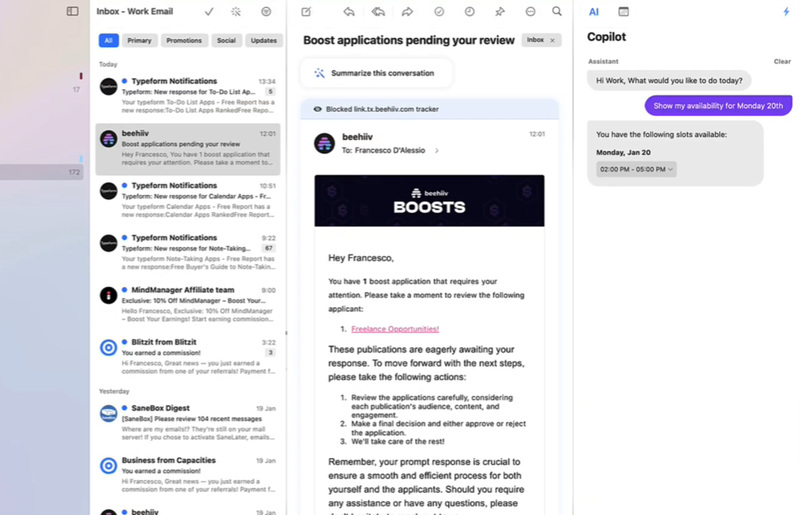
Canary Mail is a great choice to safeguard your Outlook app on your mobile phones. Canary Mail also uses AI to help you manage your Outlook inbox more efficiently while protecting you from phishing threats. Its Focus Inbox automatically prioritizes important emails and moves less relevant messages out of your way, helping you stay focused on what matters most. You can also unsubscribe from unwanted mailing lists with a single click, while built-in phishing and impersonation detection helps identify suspicious emails before you interact with them. Compatible with Outlook, Gmail, Yahoo, iCloud, and other IMAP accounts, Canary Mail works seamlessly across Windows, macOS, iPhone, and Android, making it an excellent cross-platform solution for keeping your inbox clean, organized, and secure.
The core features of Canary Mail
AI Copilot
Uses AI to summarize long emails, draft replies, and prioritize important messages, helping you process your inbox faster.
Focus Inbox
Automatically separates important emails from newsletters, promotions, and low-priority messages to reduce inbox clutter.
One-Click Unsubscribe
Lets you quickly unsubscribe from unwanted newsletters and marketing emails, reducing future spam with a single click.
Phishing & Impersonation Protection
Detects suspicious emails, phishing attempts, and sender impersonation to help protect you from scams and malicious email threats.
Pricing Free Plan:
Includes the core email client and basic AI features.
Pro Plan: Starts at US$49/year (or about US$4/month when billed annually), unlocking unlimited AI Copilot, advanced productivity features, and premium support. Business plans are also available for teams.
Supported Operating Systems:
Windows, macOS, iOS, Android, and Web. Canary Mail syncs across all major platforms, allowing you to manage your Outlook and other email accounts from virtually any device.
Conclusion
How to stop spam mail in Outlook? This blog shares 4 methods to block spam emails in Outlook. Spam emails can clutter your Outlook inbox and expose you to phishing scams. By using Outlook's built-in tools, such as Rules, Junk Email Filter, and Report Junk, you can significantly reduce unwanted messages. For even stronger protection against phishing emails and malicious links, IObit Advanced SystemCare Pro adds an extra layer of real-time email security. Download it today to keep your Outlook inbox cleaner, safer, and better protected.
Advanced SystemCare Free
- Clean: 420 billion traces removed & 85 EB junk files cleaned
- Protect: 80 million unauthorized access blocked & 20 million bugs fixed
- Speed Up: 6 million hours of startup time saved & Turbo boost
- Optimize: Auto clean and auto care your PC with AI mode