Modern malware doesn’t announce itself with flashy pop-ups anymore; it slips into the background, quietly stealing processing power or tracking your data while everything looks completely normal on the surface. Identifying these hidden threats on your own is extremely difficult, and attempting manual removal often does more harm than good. It can either leave behind deeply embedded malicious components or unintentionally damage essential system files needed for proper operation.
Below, we break down a completely free, highly effective strategy to scan computers for viruses, root out hidden malware, and restore your system's performance.
Why You Need to Scan PC from Virus?
Once strange behavior starts appearing on your computer, it becomes important to understand what might be happening behind the scenes.
1.1 Common Signs of Virus Infected PC
Slow system performance, unexpected pop-ups, or programs launching on their own are often early signs that something is wrong with your computer. You may also notice browser redirects, missing files, or unknown apps appearing without permission. When these problems begin to accumulate, it’s usually a strong sign that you should scan PC from virus.
1.2 Hidden Dangers of Unscanned PC Viruses
Hidden malware may collect passwords, track browsing habits, or even lock important files through ransomware attacks. Some infections stay silent for weeks, gradually exposing sensitive information without obvious warning signs. That is why relying on tools like the best free virus scan for PC options can help users detect threats early and reduce damage.
Method 1: How to Scan Computer for Viruses - Built-in Windows Defender (Free & Basic)
Windows Defender (Microsoft Defender Antivirus) offers real-time protection, automatic security updates, and several scan modes designed for different situations.
For users who want to scan PC from virus threats quickly and at no cost, it serves as a convenient first line of defense. Windows Defender tops the list of the best free virus scan for PC solutions available today, but those who need more comprehensive protection may benefit from pairing it with additional security tools and safe browsing habits.
How to Run a Virus Scan Using Windows Defender
Step 1: Open the Start menu, type “Windows Security” in the search bar, and select the app from the results.
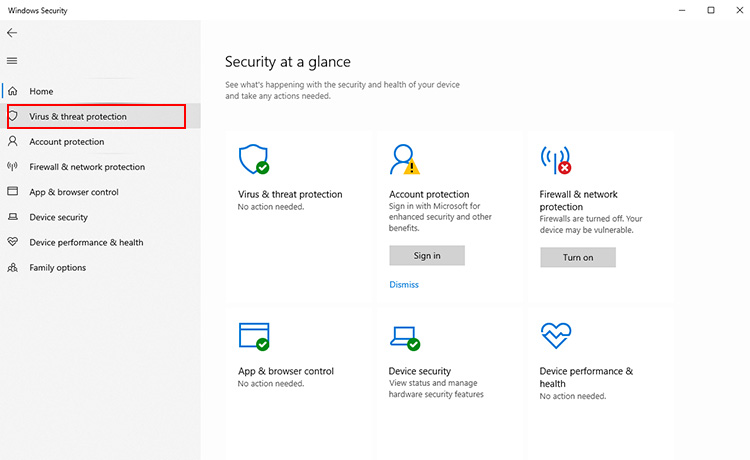
Step 2: Once inside, click on “Virus & threat protection” in the sidebar to access the security settings.
Step 3: Choose “Scan options” to view different scanning modes. You can run a Quick Scan to check the most common infection locations, or select a Full Scan for a more thorough system-wide inspection.
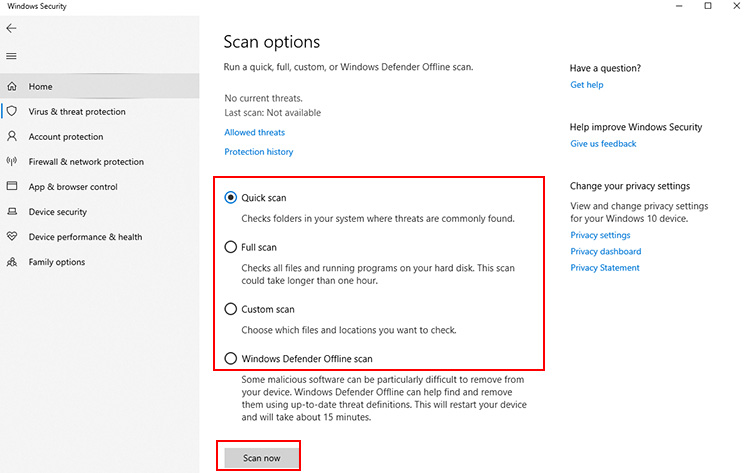
Step 4: Click “Scan now” to begin. The scan will run automatically, and you just need to wait until it completes.
Pros
Completely free and included with Windows.
No software installation or setup required.
Receives regular security definition updates automatically.
Cons
Detection of newly emerging and zero-day threats may not be as strong as some premium antivirus solutions.
Lacks advanced security tools such as password managers and identity monitoring.
Method 2: Best Free Virus Scan for PC - IObit Malware Fighter (Editor’s Choice)
1. Why Choose IObit Malware Fighter for PC Virus Scan
IObit Malware Fighter is a dedicated security solution built to scan PC from virus infections and remove threats that often slip past basic protection tools. The anti virus software for free targets malware, spyware, ransomware, trojans, adware, browser hijackers, and other security risks while maintaining a lightweight footprint. If you're looking for the best virus scan for PC that combines antivirus, privacy, and browser security features in one package, IObit Malware Fighter is worth considering.
Highlights of IObit Malware Fighter
Security scanning is supported by IObit Malware Fighter’s own anti-malware engine, reinforced with anti-ransomware protection and Bitdefender technology. Together, these layers help detect well-known threats as well as newly appearing malware variants.
A constantly updated database containing over 200 million threat signatures improves detection accuracy and helps block viruses, spyware, trojans, worms, and ransomware attacks.
Users can choose Smart Scan, Full Scan, Custom Scan, or right-click scanning, making it easy to inspect entire drives or individual files.
Multiple security guards monitor system activity continuously and prevents malware execution, unauthorized changes, suspicious downloads, and dangerous application behavior.
Additional web protection helps block phishing pages, harmful websites, malicious advertisements, email-based attacks, and unauthorized cryptocurrency mining scripts.
Sensitive Data Protect and Safe Box secure confidential documents through encryption and access controls, then reduce the risk of data exposure.
Automatic scanning can be configured to run daily, weekly, or monthly, to detect and remove threats without requiring manual intervention for the best virus protection for PC.
2. How to Scan PC for Virus with IObit Malware Fighter (Step-by-Step)
Use the steps below if you're still searching for how to scan your computer for viruses Windows 11 or how to scan your computer for viruses Windows 10.
Step 1. Free download IObit Malware Fighter, once the installer file is saved, open it and follow the on-screen setup instructions until installation is complete.
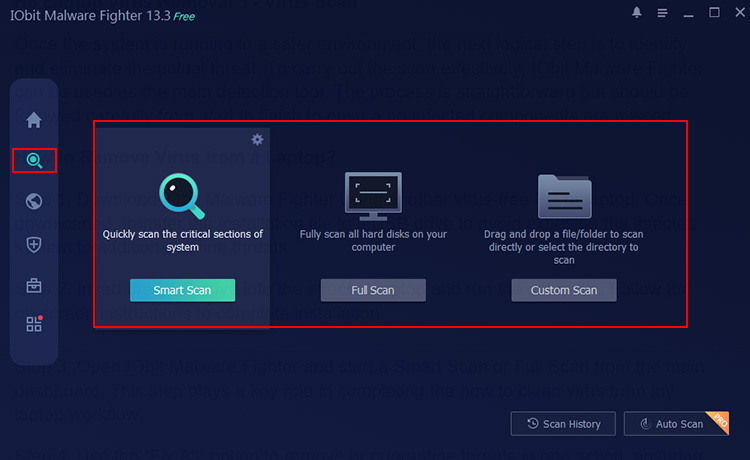
Step 2. Launch IObit Malware Fighter, select Smart Scan mode, for a more extensive inspection, and switch to Full Scan to analyze all hard disks connected to the computer. You can also select Custom Scan and specify particular folders, files, or programs for targeted examination.
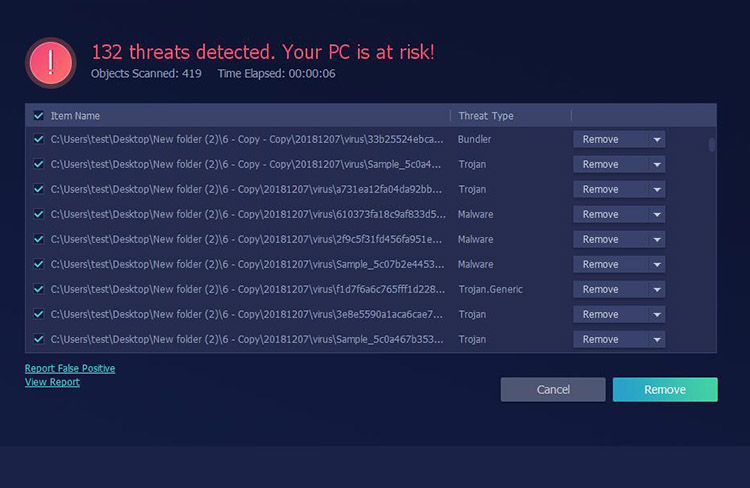
Step 3. When the scan ends, a results page will appear showing any suspicious items, malware traces, or potential ransomware threats. Carefully review what is flagged, then press Remove to eliminate threats or clean affected files from the system.
Method 3: How to Scan PC for Virus - Online Scanner Tools
Online virus scanners are always used as a convenient fallback when people need to verify suspicious files without installing a complete antivirus program. Here are the top three online PC virus protection software when you need to scan PC from virus risks in specific situations.
VirusTotal
VirusTotal is a free online platform that scans files, URLs, IPs, and domains using 70+ antivirus engines. It combines hash lookup, sandbox behavior analysis, and community insights, giving a fast second opinion on threats. Useful, but not a full real-time security solution.
Alt: Scan PC from Virus VirusTotal
ESET Online Scanner
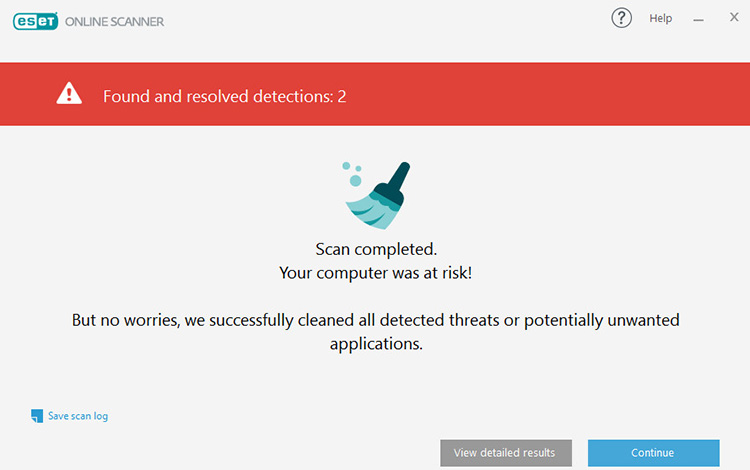
ESET Online Scanner is a free on-demand malware scanner using ESET’s ThreatSense engine. It detects viruses, spyware, and ransomware without full installation. ESET Online Scanner runs alongside existing antivirus with strong accuracy, but lacks the real-time protection support tool.
Trend Micro HouseCall
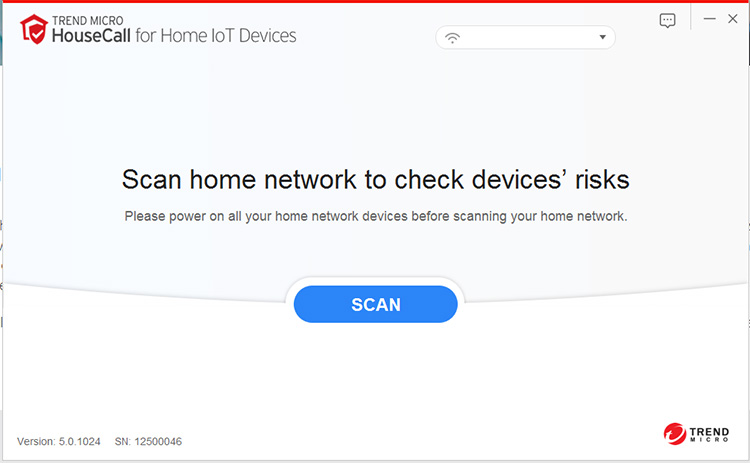
Trend Micro HouseCall is a free on-demand malware scanner that detects viruses, spyware, rootkits, and other threats without interfering with existing antivirus software. It runs as a lightweight cloud-based tool for quick or full system scans, however, it offers no real-time protection and is not a replacement for full security suites.
Tips
Online virus scanning services often come with file size limits, no real-time defense, no automatic scanning, and limited ability to remove advanced malware. For anyone looking for how to scan for viruses on PC or comparing options for the best virus scan for PC, these online scanners should be seen as supplementary tools rather than a complete security solution.
Method 4: How to Scan Viruses on PC - Effective Tips to Prevent PC Virus Infection H2
Keeping a computer safe is also about building habits that reduce the chance of infection in the first place. The following practices support smoother protection when using tools like how to scan PC for virus utilities in everyday use.
1. Avoid downloading software from unofficial and unknown websites
Installing programs from random sources often introduces hidden malware.
2. Do not open unknown email attachments and pop-up links randomly
Suspicious emails and unexpected browser pop-ups are common delivery methods for viruses.
3. Turn on real-time antivirus protection permanently
Keeping real-time protection active ensures threats are blocked instantly before they can spread or damage system files or personal data.
4. Regularly update system patches and antivirus virus database
System updates and updated security definitions close vulnerabilities that attackers often exploit.
5. Scan external devices (USB disk, mobile hard disk) before use
External storage devices can carry infected files, so check them first.
FAQs About Scan PC from Virus
Q: How often should I scan PC for virus?
A: A weekly full scan is usually enough for most users, especially if you download files or browse frequently.
Q: Why does my PC still have viruses after scanning?
A: Many tools have limited detection rates and may fail to catch hidden or deeply embedded threats. That’s why a second tool matters when you scan my PC for malware. IObit Malware Fighter is the best for a thorough virus scan and removal, thanks to full scan mode.
Q: Is Windows Defender enough to scan PC from virus?
A: Windows Defender offers basic protection, but combining it with IObit Malware Fighter provides stronger coverage and reduces missed threats.
Q: Is IObit Malware Fighter safe to use?
A: Yes, it is commonly used and is regarded as safe when obtained directly from the IObit official website.
Q: Can I use multiple antivirus software together?
A: Yes, but it works best when one is real-time protection and the other focuses on deep scanning. IObit Malware Fighter can work with most mainstream anti-virus programs without any compatibility issues. With the newest Bitdefender antivirus engine, IObit Malware Fighter protects your PC against both malware and viruses in real-time. So you can rely on IObit Malware Fighter alone to get anti-malware and anti-virus protection.
Conclusion
Different methods to scan PC from virus each serve a purpose, from built-in Windows tools to online scanners and dedicated security software. For more complete protection, IObit Malware Fighter offers deeper detection and removal. Get IObit Malware Fighter and reduce missed threats and keeps your system more reliably protected.
IObit Malware Fighter Free
- Quick and deep system scanning throughout PC system.
- Smart defense against all malicious infestations.
- High-level security and privacy protection in real time.
- Leading anti-malware and anti-virus engines.