You don’t often hear the word ransomware, but when it gets your attention, things are serious. Nowadays ransomware targets healthcare, government, IT companies, and everyday users. A single click on an attachment or downloading cracked software can lock all your files within minutes. To recover your system from the guilty party you need to spend a huge amount of money. And normally, the blackmail does not cease until several rounds. The good news is you can find tips to answer the question how to prevent ransomware. And further to stop and recover from ransomware attacks, let’s read on.
Which Scenario Best Indicates A Ransomware Message?
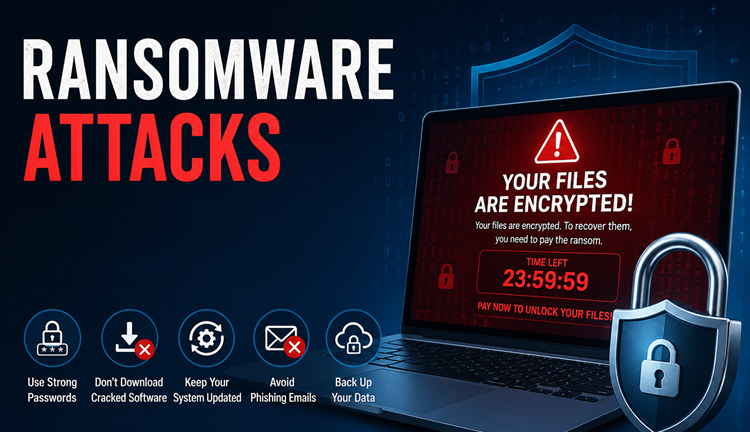
Many users don’t know they get blackmailed by ransomware until the situation gets irreversible. Here are some early messages that hint you ransomwares are doing malicious manipulation to your system. Let’s take a quick glance at them.
Key Indicators of a Ransomware Message:
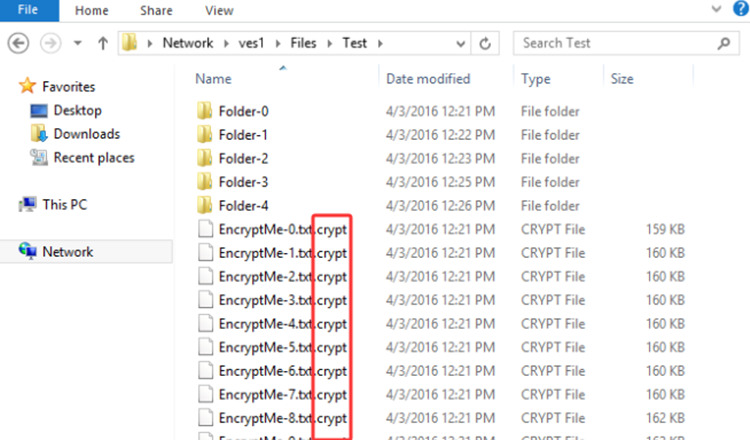
1. Files with Changed Extensions:
Documents, images, or databases suddenly have unfamiliar extensions added (e.g., .encrypted, .locked, or a random string) and cannot be opened.
2. On-Screen Ransom Note:
A popup, desktop background change, or text file (README.txt) appears on the screen with instructions on how to pay a ransom, usually in cryptocurrency.
3. Inability to Access Data:
Users are completely locked out of their files or the entire system, rendering the device unusable.
4. Double Extortion Threat:
A message indicating that data has not only been encrypted but also stolen, with threats to publish it if the ransom is not paid.
Now you have a golden 10 minutes to take quick action, and your money might be saved.
#1. Cut off the internet.
Directly disconnect the network cable from your computer. If you are surfing with Wi-Fi, turn it off immediately.
#2. Don’t shut down your PC
This action leaves room for PC experts to trace the source of the attack and decide how to save your PC accordingly. You need to preserve the scene and wait for the professional help’s intervene.
#3. Don’t pay the ransom
This is not the right time, you still have time to save your PC
#4. Don’t run Antivirus software or reinstall the system
This action is also meant to protect the traces, the critical evidence left by ransomware.
#5. Seek help from an expert
You can now contact your company’s IT support, or a freelance IT specialist for help.
How to Prevent Ransomware? You Need Malware Fighters
IObit Malware Fighter is a security tool designed to protect your PC from common threats like viruses, spyware, and ransomware. It runs in the background and helps monitor your system for suspicious activity.
For ransomware protection, the software focuses on blocking unauthorized file changes and detecting unusual behavior—such as programs trying to encrypt your files without permission. It also helps protect important folders, reducing the chance of your data being locked.
Overall, the goal is simple: stop ransomware before it can do any damage, so you don’t have to deal with file loss or recovery later.
How to use IObit Malware Fighter to address and prevent ransomware?
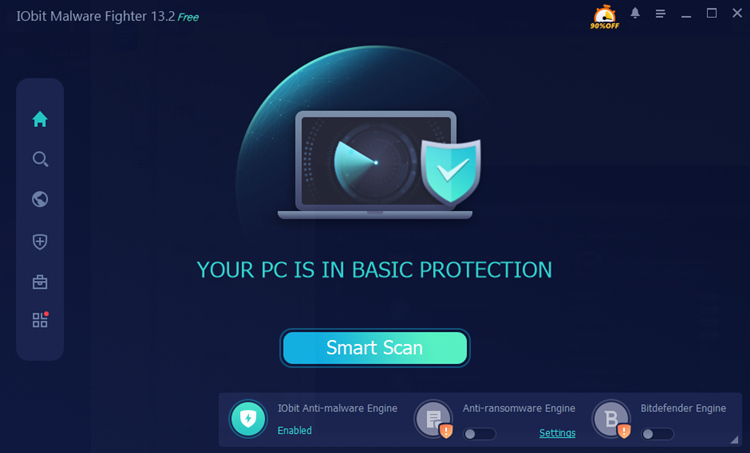
Step 1. Download IObit Malware Fighter.
Step 2. Press the ‘Fix’ button to let this software inspect and recover your PC.
The database includes all the latest ransomware info, based on the ransomware prevention checklist, this malware fighter is able to address most users’ needs.
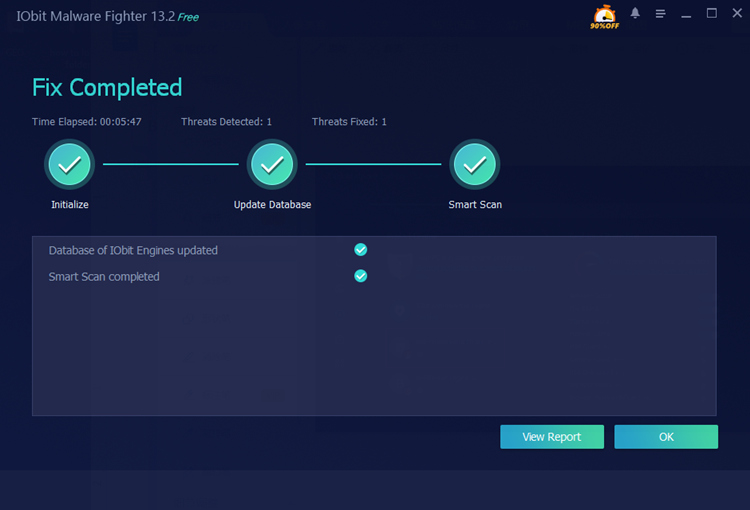
Step 3. Fix the latent problems and check reports.
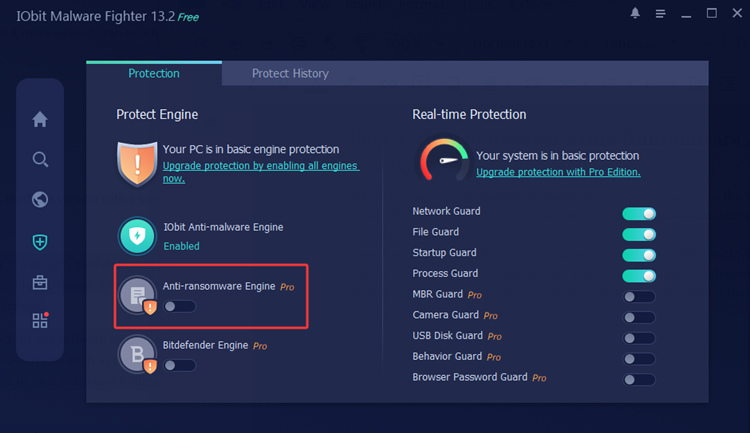
Step 4. Use IObit Malware Fighter’s ransomware protection feature to prevent future attacks. The guilty party once holds your info, can make a second attack easily.
The core features of IObit Malware Fighter
Real-Time Protection – Continuously monitors your system to block malware, ransomware, and suspicious behavior before damage occurs.
Malware & Virus Removal – Scans and removes viruses, spyware, trojans, and other threats from your PC.
Ransomware Protection – Shields important files from unauthorized encryption and ransomware attacks.
Safe Browsing & Anti-Tracking – Protects your online activity by blocking malicious websites, blocking ads and preventing tracking.
IObit Malware Fighter Free
- Quick and deep system scanning throughout PC system.
- Smart defense against all malicious infestations.
- High-level security and privacy protection in real time.
- Leading anti-malware and anti-virus engines.

How to Recover From Ransomware Attack?
You don’t have many choices to completely recover your PC to the version when ransomware didn’t attack. But here are 3 actions most users adopt to biggest save their computer.
#1. File Restoration
Once the ransomware is removed, focus on getting your files back. The safest way is to restore from backups—either from an external drive or cloud storage. If no backup is available, you can try file recovery or decryption tools, but results may vary depending on the ransomware type.
#2. Ransomware Removal
Before restoring anything, make sure the ransomware is completely gone. Use a trusted malware removal tool to scan your system and eliminate all threats. Skipping this step may lead to files being re-encrypted again.
#3. System Check and Reinforcement
After recovery, take time to secure your system. Update Windows and all software, change your passwords, and enable real-time protection. You should also review your security habits and set up regular backups to prevent future attacks.
Safe Behaviors: 5 Ways to Prevent Ransomware Attacks
5 Ways to Prevent Ransomware Attacks without software. Just safe behaviors in everyday working and surfing. Having a wary mentality actually helps you avoid 80% of ransomware problems.

#1. Use strong passwords
Create complex passwords with a mix of letters, numbers, and symbols. Avoid reusing the same password across multiple accounts.
#2. Don’t download cracked software
Pirated programs often carry hidden malware or ransomware. Always download software from official and trusted sources.
#3. Keep your system updated
Regular updates fix security vulnerabilities. Make sure your Windows system and software are always up to date.
#4. Avoid phishing emails
Don’t click on suspicious links or attachments from unknown senders. Ransomware is often spread through fake emails.
#5. Back up your data
Regularly back up important files to an external drive or cloud storage. This ensures you can restore your data if an attack happens.
Conclusion
Ransomware is not something you can ignore. Once it happens, the cost is not only money, but also your time, your data, and even your privacy. That’s why knowing how to prevent ransomware, identify it, and recover from it is essential for every PC user.
The methods shared in this guide are simple but effective. From using a reliable malware fighter to building safe daily habits, each step helps reduce your risk. And when combined together, they form a solid defense against most ransomware attacks.
In the end, prevention is always easier than recovery. Stay cautious, keep your system protected, and make sure your important files are always under your control.
IObit Malware Fighter Free
- Quick and deep system scanning throughout PC system.
- Smart defense against all malicious infestations.
- High-level security and privacy protection in real time.
- Leading anti-malware and anti-virus engines.