




Kevin Hart
Kevin is an experienced editor focused on tech blog writing. Familiar with all kinds of PC software on the market. All the topics he chooses are aimed at bringing more benefits to users.
Expert in
PC Health Solution

All-in-one PC health solution: clean, optimize and secure

Comprehensive PC cleaning, optimization and protection

Keep drivers always up-to-date

More stable performance with less system crashes

Protect millions of computers against malware

Top computer security with full-round protection

Protect against viruses & boost PC performance
Clean: 420 billion traces removed & 85 EB junk files cleaned
Protect: 80 million unauthorized access blocked & 20 million bugs fixed
Speed Up: 6 million hours of startup time saved & Turbo boost
Optimize: Auto clean and auto care your PC with AI mode

How to clean up empty folders? This blog will recommend the top 5 tools. Find the best empty folder remover to quickly clean and optimize your PC now!

Kevin Hart


Empty folders may look harmless, but over time they can quietly clutter your system and disrupt organization. Although they don’t take up actual storage space, they make file navigation more confusing, slow down searches, and may even contribute to performance issues. This is the time when an empty folder remover comes into play. These dedicated tools can help you identify and delete unnecessary directories effortlessly. In this guide, we will recommend the 5 best pro-grade empty folder cleaners. Just read on to find the right one to keep your system running smoothly.

Empty folders are created more often than you realize. When you uninstall software, the program deletes its files but leaves behind folder structures. Similarly, interrupted downloads, temporary caches, and file transfers also generate empty folders.
While each empty folder takes up almost no space, thousands of them can slow indexing and even contribute to performance issues. Yes, you can delete them manually, but the process can become exhausting and inefficient as the files accumulate.
That’s where a reliable empty folder cleaner comes in. It can thoroughly scan your system, identify redundant directories, and remove them safely in just a few clicks. Let’s check out the best tools to simplify your cleanup process in the next part!
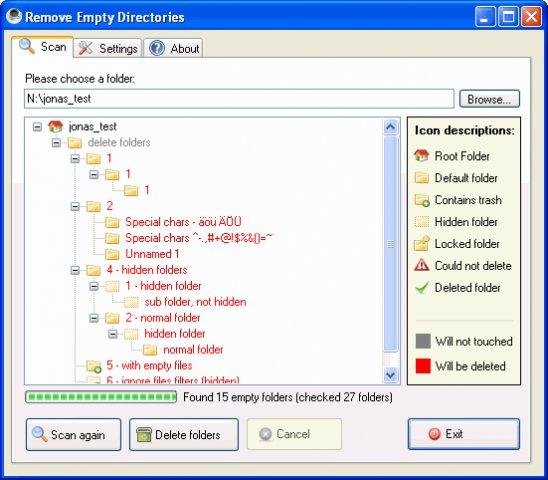
Created by Jonas John, Remove Empty Directories (RED) is a lightweight yet powerful empty folder cleaner for PC. It can scan your system or specified drives for empty folders and safely delete them. The advanced filters are great for quick and precise cleanup tasks.
Best Feature:
-The recursive scanning engine quickly detects empty folders across multiple drives and nested directories.
-Advanced filtering options to protect important system and custom folders.
-Portable version available without software installation.
-Detail tree structure view before deletion to avoid accidental removal.
-Support command-line usage for advanced automation and scripting.
Low CPU & memory usage
Free and open source empty folder finder
Fast scanning even on larger drives
High level of customization
Outdated user interface
No automation features
Not suitable for beginner
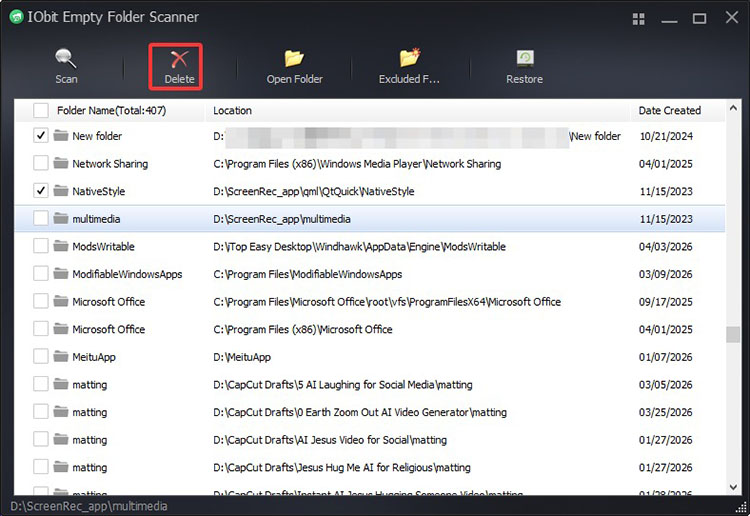
Advanced SystemCare is not just a pure empty folder cleaner. Instead, it’s a powerful all-in-one system optimization tool designed for Windows users. It can not only remove your empty folders but also improve system performance and security. Along with its intuitive, user-friendly interface, the software is an excellent choice for anyone to clean and maintain systems effortlessly!
Step 1. Get the Advanced SystemCare from the official website. It’s compatible with major Windows OS.
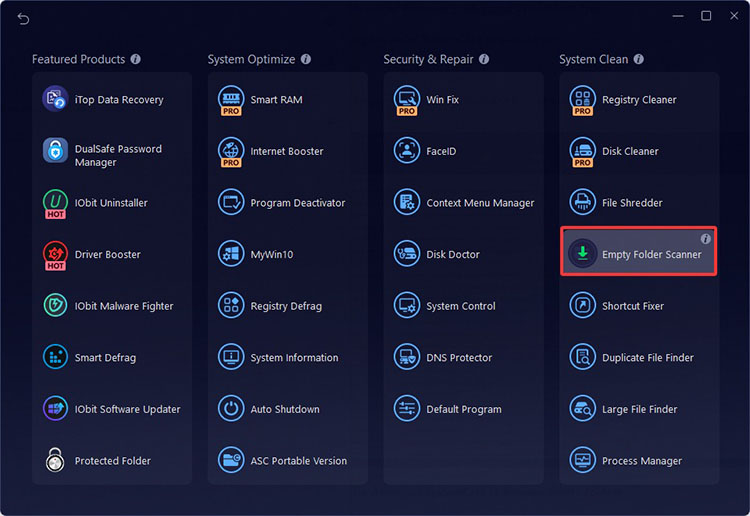
Step 2. Launch the software. Go to Speed up > More Optimization Tools. Click the three-dot icon to open another interface. Select the Empty Folder Scanner here.
Step 3. Choose the drives you want to scan. You can also click the browser to scan a specific folder.
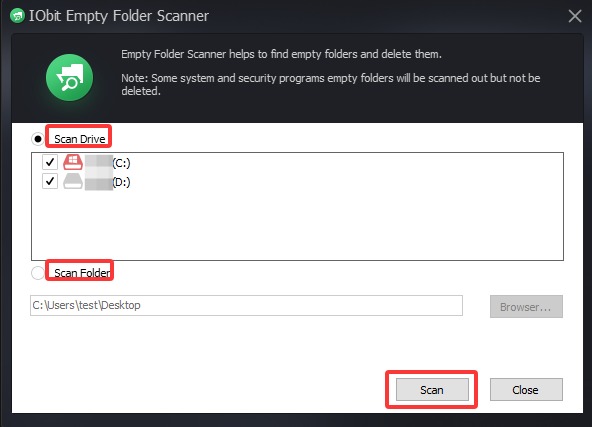
Step 4. Select the folders in the list and click on the Delete button to remove them completely.
Best Feature:
Intelligent Empty Folder Scanner: It detects redundant directories across drives and removes them safely without affecting important system folders. You can also customize scan locations(folders/drives) for precise control.
AI & Manual Mode Support: While AI mode analyzes system status and applies personalized optimization intelligently, Manual mode lets you fine-tune and control the action. For instance, you can easily fix the 100 disk usage Windows 11 and optimize system space using its Manual Mode.
Turbo Boost & Startup Optimization: Its Turbo Boost enhances PC performance with multiple modes (Work, Game, etc.), and the Startup Optimizer can disable unnecessary startup programs to reduce boot time and improve system responsiveness.
Real-time system optimization: How to free up disk space for smoother performance? Its Real-time Tuneup feature will continuously monitor CPU, RAM, and disk usage, automatically fixing issues to prevent slowdowns for stable system performance.
Privacy Protection & Security Shield: It can even disguise your digital footprint, block malware/spyware, and fix security vulnerabilities, which ensures a safer computing environment for everyday use.
Customizable empty folder cleaner for PC
Comprehensive PC optimization tool
Modern and clean UI
Great for privacy and security
Need to upgrade for advanced features
No macOS support
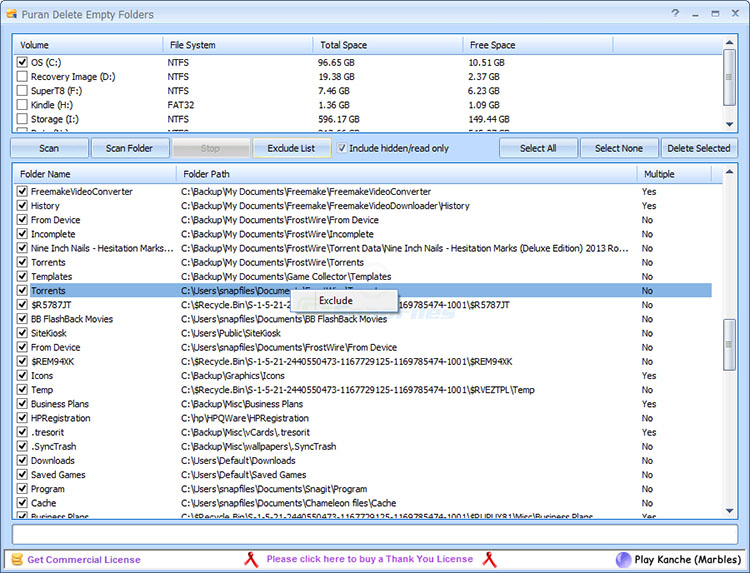
Puran Delete Empty Folders is a free utility that can scan your PC and remove unused empty directories. With blazing fast speeds, it’s the best empty folder remover to declutter file systems and reclaim space occupied by leftover folders from uninstalled apps.
Best Feature:
-Extremely fast scanning engine to handle large storage volumes.
-Option to delete empty folders instantly or send them to the recycle bin.
-Exclusion list to protect important directories from deletion.
-Support scanning removable drives and external storage devices.
Very fast performance
Free and easy to operate
Great for bulk cleanup
Minimal customization
Basic interface design
No additional optimization features
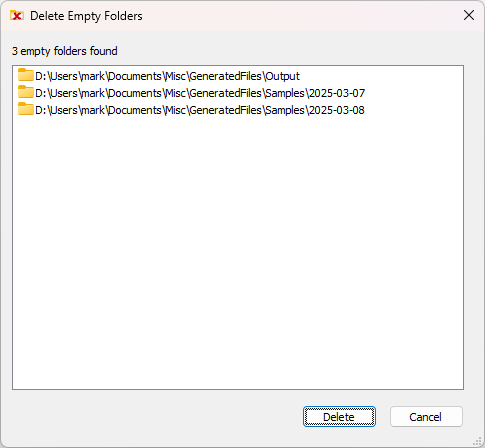
Available on the Microsoft Store, DeleteEmptyFolders is a convenient empty folder remover that works seamlessly with Windows. It allows users to clean empty folders directly through File Explorer’s context menu, which lets you delete empty directories hassle-free.
Best Feature:
-Direct right-click integration in Windows File Explorer for instant folder cleanup.
-Quick scanning of selected folders or entire drives.
-Safe deletion with built-in protection for important system folders
-Lightweight tool with minimal background resource usage
Simple & no learning curve
Free empty folder remover
Convenient & fast workflow
Limited full-drive deep scans
Fewer advanced filtering options
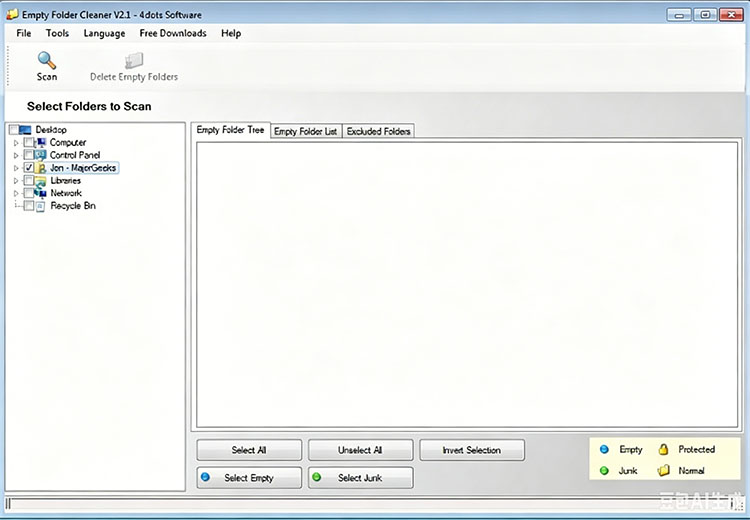
Empty Folder Cleaner is a feature-rich empty folder remover for advanced users. It offers flexible scanning options and multiple deletion methods for precise cleanup. The backup and undo support also ensures that folders can be removed safely with important files protected.
Best Feature:
-Scan and identify empty, junk, protected, and standard folders for thorough cleanup.
-Specify protected folders and files with wildcards for custom removal.
-Support permanent removal, recycle bin transfer, or zipped backup for safety.
-Undo and file backup support to prevent accidental data loss.
Customizable with strong protection options
Excellent backup and recovery features
Support 38 languages for global usability
Interface feels somewhat dated
Not easy to use for beginners
With the 5 options above, you now have several ways to keep your PC free of unnecessary folders. If you are still unsure which one suits you, here’s a brief comparison to help you decide easily.
| Software | Best For | Speed | Ease of Use | All-in-One | Free Version |
| Remove Empty Directories | Deep & selective scans | High | Medium | Low | Excellent |
| Advanced SystemCare | Overall PC optimization | High | High | High | Very Strong |
| Empty Folder Finder | Simple daily cleanup | Medium | High | Low | Good |
| DeleteEmptyFolders | Explorer integration | High | High | Low | Convenient |
| Empty Folder Cleaner | Advanced customization | High | Medium | Low | Strong |
An empty folder remover is one of the simplest ways to maintain smooth system performance and improve efficiency. With the 5 tools introduced above, you should now be able to keep your PC organized. Among them, Advanced SystemCare Free stands out as the best empty folder cleaner for most users. It’s a comprehensive tool that combines the empty folder cleaner feature with full system optimizations. You can easily remove empty folders and improve overall PC performance, all in one tool. Just download Advanced SystemCare to enjoy a faster and more responsive PC now!


All-in-one PC health solution.
Free Download