- Support Center
- Multiple Languages
- Language
- Help Us Translate
Expert in
PC Health Solution

All-in-one PC health solution: clean, optimize and secure

Comprehensive PC cleaning, optimization and protection

Keep drivers always up-to-date

More stable performance with less system crashes

Protect millions of computers against malware

Top computer security with full-round protection

Protect against viruses & boost PC performance
Automatically scan and update drivers.
Update game ready drivers for peak gaming performance.
Identify and fix various common of hardware issues.
Boost 30% of system performance for fast & smooth running.

Discover Tiny10, a lightweight version of Windows 10 built for low-spec devices. Learn its features, benefits, requirements, and limitations.



In the world of operating systems, Windows Tiny10, also known as Windows 10 Mini, has become increasingly popular among users looking for a lightweight and fast system. Designed as a streamlined alternative to the standard version of Windows 10, Tiny10 helps improve performance on older or low-spec PCs. In this article, we'll explore what Windows Tiny10 is, its advantages and disadvantages, common use cases, and a recommendation for users interested in adopting this optimized version of Windows.
What Is Tiny10?
Tiny10 vs. Windows 10 MiniOS Pro: Key Differences
Pros and Cons of Tiny 10
Common Uses for Tiny10
Can Your PC Run Windows 10 MiniOS?
Install Tiny10 or Windows 10 Mini Step by Step
Tiny10 (Windows 10 Mini) is a lightweight, optimized version of the Windows 10 operating system. It is designed to run on devices with limited resources, such as older computers and low-powered hardware, while retaining the core Windows features users need. The main difference between Tiny 10 and the standard version of Windows 10 is its reduced size and focus on efficiency. As a result, Tiny10 is often regarded as one of the lightest Windows 10 versions available.
Also Read: Remove Windows Updates on Windows 11 or 10 >>
Tiny10 and Windows 10 MiniOS share the same goal: delivering a smooth Windows experience on low-spec computers. However, some editions, such as MiniOS Pro, include advanced features, including:
BitLocker for data encryption
Group Policy Editor (GPEdit)
Domain support for enterprise networks
These features make Windows 10 MiniOS Pro and Tiny10 Pro more suitable for professional users and business environments.
Improved Performance: As one of the lightest Windows 10 versions available, Tiny10 uses fewer system resources, resulting in faster and smoother performance on low-spec devices.
Longer Battery Life: With its focus on efficiency, Tiny 10 can help extend battery life on laptops and other portable devices, making it especially useful for users on the go.
Reduced Storage Usage: Tiny10 requires less disk space than the standard version of Windows 10, which is beneficial for devices with limited storage capacity.
Customization Options: Despite being a streamlined edition, Tiny10 still offers customization features, allowing users to tailor the operating system to their preferences.
Limited Features: Because Tiny10 prioritizes efficiency and reduced resource usage, it may lack some advanced features available in the full version of Windows 10. This can be a drawback for users who rely on those specific capabilities.
Software Compatibility Issues: Some programs and applications may not be fully compatible with Tiny10 due to its streamlined nature. Before switching to Tiny 10, users should verify that their essential software works properly on this version.
Reviving Older PCs: Tiny 10 is an excellent choice for breathing new life into older computers that struggle to run the full version of Windows 10 efficiently.
Low-Power Devices: If you have a tablet or other low-spec device, Tiny10 can deliver smoother performance and better battery life than the standard Windows 10 installation.
Also Read: How to Speed Up a PC [10 Easy Ways] >>
Processor. A processor running at 1 GHz or faster is recommended.
RAM. At least 1 GB of RAM is required for basic performance. However, 2 GB or more is recommended for a smoother experience.
Storage. Windows 10 MiniOS requires a minimum of 16 GB of free disk space for installation.
Graphics Card. A DirectX 9-compatible graphics card or newer is recommended for optimal graphics performance and compatibility.
Display. Tiny10 supports a minimum screen resolution of 800 × 600 pixels. For a better viewing experience, a resolution of 1024 × 768 pixels or higher is recommended.
Internet Connection. An internet connection is recommended for downloading system updates and accessing online services.
This lightweight version of Windows is available in both 32-bit and 64-bit editions. Below are the minimum and recommended system requirements for each version:
| Requirements | Windows 10 MiniOS 32-bit | Windows 10 MiniOS 64-bit |
| Architecture | 32-bit | 64-bit |
| Processor | Intel Core i5-8400 / 1 GHz compatible x86 processor | Intel Core i7-9700 / 1 GHz compatible x64 processor |
| Minimum RAM | 1 GB | 2 GB |
| Recommended RAM | 2 GB | 4 GB or more |
| Minimum Disk Space | 16 GB | 20 GB |
| Graphics Card | DirectX 9 compatible | DirectX 9 or later compatible |
| Ideal Use Case | Netbooks and very old PCs | Entry-level to mid-range newer PCs |
| Software Compatibility | 32-bit applications only | 32-bit and 64-bit applications |
It is important to note that these are the minimum recommended system requirements for Tiny10 or Windows 10 Mini. Depending on your specific needs and the applications you use, higher hardware specifications may be necessary. Resource-intensive software and games may require more powerful components than those listed above.
Tip: Tiny10 is not officially supported by Microsoft. This means you cannot receive assistance from Microsoft's support team, and you may not get the latest Windows updates at the same time as standard Windows users.
Whether you choose Tiny10 or any other version of Windows, keeping your drivers up to date is essential for maintaining optimal PC performance. One useful tool for this task is Driver Booster, which can help automatically detect and update outdated drivers to ensure your system runs smoothly.
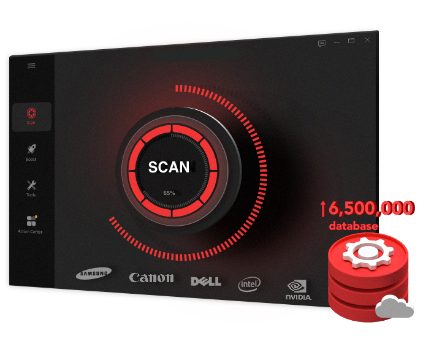
Driver Booster scans your computer for outdated, missing, or incorrect drivers and automatically updates them to the latest manufacturer-recommended versions. It also provides detailed information about your PC's hardware components, including the graphics card, audio devices, and network adapters. This allows users to better understand their system and make informed decisions about potential hardware upgrades.
Look for a download link for the Windows 10 Mini or Tiny10 ISO image on reliable forums or communities.
Ensure the file comes from a trusted source to avoid any risk of malware.
Use tools like Rufus or Ventoy to create a bootable USB drive using the Windows 10 Mini ISO image.
Prepare a USB drive with at least 8 GB of storage.
Before installing Tiny10, back up all your important data, as the installation will wipe the hard drive.
1. Configure USB Boot
Restart your PC and enter the BIOS or UEFI settings (usually by pressing F2, F12, Esc, or Delete during startup).
Change the boot order so that the USB drive is the first boot device.
2. Start the Installation
Insert the bootable USB drive containing Windows 10 Mini and restart the computer.
The system should automatically boot into the Windows 10 Mini installer.
3. Select the Installation Partition
Choose the hard drive or partition where you want to install Tiny10.
Format the partition to ensure a clean installation.
4. Follow the Installation Wizard
Complete the on-screen setup instructions.
The Tiny 10 installation process is generally streamlined and requires minimal user intervention.
5. Complete the Installation
Once the installation is finished, the system will restart automatically.
Configure basic settings such as language and network preferences according to your needs.
Tiny10 (Windows 10 MiniOS) and Windows 10 MiniOS Pro provide lightweight and efficient alternatives for users seeking better performance on low-spec devices. Their key benefits include improved speed, longer battery life, and reduced storage requirements. However, limited features and potential software compatibility issues are important factors to consider.
Users are encouraged to use tools like Driver Booster to obtain detailed system information and keep their drivers up to date. Ultimately, the choice between Tiny 10 and the full version of Windows 10 depends on your specific needs, hardware, and software requirements.
 People Also Ask
PC stuck on boot screen? Learn how to fix pc stuck on boot screen with proven methods like Safe Mode, SFC scan, and driver updates.
Yes. You can try 3 ways on how to uninstall the Realtek audio driver and reinstall it to solve the problem that PC sound is not working generally.
From downloading to Safe Mode booting and clean restart – follow these 6 easy steps on how to use DDU and resolve persistent display driver problems.