- Support Center
- Multiple Languages
- Language
- Help Us Translate
Expert in
PC Health Solution

All-in-one PC health solution: clean, optimize and secure

Comprehensive PC cleaning, optimization and protection

Keep drivers always up-to-date

More stable performance with less system crashes

Protect millions of computers against malware

Top computer security with full-round protection

Protect against viruses & boost PC performance
Automatically scan and update drivers.
Update game ready drivers for peak gaming performance.
Identify and fix various common of hardware issues.
Boost 30% of system performance for fast & smooth running.

Learn what system software is, how it works, its main types, functions, and real-world examples, including operating systems, drivers, BIOS, and system utilities.



Learn what system software is, how it works, its main types, functions, and real-world examples, including operating systems, drivers, BIOS, and system utilities.
When you turn on your computer or phone, the first thing that gets to work is a group of invisible but essential programs: system software. Without it, your device would be nothing more than a piece of hardware that can't do much on its own. In this guide, I'll explain what system software is, the different types, what they do, and some real-world examples you probably use every day without even realizing it.
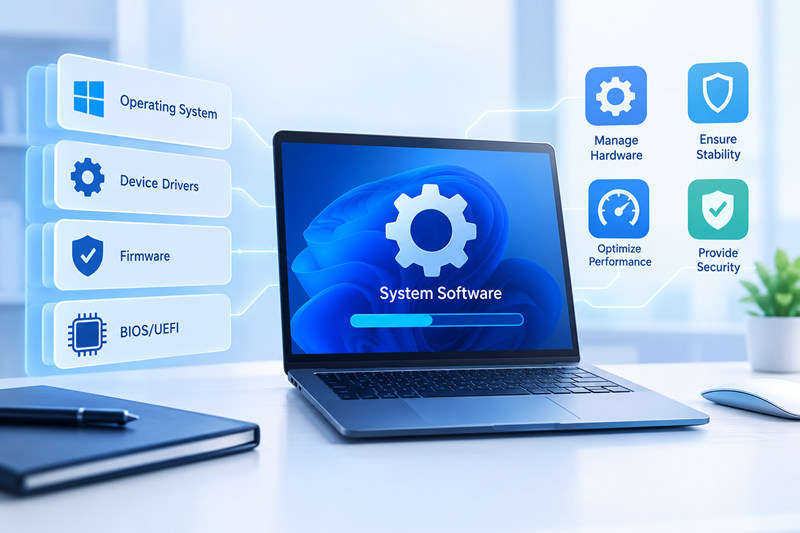
System software is a type of computer program that helps the hardware and other software work properly. It manages system resources, controls hardware devices, executes instructions, and provides the foundation that other software, such as applications, needs to run.
In simple terms, system software is the bridge between the user, applications, and hardware.
System Software vs. Application Software
| Feature | System Software | Application Software |
| Purpose | Operates and controls hardware | Performs specific tasks |
| Examples | Windows, BIOS, drivers | Word, Excel, web browsers |
| Installation | Usually comes preinstalled | Installed by the user |
| Dependency | Essential for the system | Depends on system software |
Let's break down the different types of system software. Each one plays an important role, and although many of them work "behind the scenes," they are essential for keeping your computer running.
This is the most well-known type of system software. The operating system is the brain of your computer, coordinating everything that happens, from moving your mouse cursor to running complex programs.
Examples:
Windows
macOS
Linux (Ubuntu, Fedora, Debian)
Android
iOS
Operating systems handle tasks such as:
Managing memory
Running processes
Managing files
Providing a graphical user interface (GUI)
Drivers are programs that allow the operating system to communicate with hardware devices.
Common examples include:
Audio drivers
Printer drivers
Graphics card drivers
Network drivers (Wi-Fi, Ethernet)
USB device drivers
Have you ever reinstalled Windows and found that your mouse or Wi-Fi wasn't working? You were probably missing the right driver.
System utilities are tools that help analyze, optimize, protect, and maintain your operating system.
Examples include:
Task Manager
Disk Cleanup
Disk Defragmenter
Windows Firewall
Performance Monitor
These utilities are usually built into the operating system and are essential for keeping your PC in good working condition.
This software lives on your motherboard and initializes the hardware when you turn on your computer. It then hands control over to the operating system.
BIOS: Older and more basic firmware.
UEFI: Newer, faster, and more secure firmware.
Without BIOS or UEFI, your PC wouldn't even know where to start.
Shells and terminals let users communicate with the operating system through commands.
Examples include:
CMD (Command Prompt)
PowerShell
Terminal (macOS and Linux)
Bash
Many everyday users never touch them, but system administrators and advanced users rely on them heavily.
Runtime environments provide what certain programs need to run. They interpret and execute code so applications can work properly.
Examples include:
Java Virtual Machine (JVM)
.NET Framework
Windows Subsystem for Linux (WSL)
Python or Ruby interpreters
Virtualization software allows you to run another operating system inside your current one.
Examples include:
Hyper-V
VirtualBox
VMware
Boot Camp (for installing Windows on a Mac)
These tools are commonly used by developers and IT professionals who need to test different operating systems or environments.
| Type | Main Function | Examples |
| Operating system | Controls hardware and processes | Windows, macOS, Linux, Android, iOS |
| Drivers | Connect hardware with the OS | GPU, audio, network |
| System utilities | Maintain and optimize the system | Firewall, Disk Defragmenter, Performance Monitor |
| BIOS/UEFI | Initializes hardware and loads the OS | BIOS, UEFI |
| Shells/terminals | Allow commands and scripting | CMD, PowerShell, Bash |
| Runtime environments | Run specific code | JVM, .NET, WSL |
| Virtualization tools | Run other operating systems inside the current one | Hyper-V, VMware, VirtualBox |
Outdated drivers are the main reasons for game lagging, video stuttering, and slow responses. If you want to update all drivers in one click, you can use IObit Driver Booster. This software is a driver scanner, old driver fixer, driver uninstaller, driver rollback tool, and auto driver updater.
System software is the backbone of every computer. Without it, your hardware wouldn't know what to do, and the programs you use every day couldn't run. From the operating system to drivers and system utilities, each part works behind the scenes to keep your PC running properly.
Now that you know what's happening behind the scenes, the next time you turn on your computer, you'll see all that invisible software a little differently.
 People Also Ask
PC stutters while gaming, watching videos, or using Windows? Check the quick fixes for overheating, driver issues, high CPU usage, RAM bottlenecks.
For those who forget their password and recovery key and fail to remove BitLocker encryption, this blog shares thoughts on how to unlock their hard drives.
This blog shares 4 methods to show readers how to uninstall games on PS5 without losing progress and personal preferences, check how to remotely remove games via phones or via your PS5 device.