

- Support Center
- Multiple Languages
- Language
- Help Us Translate
Expert in
PC Health Solution

All-in-one PC health solution: clean, optimize and secure

Comprehensive PC cleaning, optimization and protection

Keep drivers always up-to-date

More stable performance with less system crashes

Protect millions of computers against malware

Top computer security with full-round protection

Protect against viruses & boost PC performance
Quick and deep system scanning throughout PC system.
Smart defense against all malicious infestations.
High-level security and privacy protection in real time.
Leading anti-malware and anti-virus engines.

For those who forget their password and recovery key and fail to remove BitLocker encryption, this blog shares thoughts on how to unlock their hard drives.



When changing hardware, reselling a PC, or wiping out a PC, BitLocker locks your PC
You should not uninstall BitLocker recklessly; there are bad results
Two workarounds help you bypass BitLocker encryption
Find your recovery key from the Microsoft official website
Turn off auto-activated BitLocker
Microsoft Customer Support does not help with lost recovery key
When you forget the BitLocker password/recovery key and still want to get access to the locked drives, you may want to uninstall BitLocker to unlock your hard drive or external hard drive. However, as the most secure method built into the Windows operating system, you can have problems doing so if you forget the password or lose the recovery key.
This blog shares some thoughts on how to remove BitLocker without damaging your locked files. Please read on.
When people buy second-hand PCs, upgrade PC hardware, and reinstall Windows, the operating system jumps out asking them for the BitLocker recovery key. This is frustrating, especially when BitLocker is automatically on, and nobody knows the recovery key or has forgotten BitLocker passwords.
Here are the most common scenarios when BitLocker encrypts people’s hard drives and external hard drives, and they don’t know how to remove BitLocker:
People upgrade the motherboard, chipset, BIOS, or SSD, and Windows thinks your PC has been stolen, so it asks for a BitLocker recovery key.
When you bought a second-hand PC from another guy, and his PC is encrypted via BitLocker. Reinstalling doesn’t help since Windows keeps popping up requests for the BitLocker recovery key.
People who use work laptops and BitLocker are compulsively imposed on their PC. When your PC needs a reinstall, Windows stops the action and asks for the recovery key.
Your PC is turning on BitLocker without you knowing, and you accidentally wipe out your PC.
Many of you have misunderstandings about BitLocker, thinking the encryption is not a big deal, just uninstall it, and the encryption is gone. But the harsh reality is that BitLocker is one of the highest-level security methods adopted by Windows to prevent someone from tampering with your PC.
If you force-uninstall BitLocker (without a password or recovery key), these bad results might happen:
Permanent data loss and unrecoverable
When rebooting, BitLocker will repeatedly ask for the Recovery Key
Windows cannot reboot, and a black screen may appear
So, can you remove encryption by uninstalling BitLocker? The answer is no. If you care about the data, force uninstallation is definitely the last thing to try.
Any other workarounds to remove BitLocker? Advanced users might turn to online websites for help, hoping to remove encryption with the help of tech experts. And this action is dangerous too.
Fake BitLocker online remover warnings:
These types of websites have no special skill over Bitlocker unblocking; they cause much more harm to your PC, including:
Only wipe the drive
Attempt scams
Distribute malware
Only a small portion of this group knows some tricky skills like Linux disk tools, disk-sector editing, etc., that might work. But malware attacks are on the upper hand.
If you are reduced to this dangerous action, use IObit Malware Fighter as advanced prevention against malware and ransomware attacks.
Many of you may neglect the fact that you actually have the BitLocker password or Recovery key.
You can look up your Microsoft Account for relevant info on your BitLocker recovery key. Many Windows 11 devices have such a feature to back up recovery keys to the cloud. You can try this way by visiting Microsoft’s official webpage:
https://account.microsoft.com/devices/recoverykey
Another situation is that you are using PCs from your company or school. These big organizations usually save recovery keys on Azure AD, Active Directory, and the management backend. You can directly turn to them for help.
For those who don’t know what a BitLocker Recovery Key is, they can find relevant info on:
https://account.microsoft.com/devices/recoverykey
And the password for your encrypted external hard drive is your preset password.
If you have a recovery key, you can use the key to find the old password.
Many people do not know their PCs are automatically encrypted by BitLocker. Especially when:
They upgraded the Windows operating system to Windows 11
They bought a new laptop
They use TPM 2.0 devices
They use a Microsoft Account to log in to their devices
So, how do you turn off BitLocker?
When you have the recovery key, just follow the steps below:
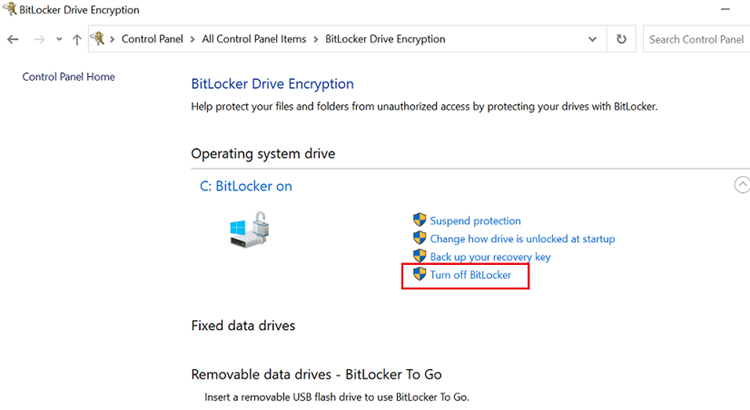
Step 1. Open Control Panel.
Step 2. Find ‘All Control Panel Items.’
Step 3. Choose BitLocker Drive Encryption.
Step 4. From the options, hit ‘Turn Off BitLocker.’
Warm reminder: if you are using your company’s PC, you shouldn’t turn off BitLocker since the public environment is under regulation. And if you tamper with BitLocker, your company may have problems passing the safety audit.
Many users believe Microsoft support can help recover lost files after a password or recovery key is lost. In reality, Microsoft cannot bypass BitLocker encryption or generate a new recovery key for users.
Microsoft support may help users:
Locate a saved recovery key
Check Microsoft account backups
Reinstall Windows
But they cannot decrypt the drive without valid credentials. This is a core security feature of BitLocker, not a technical limitation of customer service.
So, how to remove BitLocker? Actually, the only thing you can do is find the Recovery Data, regardless of unlocking encryption or turning off BitLocker. BitLocker is designed to protect your data, not make recovery easy. Many users only realize their drive is encrypted after being asked for a recovery key during a hardware change, BIOS update, or system failure. Before disabling, removing, or troubleshooting BitLocker, always make sure your recovery key is safely backed up. Once both the password and recovery key are lost, even Microsoft cannot recover the encrypted data in most cases.

 People Also Ask
PC bottleneck means some old components drag down your computer's performance. GPU, CPU, and PSU bottlenecks are common. This blog tells you what bottlenecks in PC are and how to fix them.
How to install device drivers? Easy guide for both PC and desktop users to check for driver updates and download new drivers for free.
How should I know if I can shift to Windows 11 safe and sound, and can my old hardware and system make it through the transition? WIndows Secure Boot and PC Health Checker help you know the answers.