- Support Center
- Multiple Languages
- Language
- Help Us Translate
Expert in
PC Health Solution

All-in-one PC health solution: clean, optimize and secure

Comprehensive PC cleaning, optimization and protection

Keep drivers always up-to-date

More stable performance with less system crashes

Protect millions of computers against malware

Top computer security with full-round protection

Protect against viruses & boost PC performance
Quick and deep system scanning throughout PC system.
Smart defense against all malicious infestations.
High-level security and privacy protection in real time.
Leading anti-malware and anti-virus engines.

Want to scan your PC for viruses online? Learn how online virus scanners work, their limitations, and how to protect your PC with IObit Malware Fighter.



Can you scan PC virus online? Based on my experience, this type of tool is actually rarely seen. Only a few online tools allow you to upload a single document and scan it for viruses. Most of the online websites that claim to scan your system online turn out to be the download page for desktop software. Why is the ecosystem like this?
It is because virus scanning requires high system administration to visit, log in to, and store your local disk. So there is both a trust issue and a tech shortfall (online tools cannot access any local disks due to browsers’ limitations). So the question is, do you need an online PC virus scanner or not?
Online virus scanners are usually taken as a simple option to quickly scan some suspicious documents. But they are not designed to do a full scan targeting your C disk, or a flash drive. Compared with virus scan software, online scanners mostly fall short in performance. If you want to remove virus without antivirus software, you can try online virus scanners.
What things can you upload to an online virus scanner?
#1. Unknown Files Downloaded from Websites
If you are not sure about shared/downloaded files from unofficial websites, you can upload the package to an online virus scanner to get quick results.
#2. Appended Files in E-mails
When you receive emails from unknown senders and you happen to be curious about the appended files (.docx/.pdf/.xlsx/.zip) , you can give them a quick scan to know if they are safe or not.
#3. Connect to Others’ External Hard Drives
If you lend your USB flash drives to others and, after retrieving your memory sticks, some unknown files are added. You can upload these files to an online virus scanner to make sure everything is in control.
#3. Suspicious URL
This happens all the time when you find a URL claiming to be a free MBTI test, click on it, and are redirected to a malicious website. If you want to avoid link-based ransomware attacks, you can use an online virus scanner to diagnose the URL first.
#4. Suspicious IP Address
Now, a strong online virus scanner can also help you locate malicious IP addresses to further confirm the IP Address. If you receive emails from a suspicious IP, or your account is logging in from a suspicious IP, you can use this function
VirusTotal is a free online service that helps users check whether files, URLs, domains, and IP addresses may be associated with malware or other security threats. Its file-scanning page allows you to upload a suspicious or unknown file and analyze it using results from 70+ antivirus engines, along with other security analysis tools.
After a scan, VirusTotal presents the detection results from individual security vendors, showing how many engines flagged the file and what threats they identified. It can also provide additional information such as file metadata, behavior analysis, and community comments, helping users investigate potentially harmful files in more detail.
Because VirusTotal aggregates results from multiple security vendors rather than relying on a single antivirus engine, it can be useful as a second opinion when you're unsure whether a file is safe. However, a clean result should not be treated as an absolute guarantee that a file is harmless.
Check this tool's offcial website: https://www.virustotal.com/gui/home/upload
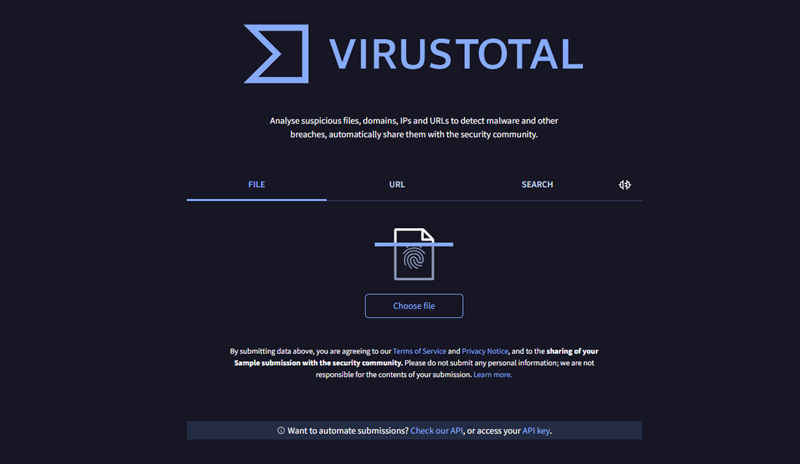
Disadvantages:
1. Privacy risks when uploading sensitive files
Standard VirusTotal submissions are part of its threat-intelligence sharing system. Submitted files and analysis information may be shared with security partners and customers, so users should not upload confidential, personal, or commercially sensitive files.
2. It does not provide real-time PC protection
VirusTotal is primarily a file, URL, domain, and IP analysis service. You need to manually submit an item for analysis, so it doesn't continuously monitor your PC or automatically block threats like dedicated antivirus software.
3. Large files can be difficult to scan
VirusTotal supports files up to 650 MB, but its documentation notes that very large files can cause performance issues, timeouts, or incomplete scanning by some antivirus engines.
4. A clean result does not guarantee a file is completely safe
VirusTotal aggregates results from more than 70 antivirus scanners and other analysis tools, but detection results can differ between engines. A file receiving no detections should therefore be treated as evidence that no participating engine detected a threat, rather than an absolute guarantee of safety.
Kaspersky Threat Intelligence Portal provides an online way to check suspicious files, file hashes, IP addresses, domains, and web addresses for potential security threats. For file analysis, users can upload a file directly to the portal, which uses Kaspersky’s threat detection technologies, including static, dynamic, and behavioral analysis, as well as its cloud-based reputation system.
For suspicious websites or URLs, the portal can perform web address analysis in a sandbox environment, allowing users to examine potentially dangerous webpage activity without directly opening the page in their own browser. Users can also look up hashes, IP addresses, domains, and URLs to obtain threat-related information and contextual details.
Overall, Kaspersky’s online virus scanner is particularly useful when you want to check a suspicious file or link without installing a full antivirus program. For deeper investigation, it also provides additional threat-intelligence features and reporting options.
Check this tool's offcial website: https://opentip.kaspersky.com/
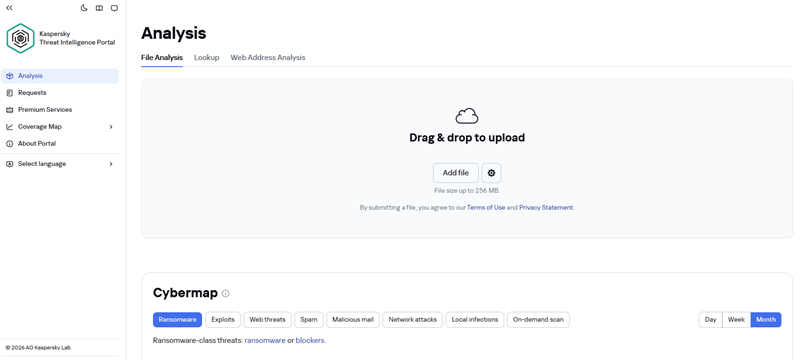
Disadvantages:
1. Privacy concerns when uploading files
Kaspersky’s Terms of Use specifically state that uploaded samples must not be confidential or contain commercially sensitive information. By submitting a sample, users also grant Kaspersky certain rights to use, copy, store, reproduce, and distribute the submitted content. Therefore, users should avoid uploading private documents or sensitive company files.
2. It is not a full PC virus scanner
OpenTIP is designed to analyze individual suspicious files, hashes, IP addresses, domains, and web addresses. It does not continuously scan your entire PC or provide ongoing real-time protection like installed antivirus software.
3. File-size limitations
The online file-analysis function supports files up to 256 MB. Larger files cannot be submitted through the service, which can be a limitation when analyzing large installers, archives, or other files.
4. Some advanced analysis requires additional access
Although OpenTIP provides free threat analysis, Kaspersky notes that full reports and some advanced features require demo access or premium services. This means users may not get the complete threat-analysis information from the basic online service.
Online virus scanners are convenient for quickly checking suspicious files or links, but they also have limitations. They usually require you to manually upload or submit items for scanning, making them less suitable for real-time protection. They may also have file-size limits, privacy concerns, and cannot continuously monitor your PC for emerging threats.
For more complete and continuous protection, consider using IObit Malware Fighter. It helps detect and block malware, viruses, spyware, and other security threats while providing real-time protection for your PC. Instead of checking threats one by one with an online scanner, you can keep your system protected in the background.
You can scan PC virus online, but online virus scanners are better suited for checking suspicious files, programs, or URLs than scanning your entire PC. Tools such as VirusTotal and Kaspersky’s online scanner can provide a quick second opinion without requiring you to install a full antivirus program. However, they generally cannot provide full scan services for your system or continuous, real-time protection for your entire system.
If you want more comprehensive protection, IObit Malware Fighter can help detect and block malware, viruses, spyware, and other threats in real time. Instead of manually uploading suspicious files whenever you have concerns, install IObit Malware Fighter to keep your PC protected in the background.
 People Also Ask
Learn what system software is, how it works, its main types, functions, and real-world examples, including operating systems, drivers, BIOS, and system utilities.
PC stutters while gaming, watching videos, or using Windows? Check the quick fixes for overheating, driver issues, high CPU usage, RAM bottlenecks.
For those who forget their password and recovery key and fail to remove BitLocker encryption, this blog shares thoughts on how to unlock their hard drives.