

- Support Center
- Multiple Languages
- Language
- Help Us Translate
Expert in
PC Health Solution

All-in-one PC health solution: clean, optimize and secure

Comprehensive PC cleaning, optimization and protection

Keep drivers always up-to-date

More stable performance with less system crashes

Protect millions of computers against malware

Top computer security with full-round protection

Protect against viruses & boost PC performance
Clean: 420 billion traces removed & 85 EB junk files cleaned
Protect: 80 million unauthorized access blocked & 20 million bugs fixed
Speed Up: 6 million hours of startup time saved & Turbo boost
Optimize: Auto clean and auto care your PC with AI mode

Check how to boot into BIOS to change CPU ratio and tune your voltage. Also learn to use AMD’s Ryzen Master to directly change CPU frequency.



Overclocking CPU May Stress Up Your Computer
How to Overclock CPU in BIOS with Safe Settings?
How to Overclock AMD CPU Without BIOS?
How to Overclock Intel CPU Without BIOS?
How to Overclock CPU with Third Party CPU Tool?
Use System Care to Unburden Your PC from CPU Overclocking
A safe BIOS is a restricted BIOS. If your PC is always overwhelmed when playing CPU-heavy games, you can configure BIOS to increase CPU clock speed. Evident FPS increases, and faster rendering speed will be observed. This is a chance for low-end CPUs to get a performance boost.
CPU overclocking is seen as an effective method to reduce CPU bottlenecks. When the default settings are set to balance device performance with hardware safety, manually increasing CPU clock speed can bring you new problems, including overheating and hardware damage. So if you increase your PC performance by breaking the balance, you should do extra work to protect your PC components. So how to overclock CPU with or without BIOS? Please read on.
Your computer manufacturer will never suggest you manually overclock CPUs. The default CPU frequency is set to keep your system running stably, not running at its utmost potential. So if you increase CPU clock speed, you may do some damage to your PC. Here are some common scenarios after CPU overclocking:
Higher CPU Temperature
If your cooling system is not strong enough, overclocking the CPU leads to thermal throttling, resulting in FPS drops, game stutters, and, more severely, a reduced CPU lifespan.
Read Also: How to Check CPU Temperature? >>
Higher Power Consumption
Higher CPU clock speed results in higher power consumption, which means more voltage and power are required. The battery stress will reflect on electricity costs, and eventually, the fact you don’t want to see - the reduced battery life.
Cast aside the two factors above, manually increasing CPU clock speed leads to an unstable system. You will see crashes, freezes, BSODs more frequently. And data corruption is possible too. So, anyway to overclock the CPU in a 100% safe way? Yes, but you need to do a lot of preparation work.
Overclocking CPU via CPU Ratio Configuration and voltage settings is a traditional and safe way to boost CPU frequency. Less battery stress and heat. Here is a quick tutorial.
Step 1. Restart your PC and repeatedly press the Delete key during startup to enter the BIOS.
Step 2. Press the Left Arrow or Right Arrow to select the screen until you see the option ‘CPU Configuration.’
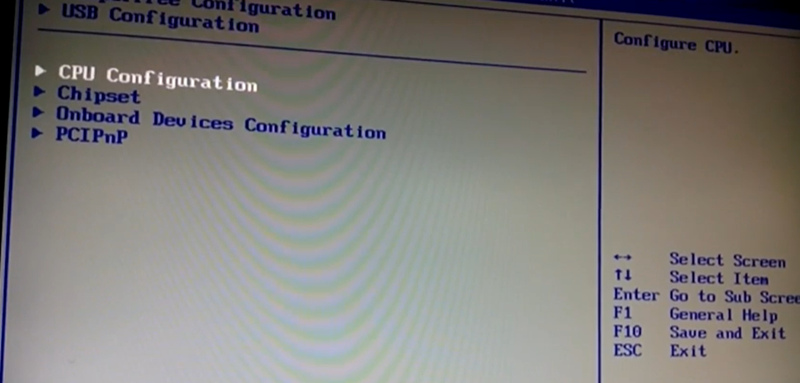
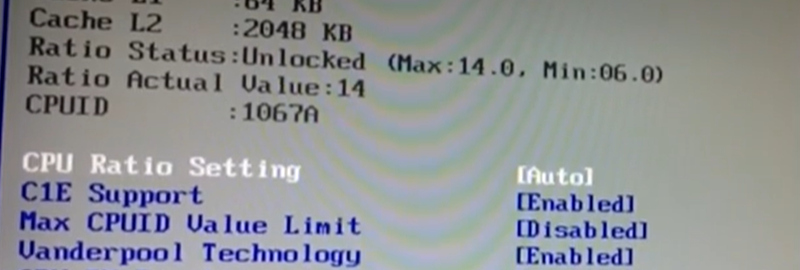
Step 3. Enter and go to CPU Ratio Setting.
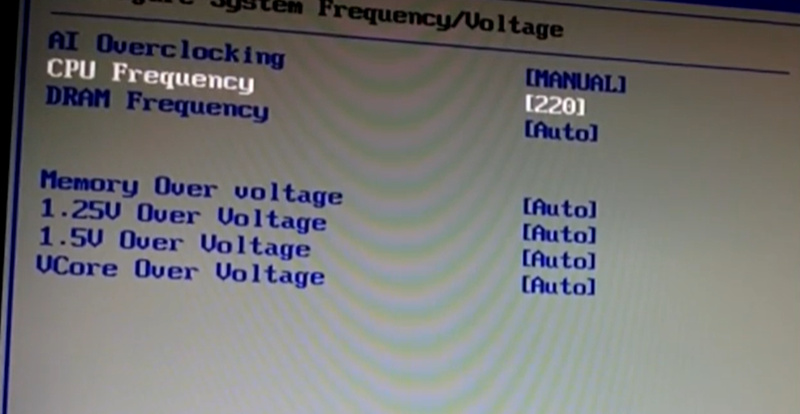
Step 4. Change AI Overclocking from Auto to Manual. And change CPU Frequency from 200 to 220. A safe and conservative increase to make sure your CPU and battery are not too overwhelmed.
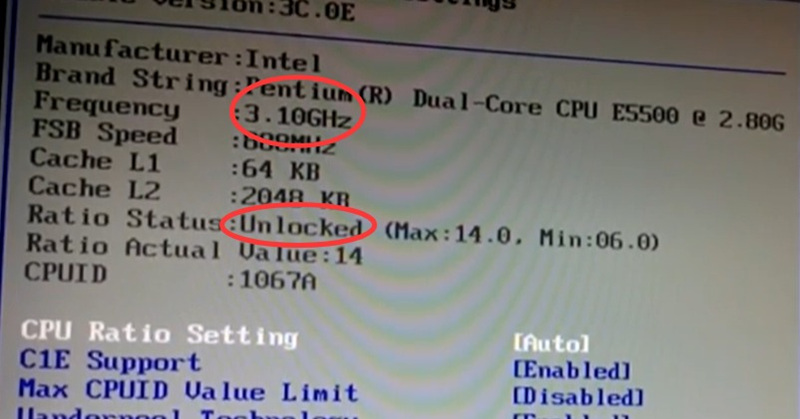
Now you can see the CPU frequency has increased from 2.80 GHz to 3.10 GHz.
BTW, if you make a bold move to increase the CPU frequency, you need to adjust more settings for the voltage.
Is the BIOS the only way to overlock CPU?
Not actually; in 2026 and later, dynamic ways to overclock CPU are available. For AMD users, it is using PBO and Curve Optimizer. And for Intel users, it is
To overclock an AMD Ryzen CPU, you don’t need to boot into BIOS to do configurations. It’s 2026, and you have a modern tool to do quick settings via programs. Ryzen Master (An official program developed by AMD) is a dedicated tool to overdrive CPUs.
You can use this tool to monitor your CPU. Check the performance of cores, take a look at the temperature, control voltage, and, of course, boost CPU frequency.
Step 1. Download Ryzen Master from AMD official website.
Here is the link: https://www.amd.com/en/products/software/ryzen-master.html
Step 2. Activate this software and switch to Profile.
Step 3. Find the Auto Overclocking tab and then the Boost Override CPU. Set the number to 200.
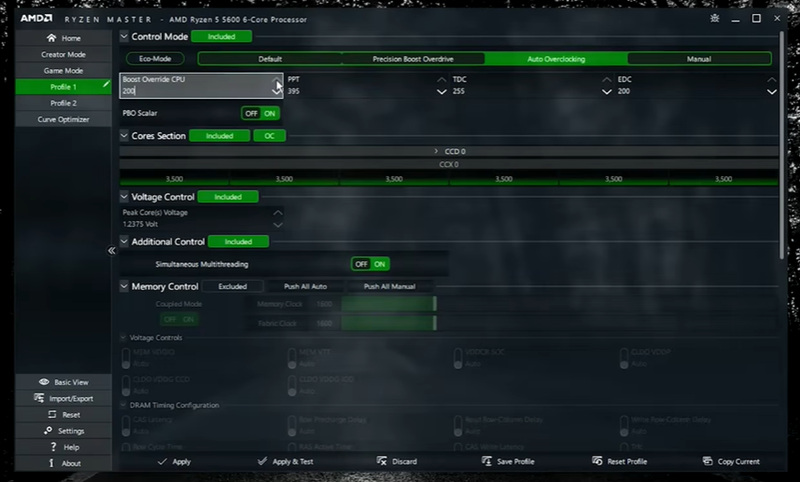
(image from: YouTube uploader: CyberCPU Tech)
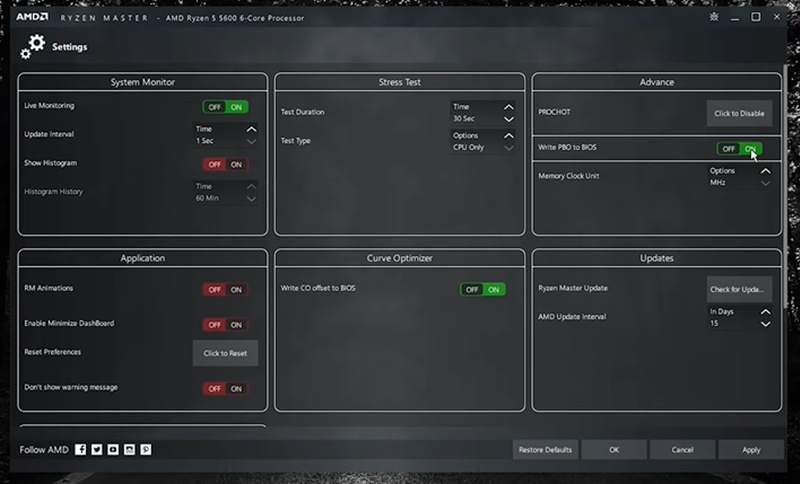
Step 4. Go to Settings; from the Advanced area, toggle on the ‘Write PBO to BIOS’ to remember your changes. This action will make your PC always overclock the CPU at 200; no need to set it up every single time.
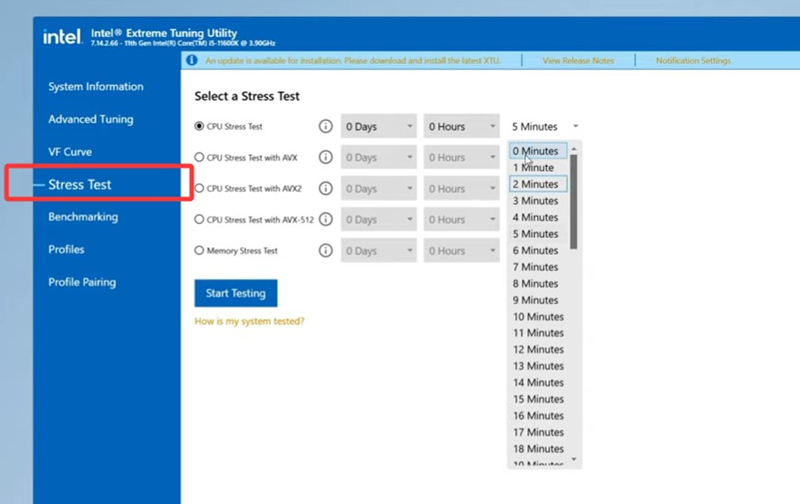
Intel also develops a cutting-edge CPU management tool like AMD Ryzen Master, letting users to directly change CPU cores, ratio, and the boost is evident at around 1Ghz once you make the settings right.
Here is the short tutorial, follow the settings in the image below to make your Intel CPU be boosted in a safe way.
Step 1. Download Intel XTU from its official site.
Here is the link: https://www.intel.com/content/www/us/en/download/17881/intel-extreme-tuning-utility-intel-xtu.html
Step 2. Activate this program and switch to the ‘Advanced Tuning.’
Step 3. Locate the Performance Active-Core Tuning. Here you can slightly increase the number to 50 or 51 to see if your PC can handle the overclock. If your computer is still smooth, you can slowly test the limit by adding to the core number.
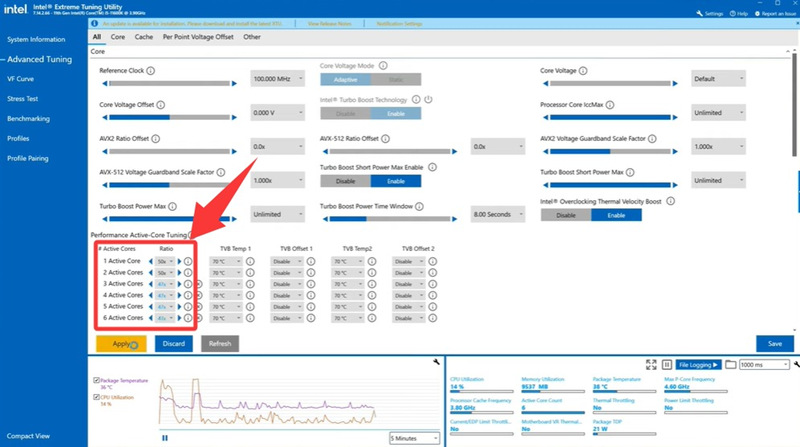
(Image from YouTuber: TechSolutionZ)
Step 4. Tune your Core Voltage.
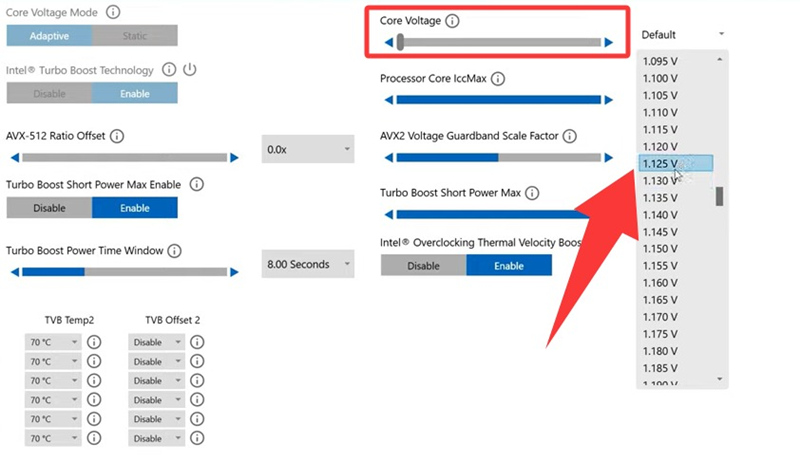
Step 5. Run a CPU stress test.
If you don’t have Ryzen Master, you can use a CPU Booster to configure the CPU without booting into the BIOS. The software is called Quick CPU.
Step 1. Download Quick CPU, software helping with overclocking the CPU and also monitoring CPU temperature.
Download URL: https://coderbag.com/product/quickcpu
Step 2. As the image below suggests, please do the same configuration.
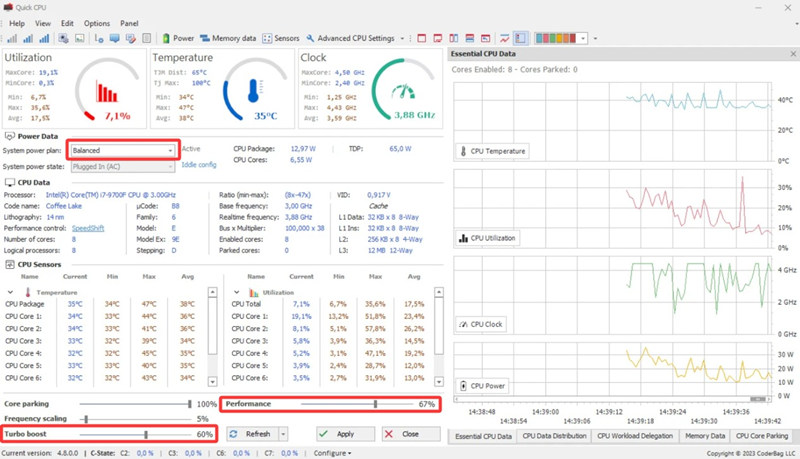
After configuration, the GHz can see an evident escalation from 2.59 GHz to 3.88 GHz.
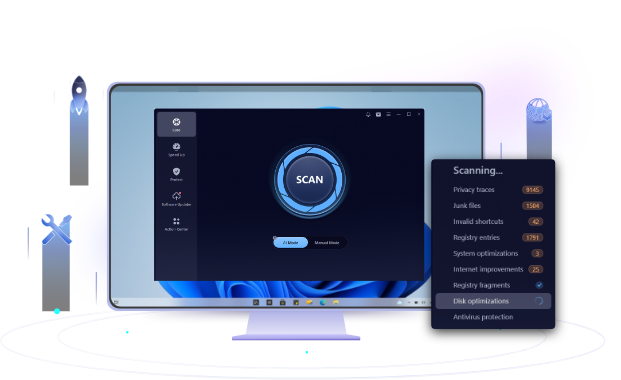
If your CPU is successfully boosted and you are worried about the downside of overriding your CPU, you can use a system optimizer to unburden your computer. Advanced SystemCare is an all-in-one PC optimizer that cleans unnecessary files, manages system resources, cleans RAM, and monitors PC temperature. Please use this free software to guard your computer and prevent further harm to your hardware.
How to overclock CPU? This blog shares all the popular methods you can find on the Internet. The BIOS ratio and voltage settings, the third-party CPU tool, and the dedicated CPU management tool developed by AMD and Intel. Please feel free to try them, and don’t forget to use a system care tool to unburden your computer and prevent further damage caused by an overclocked CPU.
 People Also Ask
PC stutters while gaming, watching videos, or using Windows? Check the quick fixes for overheating, driver issues, high CPU usage, RAM bottlenecks.
For those who forget their password and recovery key and fail to remove BitLocker encryption, this blog shares thoughts on how to unlock their hard drives.
PC bottleneck means some old components drag down your computer's performance. GPU, CPU, and PSU bottlenecks are common. This blog tells you what bottlenecks in PC are and how to fix them.