Security weaknesses do not affect only large companies. A home PC, office network, or public website can become exposed because of missing patches, outdated applications, unsafe settings, or services that should not be reachable. A vulnerability scanner free can help reveal these issues before attackers have a chance to exploit them.
However, scanning targets differ: a Windows maintenance utility checks a local PC, a network scanner examines hosts and ports, and a web security tool tests servers or applications. This guide compares five options so you can match the scanner to the asset you actually need to protect.

What is a Vulnerability Scanner & What Can It Detect?
Before comparing vulnerability scanner freewares, it is necessary to understand what a vulnerability scanner actually checks. A vulnerability scanner checks a system, application, network device, or website against known security tests. Depending on its scope, it may identify missing updates, obsolete software, exposed ports, risky services, weak server configurations, or application flaws.
A general PC health check can complement this process by reviewing maintenance and performance conditions, but it should not be confused with a security vulnerability scan. When comparing options for a vulnerability scan free download, first decide whether the target is one Windows PC, an IP network, a web server, or a web application.
Free Vulnerability Scanner Comparison
The table separates PC maintenance from technical network and web testing. A vulnerability scanner free edition is useful only when its scan target matches the asset you need to assess.
| Tool |
Best For |
Scan Target
|
Ease of Use |
Free Version |
| Advanced SystemCare |
Everyday Windows maintenance |
Windows PC |
Easy |
Free/Paid |
| Greenbone Community Edition |
Vulnerability management |
Hosts and networks |
Advanced |
Community edition |
| Nmap |
Discovery and security auditing |
Hosts, ports, services |
Intermediate |
Open source |
| Nikto |
Web-server checks |
Websites and web servers |
Intermediate |
Open source |
OWASP ZAP
|
Web application testing |
Web apps and APIs |
Intermediate |
Open source |
With these differences in mind, the following reviews explain what each tool can detect, who it suits, and where its limitations begin.
5 Best Free Vulnerability Scanner Tools to Keep Your PC Safe
1. Advanced SystemCare - Best for PC Security and System Health
Advanced SystemCare is a powerful and comprehensive Windows optimization suite. It helps reduce preventable exposure by patching Windows, identifying supported outdated applications, and clearing selected privacy traces. For everyday users searching for a vulnerability scanner free to use on a local Windows PC, its Care interface is more approachable than a technical network-testing platform.
Advanced SystemCare Free
- Clean: 420 billion traces removed & 85 EB junk files cleaned
- Protect: 80 million unauthorized access blocked & 20 million bugs fixed
- Speed Up: 6 million hours of startup time saved & Turbo boost
- Optimize: Auto clean and auto care your PC with AI mode

Why Advanced SystemCare is One of the Best Vulnerability Scanner Free:
Vulnerability Fix: Checks the PC for supported Windows security weaknesses, obtains applicable hot patches from Microsoft servers, and installs selected fixes.
Software Update: Detects supported outdated programs and helps users update them to newer versions.
Privacy Protection: Privacy Sweep finds and removes selected browser and application traces that may expose personal activity.
System Optimization: Reviews supported Windows settings, while the separate Junk File Clean module handles unnecessary data.
PC Maintenance: Combines routine cleaning, startup review, update checks, and optimization in one interface.
All-in-One Protection: Combines privacy, browser, and system protection features within a broader toolkit for everyday Windows maintenance and optimization.
Advanced SystemCare supports preventive maintenance rather than penetration testing. As a PC optimizer, it can also address cleanup and performance issues, but these tasks are separate from deep network or web security assessments.
For broader malware detection and real-time protection, IObit Malware Fighter can complement routine vulnerability prevention. It can identify security risks and potential weak points on your system, helping you detect threats that may compromise your PC’s security and take appropriate protective action.
Also Read: 4 Best Free Ad Blocker for Chrome (No Pop-Ups, No Malware) >>
2. OpenVAS / Greenbone Community Edition - Best for Advanced Open-Source Scanning
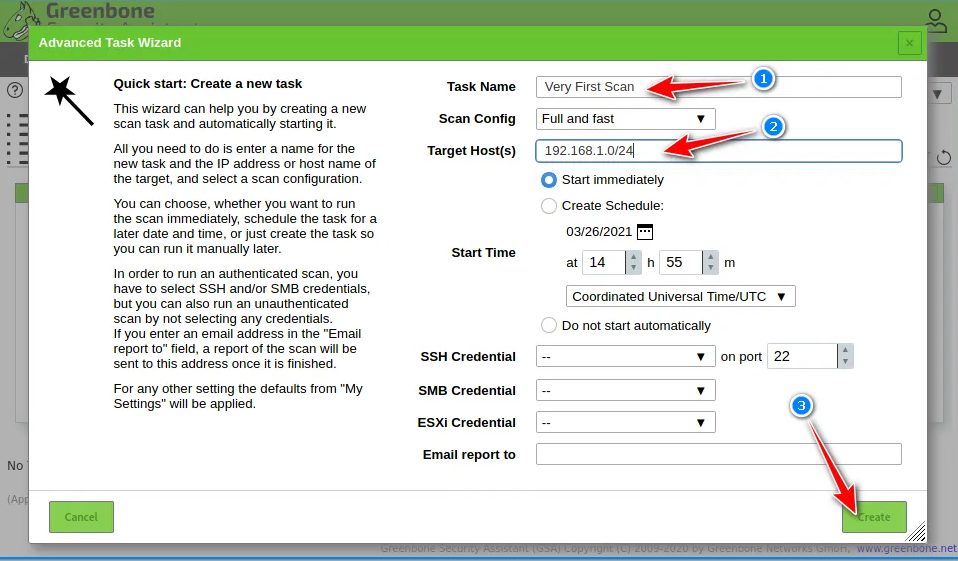
Greenbone Community Edition is a free, open-source vulnerability scanner that checks computers and networked devices for known security vulnerabilities. It uses OpenVAS to scan reachable hosts and services, then provides reports to help you understand potential security risks.
It’s a powerful option for users who need detailed vulnerability scanning, but it can be complicated to set up and maintain. If you’re looking for a vulnerability scanner free solution and have some technical experience with Linux, containers, and security tools, Greenbone Community Edition is worth considering.
3. Nmap - Best for Network and Port Security Scanning
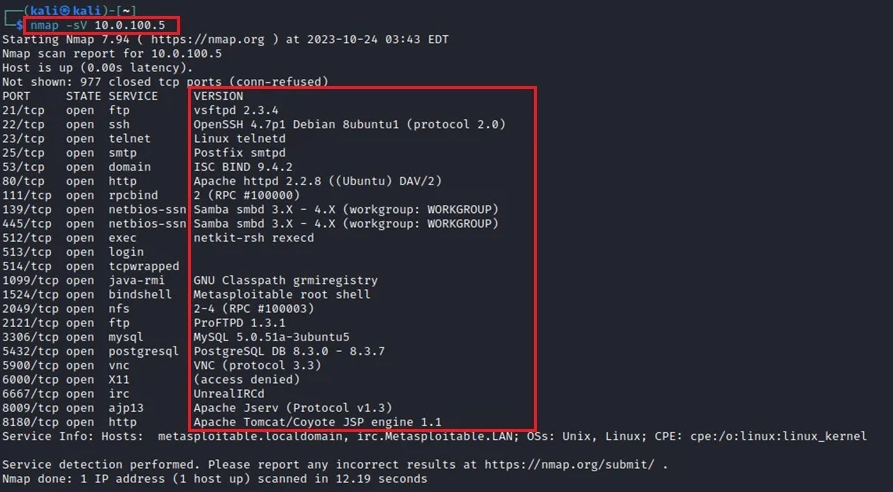
Nmap is a free network security tool that scans computers and networks to find active devices, open ports, and running services. It helps you identify unexpected or potentially risky services that could leave a system exposed to security threats.
Nmap does not fix vulnerabilities or install patches itself. Instead, it gives you useful information about your network’s security status, making it a good choice for users who want a vulnerability scanner free tool for basic security auditing and network discovery.
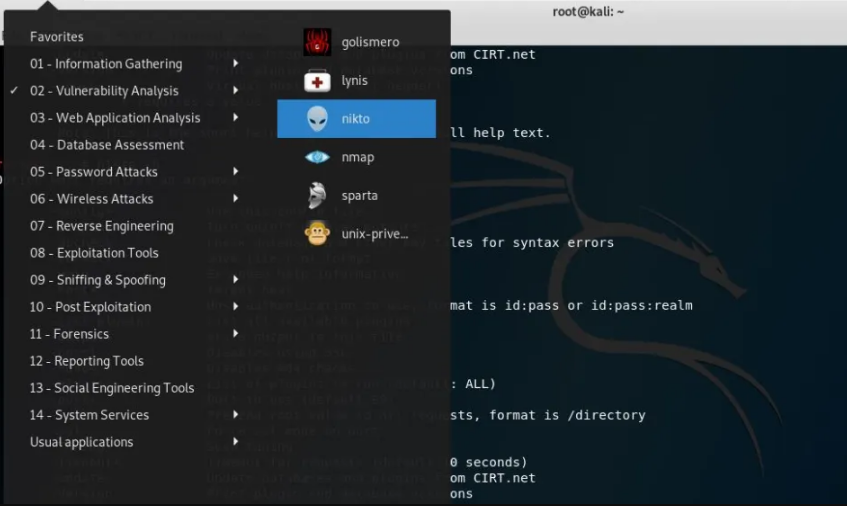
4.Nikto - Best Free Vulnerability Scanner for Websites and Web Servers
Nikto is a free, open-source web server scanner that checks websites and servers for potential security issues, such as outdated components, risky files, and common configuration problems. It is mainly designed for scanning web-server infrastructure rather than a local Windows PC.
For users looking for a vulnerability scanner free tool for website security testing, Nikto provides a simple command-line way to identify potential weaknesses. However, its results should be reviewed carefully, and you should only scan websites or servers you have permission to test.
5. OWASP ZAP - Best for Web Application Security Testing
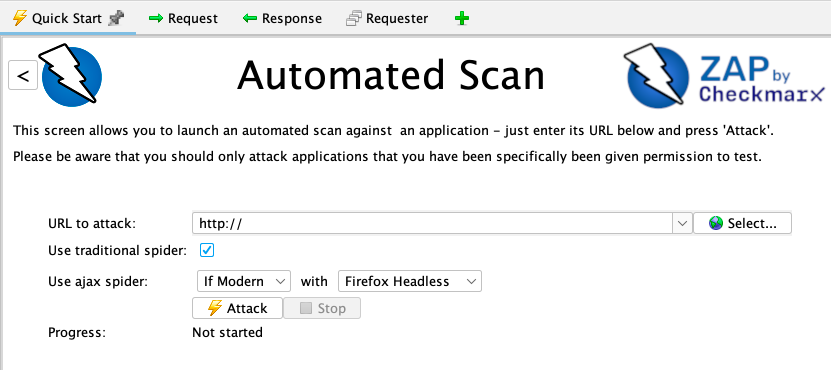
OWASP ZAP is a free, open-source web application scanner that checks websites for potential security vulnerabilities. It can passively analyze web traffic or actively test applications to uncover weaknesses, while also offering tools for manual testing and automated scans.
For users looking for a vulnerability scanner free tool for website security, ZAP is useful for developers, testers, and site owners who need more detailed web application testing. Active scans should only be performed on websites you have permission to test.
How to Perform a Vulnerability Scan Free on Windows
The tools above cover different security needs: Greenbone and Nmap focus more on network and system discovery, while Nikto and OWASP ZAP are designed mainly for web-server and web-application security testing. If you simply need a vulnerability scanner for everyday PC use without complicated configuration or technical setup, Advanced SystemCare offers a simpler approach. It can automatically scan your computer for security vulnerabilities, download the required patches, and install them to help keep your Windows system protected.
How to scan PC vulnerability with Advanced SystemCare:
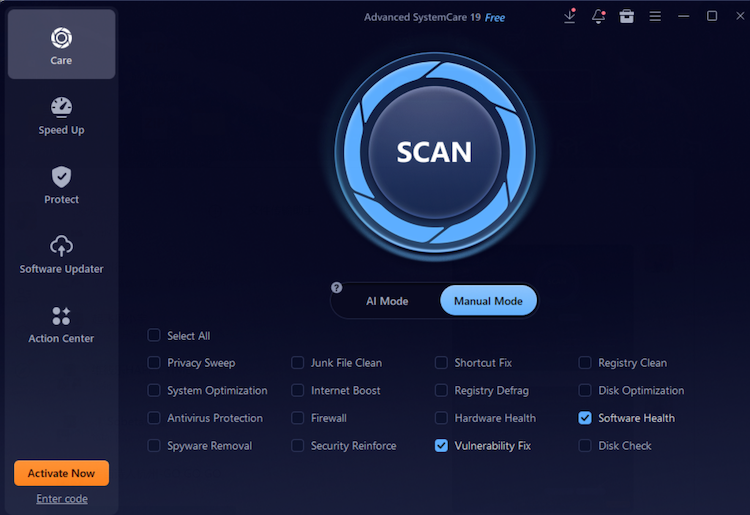
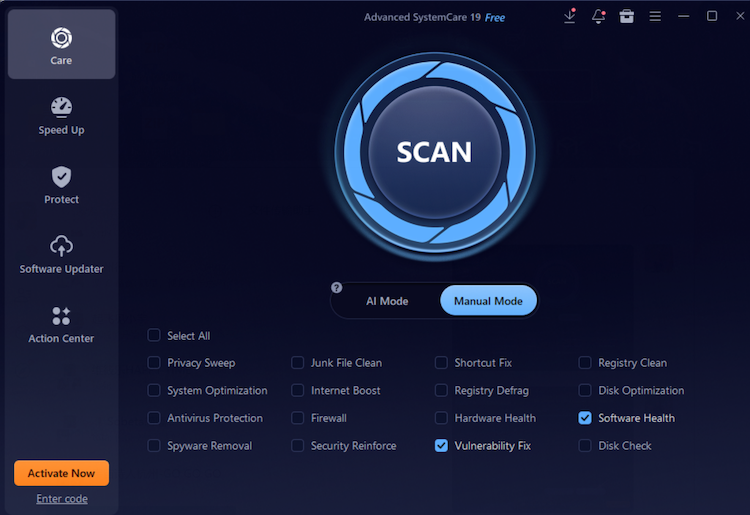
Step 1. Download and install Advanced SystemCare, open Care, and select Manual Mode.
Step 2. Select Vulnerability Fix. Optionally add Software Health to check for supported outdated programs, then click Scan.
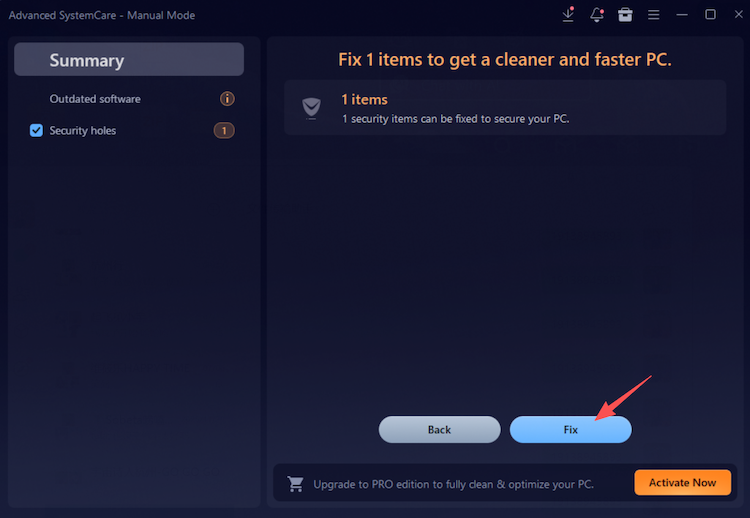
Step 3. Review detected vulnerabilities and optional software recommendations. Apply only the chosen fixes and restart Windows if required.
This vulnerability scanner free workflow supports routine Windows maintenance rather than deep security testing. A hard disk cleaner may remove unnecessary files and recover storage space, but it does not detect security vulnerabilities. Use a dedicated scanner when you need a deeper network, server, or web application assessment.
Choose the Best Vulnerability Scanner Freeware That Suits You Most
For users searching “vulnerability scanner free,” the deciding factors should be target and skill level. First, confirm that security is the actual problem you need to solve. If the main issue is high memory usage or slow multitasking, a RAM optimizer Windows 11 may be more relevant, although it cannot replace vulnerability scanning. For routine Windows patch and maintenance checks, Advanced SystemCare offers the easiest workflow.
Greenbone is better for managed network assessments and reporting; Nmap maps hosts, ports, and services; Nikto checks web-server exposure; and ZAP tests web application behavior. Before running any scanner, define the authorized scope, update its checks or feeds, and plan how findings will be verified and fixed.
Final Words
The 5 tools in this guide cover different layers, from Windows maintenance to network discovery and web application testing. For home users who want an accessible vulnerability scanner free workflow alongside cleanup, privacy, and optimization features, download Advanced SystemCare from IObit and begin with Manual Mode. Review every finding, keep backups, and use a dedicated network or web scanner whenever the assessment extends beyond one PC.