

- Support Center
- Multiple Languages
- Language
- Help Us Translate
Expert in
PC Health Solution

All-in-one PC health solution: clean, optimize and secure

Comprehensive PC cleaning, optimization and protection

Keep drivers always up-to-date

More stable performance with less system crashes

Protect millions of computers against malware

Top computer security with full-round protection

Protect against viruses & boost PC performance
Complete forced uninstallation for stubborn programs.
Uninstall a batch of programs at once.
Scan and remove leftover files, folders, and registry entries.
Support the management of Universal Windows Platform apps.

Is IObit Uninstaller safe? Can you trust it? Learn about its main features, bundleware risks, safe installation tips, and alternatives before installing it.



Whether IObit Uninstaller is safe to use.
Why Windows Security may flag IObit Uninstaller and what you should do.
Whether IObit Uninstaller poses bundleware, adware, or unwanted software concerns.
Precautions to download, install, and use IObit Uninstaller more safely.
Pros and cons of IObit Uninstaller and alternative uninstallers worth considering.
Search online for the best uninstallers, and you'll often find IObit Uninstaller among the top results. However, despite receiving a 4.6 out of 5 rating from over 2,400 customer reviews on Trustpilot, some users on Reddit still ask, “Is IObit Uninstaller safe?” Let's explore the concerns and what you should know before using it.
Yes. IObit Uninstaller itself is a safe and legitimate utility tool, provided you download it directly from the official IObit website. It is designed to remove unwanted programs, brows
er extensions, and leftover files. Major technology publications like PCMag and TechRadar have praised it favorably for its ease of use and powerful uninstall features. However, no software is entirely risk-free; it is always prudent to verify any security warnings you might encounter.

The installer offers additional IObit products or promotional extras. These are optional, but you could accept them accidentally if you click through the setup too quickly. To avoid unwanted installations, read each setup screen carefully and decline any additional software you don't need.
It’s also important to distinguish these concerns from claims that the program itself contains malware: bundleware refers to extra applications offered alongside the main program, whereas ads and promotional offers are separate issues.
Another concern raised by IObit Uninstaller Reddit users is that some versions have triggered Windows Security alerts, including a generic detection labeled Trojan:Win32/Malgent!MSR. Labels like that are usually heuristic, meaning the antivirus is flagging suspicious activity instead of a confirmed threat. As uninstallers need deep system access to delete files and registry entries, their actions can resemble malicious activity, so false positives are possible.
If you encounter this warning:
Check where the file came from. If it wasn’t the official site, delete it.
Download the latest version from the official site and reinstall.
Upload the installer to VirusTotal and review the results across multiple engines.
Update your Windows Security definitions and run a new scan.
If a detection persists on a fresh official download, contact IObit support for assistance.
Follow these precautions to reduce potential risks:
Download from the official IObit site or click the button provided below.
Review installation options and decline any unwanted extras.
Keep Windows Security or another reputable antivirus enabled.
Select the option to create a restore point before deleting programs.
Avoid uninstalling items you don’t recognize, especially system components or security software.
Review the results before deleting them.
IObit Uninstaller is a good fit for those who want deep cleanup and batch uninstall in one click, with core features available for free. Its clean interface handles stubborn programs, Windows apps, and browser plugins. If you prefer other options, check Revo Uninstaller or Geek Uninstaller for features, pricing, and installation practices.
Pros: Free core uninstall features, batch uninstall, stubborn programs force uninstall, leftover file cleanup, browser plugin removal, software relocation, bloatware removal, hunter mode.
Cons: Optional promotional offers during installation, potential bundled software, and some advanced features reserved for the Pro version.
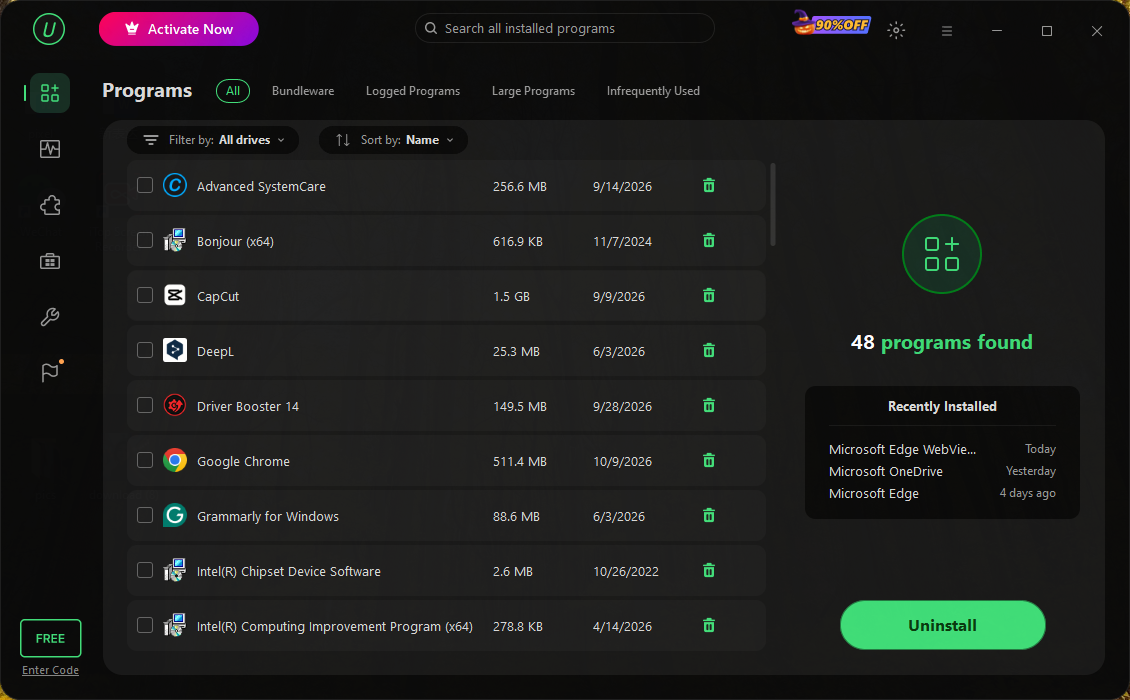
Is IObit Uninstaller good? For most people, yes—as long as you download it from the official website and pay attention during setup. Overall, it’s worth considering if you want thorough leftover cleanup and convenient batch uninstallation. The straightforward interface also makes it a practical choice for beginners who lack the time or technical knowledge to remove programs and their remnants manually.
 People Also Ask
Is IObit legit? This IObit review checks whether IObit Windows PC tools are legit and safe. Explore its popular utilities and common user concerns about the software.
Free up disk space by safe Windows Installer folder cleanup. This guide shows how to use Settings, Disk Cleanup, etc., to remove unwanted installer files.
Learn what bloatware is, why devices come with it, common examples, and how to safely remove unnecessary apps to free up storage and improve performance.