

- Support Center
- Multiple Languages
- Language
- Help Us Translate
Expert in
PC Health Solution

All-in-one PC health solution: clean, optimize and secure

Comprehensive PC cleaning, optimization and protection

Keep drivers always up-to-date

More stable performance with less system crashes

Protect millions of computers against malware

Top computer security with full-round protection

Protect against viruses & boost PC performance
Complete forced uninstallation for stubborn programs.
Uninstall a batch of programs at once.
Scan and remove leftover files, folders, and registry entries.
Support the management of Universal Windows Platform apps.

Learn how to disable pop up blocker in Chrome on Windows, Mac, and mobile. Disable all pop-up blockers or allow pop-ups only for trusted websites.



Steps to disable pop up blocker in Chrome on Windows, Mac, or Chromebook.
Steps to turn off pop up blocker in Google Chrome on Android/iPhone.
The safest way is to remove pop up blocker Google only for trusted sites.
Use IObit Uninstaller to remove unwanted programs that cause annoying pop-ups.
If a trusted website isn't opening a login window, payment page, or download dialog, Chrome's pop-up blocker may be preventing it. Fortunately, it's easy to adjust the settings. Here's how to disable pop up blocker in Chrome in just a few steps.
If you need pop-ups to work everywhere, here’s how to disable the blocker entirely:
1. Open Google Chrome.
2. Click the three-dot menu in the upper-right corner and select Settings.
3. Go to Privacy and security > Site settings.
4. Scroll down and click Pop-ups and redirects.
5. Select Sites can send pop-ups and use redirects to disable Chrome's pop-up blocker.
1. Open the Chrome app.
2. Tap the three-dot menu > Settings.
3. Go to Site settings > Pop-ups and redirects.
4. Turn the toggle on to allow pop-ups.
Only allow pop-ups from websites you trust. Unwanted pop-ups can sometimes contain misleading ads or malicious content. If you only need pop-ups for a specific website, it's safer to leave the blocker enabled and add that site to the Allowed to send pop-ups and use redirects list instead.
Turning off the blocker entirely leaves you exposed to malicious ads and phishing attempts. A safer approach is to whitelist only the sites you trust.
1. Scroll down to the “Allowed to send pop-ups and use redirects” section. Click Add.
2. Enter the website address (e.g., xxx.com) and click Add again.
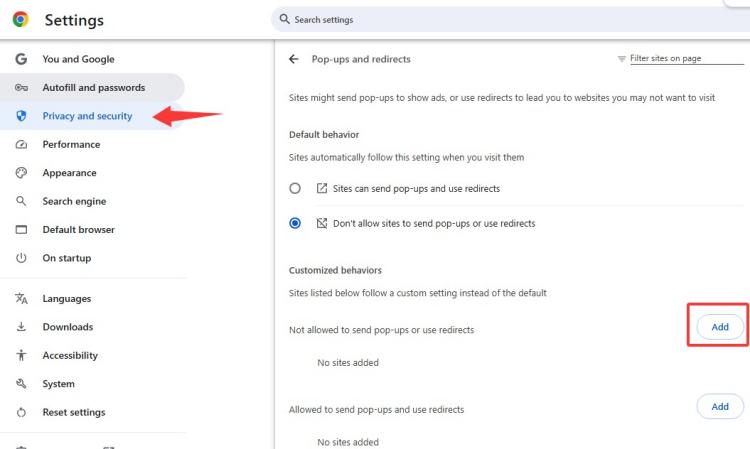
3. Now that specific site can show pop-ups, while Chrome continues blocking them everywhere else.
If you're seeing excessive pop-ups even outside your browser, the issue may be caused by unwanted software installed on your PC. IObit Uninstaller can help by thoroughly removing stubborn applications, browser toolbars, and bundled programs that Windows' default uninstaller often leaves behind. It also scans for leftover files and registry entries after uninstallation, helping keep your system clean and Windows installer folder cleanup, reducing the chance of unwanted pop-up behavior caused by residual software.

Completely blocking pop-ups might interfere with your online activities. If you want to disable pop up blocker in Chrome, it is recommended to allow pop-ups from specific websites.
 People Also Ask
Check how to uninstall Claude Code and details both the manual terminal commands and a free uninstaller tool to cleanly remove it from your system.
Stuck with the “This app can’t run on your PC” error? Learn quick fixes, compatibility settings, and advanced ways to make programs run smoothly on Windows.
Why is Windows Defender not turning off? How to remove and uninstall Windows Defender on Windows 11? Can I disable Windows Defender permanently?