Google Chrome remains the most popular browser across the globe, yet it eats up system resources faster than almost any other browser. Over weeks of daily use, Chrome accumulates gigabytes of cached files, residual cookies, and browsing traces that drag down your PC speed. Even worse, lingering advertising trackers continuously monitor your personal web activity. Running the best cleaner for Chrome fixes this by clearing out that digital buildup and restoring your browsing speed. Here is how the top five tools compare
Part 1. Why You Need a Web Browser Cleaner?
Every time you open tabs, stream media, or log into websites, Chrome quietly stores large amounts of data. This includes temporary cache images, session cookies, download records, autofill forms, and leftover extension data. Over time, these redundant files consume local drive space, stall page loading times, and compromise your privacy through persistent cross-site tracking scripts.
While Google Chrome includes a default clearing utility, it has obvious limitations. Chrome's built-in feature requires manual selection each time, misses deeply buried extension leftovers, and cannot schedule background cleanups. Choosing a dedicated web browser cleaner provides thorough, automated maintenance that wipes residual clutter in seconds without breaking your vital logins.
Part 2. What Is a Good Chrome Cleaner?
When selecting a browser cleaner for Chrome, you should not settle for a basic tool that only empties your browsing history. Learning what is a good Chrome cleaner means evaluating specific performance and security standards before making a choice:
Dedicated Chrome Cleaning: The utility must target Chrome's specialized storage directories, including deep cache, expired cookies, download logs, and leftover extension databases.
Granular Privacy Protection: You should be able to whitelist favorite websites so you do not lose important login sessions while wiping intrusive tracking scripts.
Multiple-Browser Coverage: A good web browser cleaner supports older and newer Chrome builds, alongside Chromium derivatives, Mozilla Firefox, Microsoft Edge, and Opera.
System-Wide Optimization: In addition to web cleanups, the tool should show you how to clean junk file in PC to free up system drive storage and free up RAM.
Intuitive Ease of Use: The interface must be straightforward, presenting transparent scan summaries before permanently deleting files.
Free to Start: Reliable software provides robust free cleanup functions so users can test core features before considering an upgrade to a paid version.
Once you understand what is a good Chrome cleaner, finding the best cleaner for Chrome becomes much simpler.
Part 3. Best Cleaner for Chrome: Top 5 Picks
To help you choose the right tool, we tested the most reliable cleaners available. Explore our detailed reviews below to find the best cleaner for Chrome tailored to your daily workflow.
-1. Advanced SystemCare: Best Overall Cleaner for Chrome
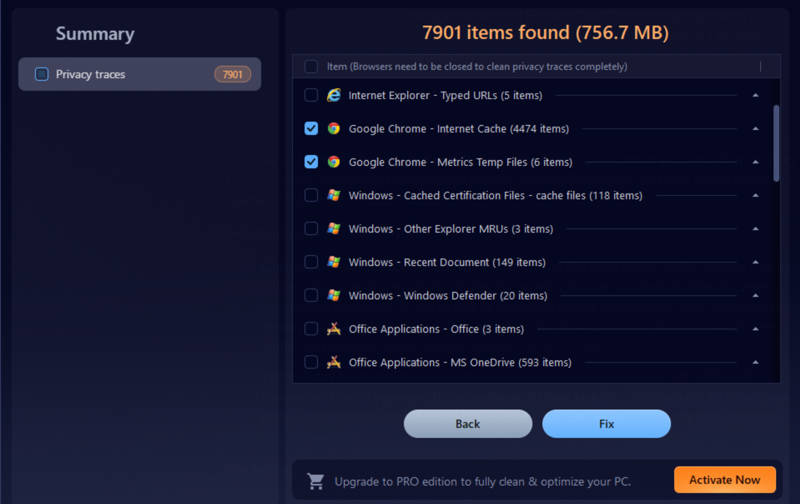
Advanced SystemCare is our top pick for the best Google Chrome cleaner because it handles both browser clutter and overall Windows performance in one run. It features a specialized Privacy Sweep module that targets Google Chrome cache, history, stored database entries, and temporary surfing files. At the same time, it repairs invalid registry items, optimizes internet bandwidth, and strips out clutter that slows down your operating system.
Key Features of Advanced SystemCare:
Deep Chrome Privacy Sweep: Erases Chrome browsing history, cache, download logs, and tracking cookies alongside traces from Microsoft Edge and Mozilla Firefox. It functions as an effective browser history cleaner without leaving personal tracks behind.
Multi-Browser Cleanup: Cleans all mainstream web browsers concurrently in one automated pass, keeping passwords secure while removing redundant session baggage.
AI-Powered System Optimization: Employs intelligent algorithms to detect junk files, residual logs, and RAM bottlenecks to maintain peak computer responsiveness.
Automatic Smart Care: Runs silent scheduled maintenance in the background, automatically cleaning browser junk as soon as Google Chrome closes.
All-in-One PC Care: Delivers real-time spyware defense, disk defragmentation, startup acceleration, and internet speed boosting alongside routine browser care.
Pros
Offers free Auto Clean to automatically clear Chrome cache and cookies upon closing the browser, a feature most competitors lock behind paid upgrades.
One-click scanning wipes Chrome junk and system bloatware together.
Privacy Sweep lets you select precisely which Chrome elements to wipe or retain.
Clean, beginner-friendly interface with detailed scan metrics.
Cons
Advanced automated background scheduling requires the Pro edition.
The extensive feature set may provide more tools than users wanting only a standalone browser addon require.
-2. CCleaner: Best Lightweight Browser Cleanup
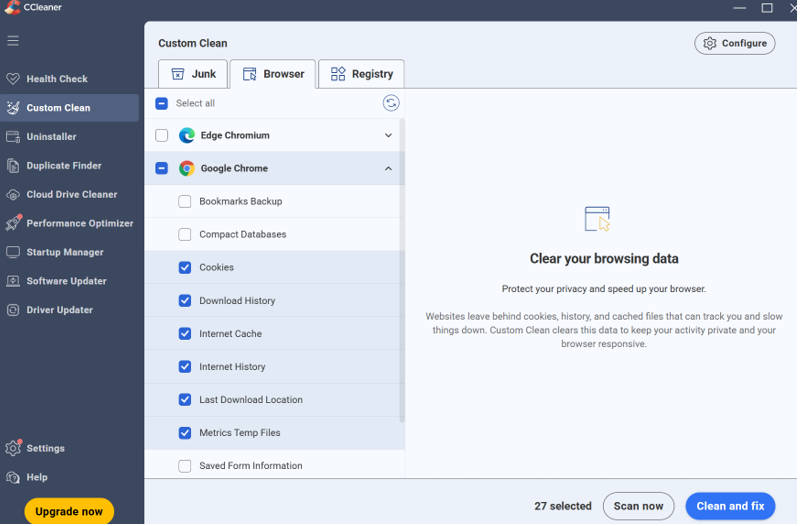
CCleaner is a long-standing browser cleaner for Chrome known for its lightweight footprint and modular selection sliders. It allows users to pinpoint exact browser sections to remove, such as indexed databases, compact caches, and autofill values.
Key Features of CCleaner:
Custom Clean Options: Lets you toggle individual Chrome items, including internet cache, download history, and session tokens.
Cookie Management Whitelist: Allows you to preserve essential login cookies while flushing third-party marketing identifiers.
Software Updater: Alerts you when Google Chrome or installed desktop software needs security patches.
Pros
Fast scanning speed with minimal system resource consumption.
Great control over preserving persistent site logins.
Familiar, easy-to-navigate layout.
Cons
The free version includes frequent upgrade notifications.
Bundled software prompts during setup require careful attention during installation.
Automated background cleaning on browser close is locked behind the paid version.
-3. Avast Browser Cleaner: Best Browser-Focused Maintenance
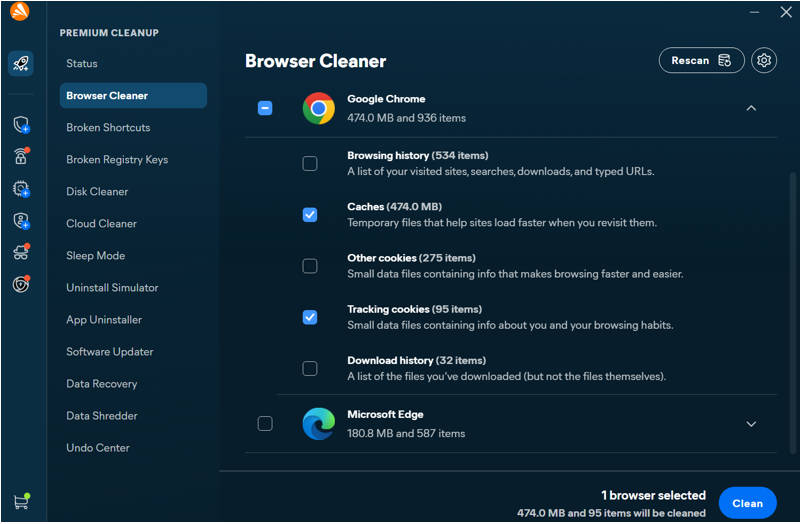
Integrated inside the Avast One security suite, Avast Browser Cleaner focuses strictly on security-driven browser decluttering. It targets privacy-compromising cookies, tracking logs, and low-reputation Chrome extensions that might compromise your device.
Key Features of Avast Browser Cleaner:
Bad Extension Removal: Identifies and disables malicious, hijacked, or suspicious Chrome add-ons.
Integrated Privacy Shield: Cleans tracking cookies and prevents digital fingerprinting attempts.
One-Click Maintenance: Runs rapid cleans across all detected desktop browsers simultaneously.
Pros
Backed by strong cybersecurity threat definitions.
Excellent detection of harmful or unwanted browser extensions.
Modern, sleek user interface.
Cons
Cannot be installed as a separate utility; requires downloading the wider Avast One suite.
Limited deep-cleaning options for Chrome power users.
Scheduled automatic browser cleanups require an active paid subscription to Avast One.
-4. Ashampoo WinOptimizer: Best for Multi-Browser Cleanup
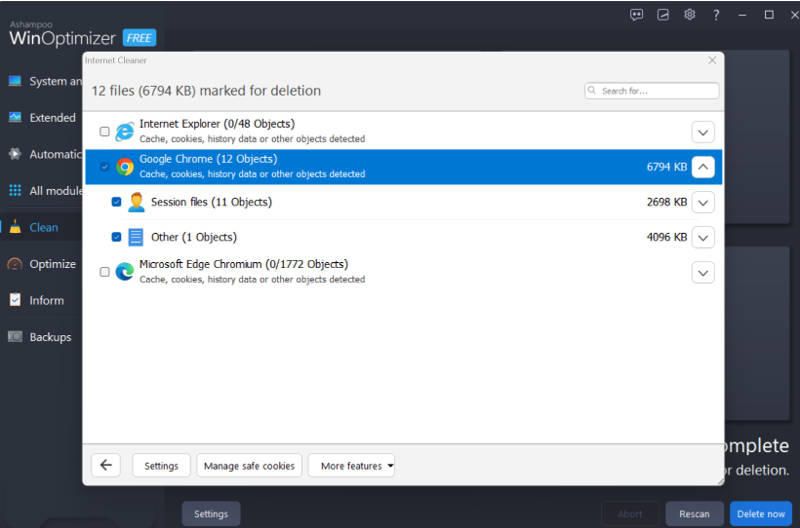
Ashampoo WinOptimizer is a feature-rich Windows suite equipped with a dedicated Internet Cleaner module. It excels at managing multiple browser profiles, clearing junk caches, and resolving file conflicts across different installations.
Key Features of Ashampoo WinOptimizer:
Dedicated Internet Cleaner: Specifically hunts down browser cache files, local shared objects, and tracking scripts.
Multi-Profile Support: Easily cleans secondary Google Chrome profiles without disrupting main configurations.
Live Tuner: Allocates CPU resources dynamically to active applications like Chrome to reduce stutter.
Pros
Outstanding multi-profile cleaning capabilities for shared computers.
Rich diagnostic data explaining the exact purpose of detected junk.
Solid automated maintenance routines.
Cons
The interface can feel overwhelming for beginners.
Full access to deep cleanup algorithms requires purchasing a license key.
Requires mandatory account registration and an email address even to use the free version.
-5. BleachBit: Best Free and Open-Source Browser Cleaner
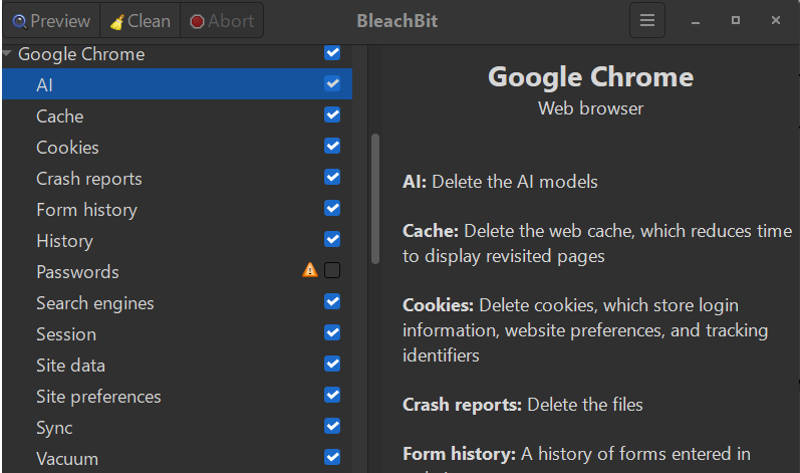
BleachBit is an open-source system and browser scrubber designed for users focused strictly on privacy. It performs shredded file deletions, ensuring that Chrome cache, SQL database entries, and history logs cannot be recovered by forensic software.
 Key Features of BleachBit:
Direct Database Vacuuming: Shrinks Chrome SQLite database files to boost browser launch times without deleting settings.
File Shredding: Permanently destroys sensitive download records and session tokens.
100% Free Architecture: Free of advertising, upsells, or commercial telemetry tracking.
Pros
Completely free and open-source software.
SQLite vacuum feature noticeably speeds up slow Chrome installations.
Lightweight installation package with no promotional background services.
Cons
Utilitarian user interface with no graphical dashboards.
Lacks automated background maintenance or whitelist safeguards for beginners.
Deletions made through its shredding and deep-clean engine are permanent and cannot be undone.
Part 4. Quick Comparison: Best Cleaner for Chrome at a Glance
Review this breakdown to compare how each top contender manages Google Chrome maintenance and overall system health:
Tool |
Chrome Cleaning Focus |
Main Features |
Best For |
Advanced SystemCare |
Deep privacy sweep, cache, cookies, password security |
AI-driven optimization, system junk cleaner, auto care |
Users seeking all-around PC speed and browser cleanup |
CCleaner |
Custom Chrome cache, cookies, session databases |
Cookie whitelist, registry tool, app uninstaller |
Users wanting granular manual control over browser data |
Avast Browser Cleaner |
Risky extension removal, tracking cookie wipe |
Antivirus integration, privacy protection, quick clean |
Users wanting integrated cybersecurity and add-on audits |
Ashampoo WinOptimizer |
Multi-browser profile caches, browsing histories |
System diagnostics, process manager, live performance tuning |
Multi-profile Chrome users and heavy PC multitasking |
BleachBit |
Database vacuuming, irreversible file shredding |
Open-source engine, zero tracking, secure file wipe |
Privacy enthusiasts and budget-conscious technical users |
Part 5: How to Clean Chrome with a Cleaner for Chrome
Follow this step-by-step tutorial on how to clean Chrome cache, cookies, and privacy records using Advanced SystemCare:
Step 1. Download Advanced SystemCare and install it.
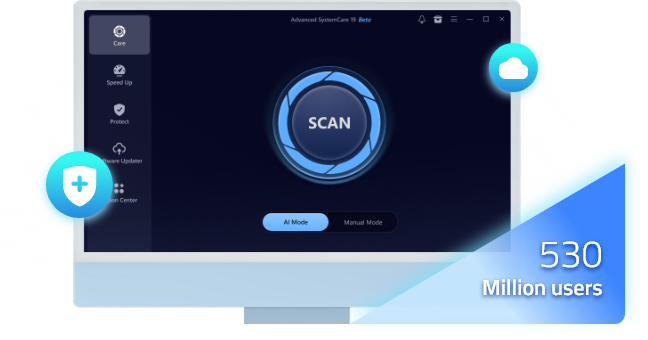
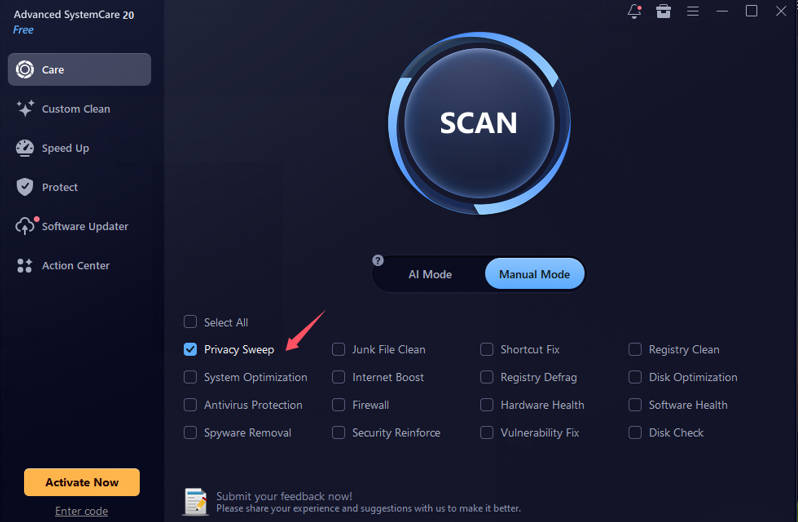
Step 2. Choose Privacy Sweep in the Main Menu: Open Advanced SystemCare on your computer, navigate to the Care screen, and check the Privacy Sweep module to prepare your scan.
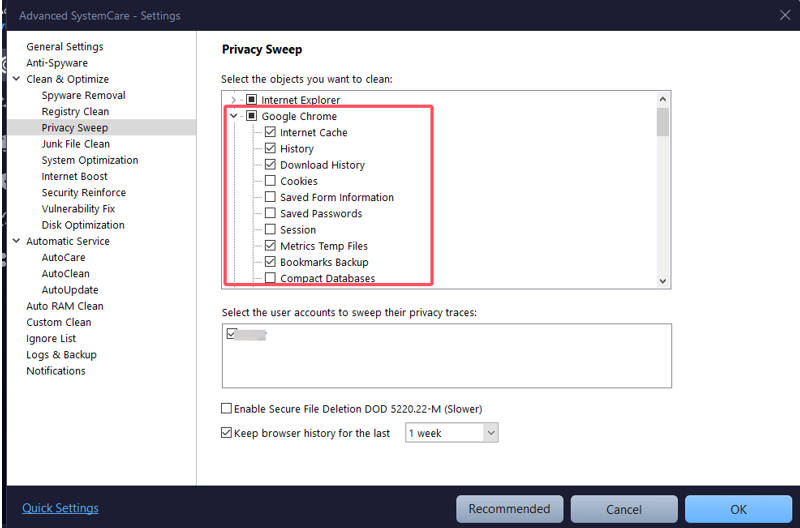
 Step 3. Customize Google Chrome Cleaning Options: Hover over Privacy Sweep and click the gear icon to open Settings. Select Google Chrome under the Browsers list to mark Internet Cache, History, and Download History and click OK.
Note. You can also specify whitelist rules so everyday cookies delete Chrome tasks purge marketing trackers without logging you out of favored sites.
Step 4. Scan and Remove Chrome Clutter: Return to the main screen, click the Scan button to locate junk files, and click Fix to finish the purge.
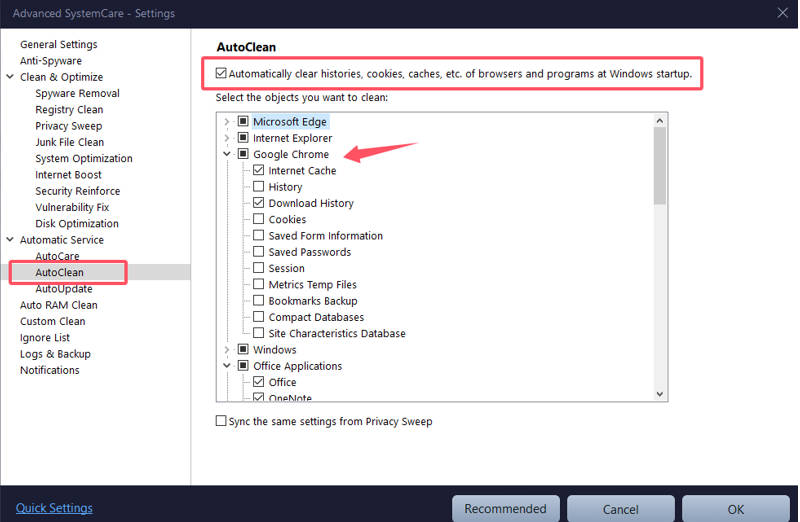
Step 5. Turn On Auto Clean for Continuous Maintenance: Click the Options menu icon in the top-right corner of the window and select Settings. Locate the Auto Clean section, check the box to enable automatic cleaning for your browser, and click OK to save your changes.
Part 6. FAQs About Best Cleaner for Chrome
1. What is the best cleaner for Chrome?
Advanced SystemCare is the top choice because it combines deep Chrome privacy cleaning with full system decluttering.
2. What is the best cookie cleaner for Chrome?
The best cookie cleaner for Chrome supports whitelist protection, like Advanced SystemCare, deleting tracking cookies while preserving essential site logins.
3. Will using a cleaner delete my saved Chrome passwords?
No. Reliable cleaners keep passwords and bookmarks safe by default unless you manually select them.
4. How often should I clean my Google Chrome browser?
Once a week is ideal for most users, while heavy browsing benefits from scheduled cleanups every few days.
5. Is a third-party browser cleaner better than Chrome's built-in tool?
Yes. Dedicated tools remove hidden tracking traces, compact databases, and clean multiple browsers simultaneously.
Final Thought
A cluttered browser causes slow page loading, crashes, and privacy risks. Regular maintenance with the best cleaner for Chrome keeps your browser responsive and clean. IObit Advanced SystemCare offers the perfect balance of deep Chrome cleanup and total PC optimization. Download Advanced SystemCare today to enjoy a faster, smoother web experience.
Advanced SystemCare Free
- Clean: 420 billion traces removed & 85 EB junk files cleaned
- Protect: 80 million unauthorized access blocked & 20 million bugs fixed
- Speed Up: 6 million hours of startup time saved & Turbo boost
- Optimize: Auto clean and auto care your PC with AI mode