- Support Center
- Multiple Languages
- Language
- Help Us Translate
Expert in
PC Health Solution

All-in-one PC health solution: clean, optimize and secure

Comprehensive PC cleaning, optimization and protection

Keep drivers always up-to-date

More stable performance with less system crashes

Protect millions of computers against malware

Top computer security with full-round protection

Protect against viruses & boost PC performance
Clean: 420 billion traces removed & 85 EB junk files cleaned
Protect: 80 million unauthorized access blocked & 20 million bugs fixed
Speed Up: 6 million hours of startup time saved & Turbo boost
Optimize: Auto clean and auto care your PC with AI mode

Learn how long Dell and Lenovo laptop batteries typically last in a day, how to test battery runtime, and simple ways to extend battery lifespan.



Dell and Lenovo Laptop Battery Lifespan
How Long Does a Laptop Battery Last in a Day
Online Test to Know How Long Can Laptop Battery Last
Laptop Battery Replacement Tips
How to Extend Your Laptop Battery Lifespan
Many bought new laptops and are curious about how long can laptop battery last without charging. And this blog lets you know the daily battery last time and overall lifespan of Dell and Lenovo. You will see a free online tool that tests your battery and tells you how long your battery drains/how long your battery charges fully.
When you buy a new laptop, you want to know the average battery life hours. Actually, no matter whether you bought a Dell laptop or Lenovo laptop, the Dell laptop battery life hours/HP laptop battery life hours is basically the same due to the lithium-ion or lithium-polymer battery chemistry.
Healthy battery usage habits: 5 Years Lifespan.
Good daily battery habits seem tiny but can hugely influence the lifespan of your battery. Here are some easy tricks you can use to maintain a healthy battery.
Keep the battery between 20% and 80% when practical.
Avoid frequent deep discharges to 0%.
Keep your laptop cool and avoid excessive heat.
Use the original charger or a reliable compatible charger.
Bad battery usage habits: 2-year lifespan.
Laptop battery life hours are easily shortened under heavy daily usage. Here are some classic wrongdoings that can damage your laptop battery.
Frequently draining the battery to 0%.
Keeping the battery at 100% for long periods in high temperatures.
Using the laptop in excessive heat.
Using cheap or incompatible chargers.
Repeatedly charging and discharging the battery unnecessarily.
What happens when your battery is old?
When your laptop has been working for years, the battery's sustainability is no longer the same as it was when it was bought that day. You can observe these things below:
Your battery drains much faster, and your laptop needs more charge cycles each day.
Your laptop starts to shut down unexpectedly.
The battery cannot be charged.
The battery health warning is reported.
How long should laptop battery last fully charged Lenovo/Dell?
For new laptops, especially Dell and Lenovo laptops, one full charge can sustain around 6+ hours. This is an average number of basic office jobs (8-10 hours) and system-intensive gaming (2-6 hours).
And the different types of laptops have different battery capacities. Gaming laptops’ battery level reduces 3 times faster than office laptops. And for old laptops, the situation could be worse.
If you want to know the exact drain time/fully charge time, you can visit an online battery test website to get quick results. IObit Online Battery Test is a 100% free and green tool to estimate ‘time to drain’, ‘time to full charge’, and whether your laptop is charging or not.
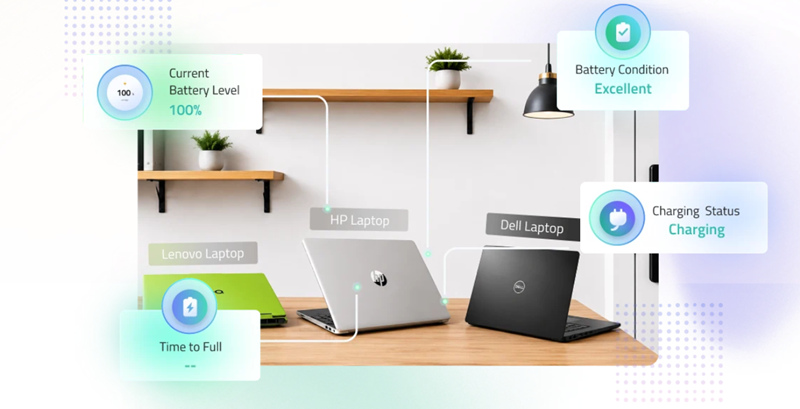
How to Test Laptop Battery Life on a Full Charge
Step 1. Navigate to IObit Laptop Battery Test. This website is an automatic tester; there is no need to submit your laptop metrics, and you can see the exact time to drain or time to full charge.
Step 2. Unplug your laptop charger and check the ‘Estimated Time to Empty.’
Step 3. Match your results with the Reference Time to Drain Data.
Consider replacing your laptop battery when its health drops below 80%, battery life becomes significantly shorter, or the battery shows signs of swelling or damage.
Signs that you need to replace your laptop battery:
Battery health drops below 80%
Battery life becomes significantly shorter than before & the battery drains unusually fast
The laptop shuts down unexpectedly
The battery level cannot reach 100%
Full charging takes much longer
The laptop only works reliably when plugged in (When unplugged, the laptop becomes choppy)
The battery overheats and swells
How to replace your laptop battery?
Laptop battery replacement procedures vary by model. Always follow the manufacturer's service instructions for your specific laptop. It is not recommended to replace laptop batteries yourself unless you are comfortable with laptop hardware.
The wise choice is:
Contact the laptop manufacturer's service center — Dell and Lenovo users can check the official support website for authorized repair options.
Search for a reputable local computer repair shop — Look for shops with good reviews and experience with laptop battery replacement.
To maximize your laptop battery's lifespan, not only do you need to keep good habits in daily use; extra laptop maintenance is necessary too. Here are some tips for those who wish to extend the lifespan of their new laptops.
Keep the battery between 20% and 80% when possible instead of frequently draining it to 0%.
Don't leave the laptop in extreme temperatures, especially in hot cars or direct sunlight.
Use the original or a compatible charger to ensure safe and stable charging.
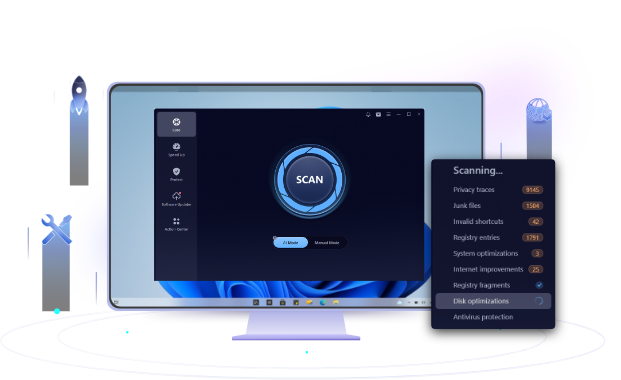
Don’t make your laptop run under heavy workload; use a PC optimization tool to unburden your laptop, clean unnecessary files, and manage system resources in a reasonable way.
Avoid frequent full discharge cycles. You don't need to drain the battery completely before recharging.
Use battery-saving settings such as lower screen brightness and Windows Battery Saver when you don't need maximum performance.
Keep Windows and battery-related drivers/firmware updated to maintain proper power management.
If you mainly use the laptop plugged in, use the manufacturer's battery charge-limit or conservation mode if available. Limiting the maximum charge can help reduce battery wear.
How long can laptop battery last in a day? Depending on your situation, the battery can last 2-6 hours for one charge cycle. If you want to know exactly the time to empty, you can use an online battery test tool. If you just bought a new laptop, to extend battery lifespan, you need to keep your laptop cool, avoid frequent deep discharges, use a compatible charger, and enable a battery charge limit when available. Don’t forget to do system optimizations to keep firmware and driver updates safe; IObit Advanced SystemCare can effortlessly help you with that.
 People Also Ask
Check how to boot into BIOS to change CPU ratio and tune your voltage. Also learn to use AMD’s Ryzen Master to directly change CPU frequency.
PC stutters while gaming, watching videos, or using Windows? Check the quick fixes for overheating, driver issues, high CPU usage, RAM bottlenecks.
How should I know if I can shift to Windows 11 safe and sound, and can my old hardware and system make it through the transition? WIndows Secure Boot and PC Health Checker help you know the answers.