

- Support Center
- Multiple Languages
- Language
- Help Us Translate
Expert in
PC Health Solution

All-in-one PC health solution: clean, optimize and secure

Comprehensive PC cleaning, optimization and protection

Keep drivers always up-to-date

More stable performance with less system crashes

Protect millions of computers against malware

Top computer security with full-round protection

Protect against viruses & boost PC performance
Quick and deep system scanning throughout PC system.
Smart defense against all malicious infestations.
High-level security and privacy protection in real time.
Leading anti-malware and anti-virus engines.

Why does my default search engine keep changing to Yahoo? Learn about browser hijacking and reliable fixes to solve it!



Reason 1. Antivirus Software’s Safe Search Feature
Reason 2. Malware & Malicious Extensions
Reason 3. Bundled Software
How to Fix “Why Does My Browser Keep Changing to Yahoo?”
Necessary Prevention for Future Security
The question “Why does my default search engine keep changing to Yahoo?” is asked across forums everywhere now and then. Numerous users found their search engine maliciously modified into Yahoo and others, especially for Google Chrome users, which implies that you may encounter Browser hijacking. Rest assured, this can result from several reasons; simply check and figure out how to solve it.
This could be the most possible reason, especially when you have McAfee installed on your device. Some legitimate antivirus provides safe-search features that are intended to protect your browser engine, so it keeps changing your preferred search engine to the one it thinks “secure”. Yet, it leads to an annoying result. For instance, McAfee’s WebAdvisor and Secure Search extension is still complained about for changing Chrome into Yahoo. Even after manually reverting to Chrome, the search engine still gets modified. So, this can answer “Why does my Google Chrome keep changing to Yahoo?”
Attention please, you may have mistakenly downloaded malware or virus applications/extensions. This kind of malware can disguise itself as a clean and harmless app/extension, intrude on your system, and hijack your browsers to a malicious site, sometimes with tons of ads.
Some free apps will promote some other related apps/sponsored apps with pre-checked boxes during installation; if you don’t manually uncheck them, extra apps will be installed as well, which are called PUAs, i.e., Potentially Unwanted Apps. Then, they will sneakily modify your web settings, including browser search engines.
How to regain control? Check the fixes below to solve the “Why does my Google homepage keep changing?” issue.
Manually reverse: for Google Chrome, Settings > Search engine > click Change > choose Google.
Reset the browser: for Google Chrome, go to Settings > find Reset settings on the left panel > Restore settings to their original defaults.
Remove unwanted apps: Check the installed app list from Windows Settings and uninstall the fishy ones. Or, you might have to use professional app uninstallers like IObit Uninstaller to force remove them if they are stubborn.
Disable the secure search feature: e.g., disable McAfee WebAdvisor/McAfee Secure Search feature or remove the extensions from Chrome.
Run a security scan with antivirus: Use a reliable antivirus like IObit Malware Fighter to scan and quarantine possible threats, stopping them from making malicious changes anymore.
To be on the safe side, you might as well use a professional tool to supervise and prevent browser hijacking from happening again. IObit Malware Fighter comes with a feature named Homepage Advisor, which makes no secret changes but only monitors and notifies you instantly of any changes to your search engines.
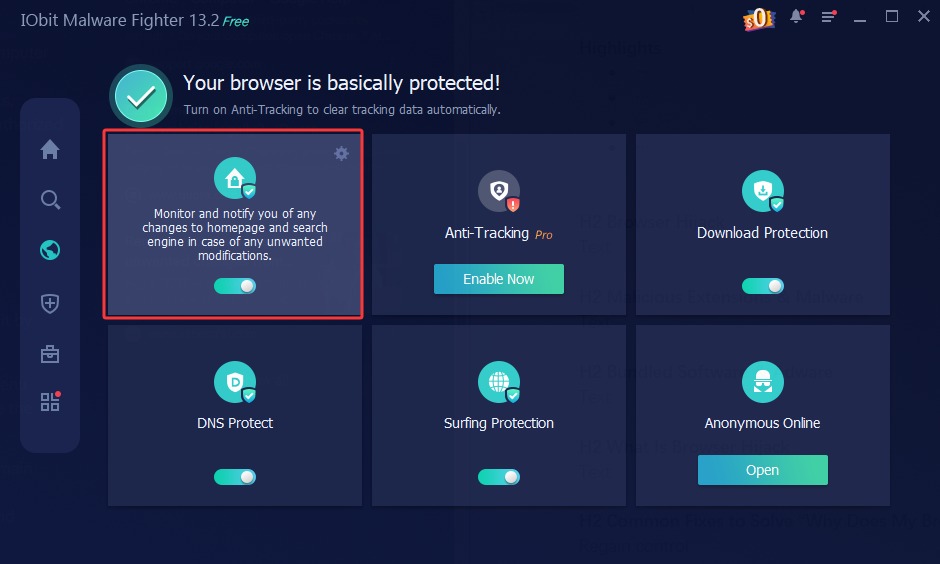
Beyond Google Chrome, it also protects other browsers, including Microsoft Edge, Internet Explorer, and Mozilla Firefox, to completely stop your browser from being modified.

 People Also Ask
Learn how to remove Chrome extensions installed by administrator and regain full control of your browser. Discover easy ways to remove extensions safely.
Why is my disk usage at 100%? It may be caused by Windows background services, hardware limitation, outdated system, & malware activity. Check reasons now!
Want to know why you can’t uninstall Rainbow Six Siege? Check this blog for the full answer and complete fixes to get R6 uninstalled successfully.
How to protect my computer from viruses? Are there any effective ways to protect my computer from attacks? Do I need a professional antivirus tool for my PC?
How to get rid of virus in PC? If you suspect a virus infection, follow this comprehensive guide and clear virus from computer in Windows 11 and 10.
Can’t uninstall Adobe Creative Cloud, why? Can I force uninstall it? Get the answer here and find solutions.