Expert in

PC Health Solution

Wise Program Uninstaller Review

  • Take an in-depth look at Wise Program Uninstaller.
  • Discover whether the uninstaller for Windows is good or not.
Wise Program Uninstaller Review
What Is Wise Program Uninstaller

What Is Wise Program Uninstaller

Wise Program Uninstaller is a lightweight utility used to remove bloatware from Windows. It streamlines the workflow and ensures effective software uninstallation.

What Can Wise Program Uninstaller Do

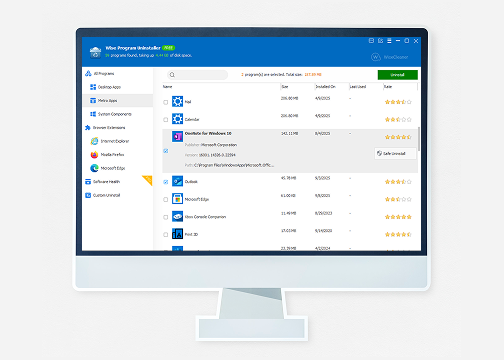
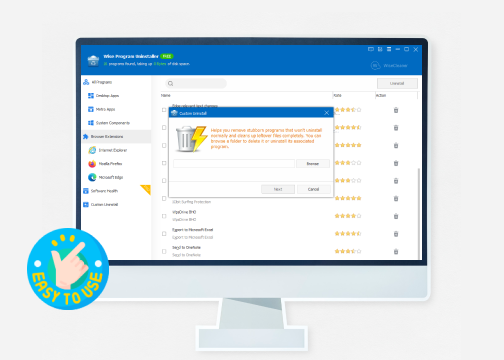
Wise Program Uninstaller makes it easy to remove any installed app - including Windows Apps - and browser extensions from your PC. Its "Force Uninstall" feature helps uninstall stubborn or corrupted applications with no effort. You can also flexibly delete programs from installation folder even though they are not listed in the control panel.
Wise Program Uninstaller Features

Why Choose Wise Program Uninstaller

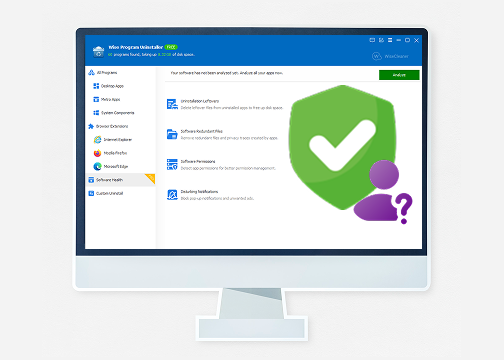
Wise Program Uninstaller offers an easy-to-navigate interface and straightforward workflow, making it good for beginners. It supports "Batch Uninstall" so that you can remove multiple programs at once. The Pro version employs a deep scan engine to clear leftover files, registry entries for keeping your PC clean and healthy.
Wise Program Uninstaller Benefits

Is Wise Program Uninstaller Safe

Wise Program Uninstaller offers an easy-to-navigate interface and straightforward workflow, making it good for beginners. It supports "Batch Uninstall" so that you can remove multiple programs at once.
The Pro version employs a deep scan engine to clear leftover files, registry entries for keeping your PC clean and healthy.
Is Wise Program Uninstaller Safe
IObit Uninstaller
- Best Alternative to Wise Program Uninstaller
Uninstall any app from Windows thoroughly. Remove stubborn programs and browser extensions with no leftovers for system stability.

Wise Program Uninstaller - Pros & Cons

Understand the advantages and disadvantages of Wise Program Uninstaller. Decide whether it is the right solution for programs management.
What We Dislike
  • Lack of installation tracking
  • Limited advanced features
  • Occasional slower process

Wise Program Uninstaller Free vs. Pro - What Is Better

Wise Program Uninstaller is available in both free and pro versions, giving different levels of functionality. Get the full comparison of Wise Program Uninstaller Free vs. Pro.
Wise Program Uninstaller Free
  • Uninstall Programs & Windows Apps
  • Uninstall Browser Extensions
  • Force uninstall stubborn programs
  • Uninstall multiple programs
Wise Program Uninstaller Pro
$9.97/Year for 3 PCs
  • Full access to free features
  • Delete uninstallation leftovers
  • Remove redundant files/privacy traces
  • Detect software permissions
  • Block pop-up notifications & ads
  • Premium technical support
Verdict: Wise Program Uninstaller Free, which offers basic software removal, is a practical option for everyday users. While, the Pro version adds advanced features, such as deeper scanning, software health analysis, for users who want more powerful system maintenance tools. Choose the right version depending on your PC cleanup and software management needs.

Wise Program Uninstaller - User Reviews

An excellent uninstaller tool for Windows
"We really liked the presentation of Wise Program Uninstaller. It feels modern and sits alongside native Windows software without looking like a relic from the past. It is also easy to use, with everything you need to remove applications and games from your computer."
Wise Program Uninstaller User Review 1
- From Christian, Techradar Editor
Everything I want an installer
"Been using this for almost a year and I have no complaints. Easy UI and even gives you different options on how to uninstall. Great for a fresh Windows install and removing all of the ads."
Wise Program Uninstaller User Review 2
- From Benjamin, MS Store User
Easy and quick install
"I am running Windows 8.1 and the Programs and Features uninstaller would not complete. After installing the Wise Uninstaller, the massive 'bad' install of Roxio NXT3 was gone in about 2 minutes. I had previously wasted about 45 minutes waiting for Windows to unsuccessfully complete the uninstall."
Wise Program Uninstaller User Review 3
- From CMK2112, CNET User
Convenient program uninstaller
"Wise Program Uninstaller can help me uninstall the unnecessary programs fast and clean, love it and keep using it.when uninstall specific program, it can scan the related registry entries to decide whether they will be deleted or not."
Wise Program Uninstaller User Review 4
- From Anonymous user

Wise Program Uninstaller vs. IObit Uninstaller

IObit Uninstaller is considered as one of the best Wise Program Uninstaller alternatives if you need a full-featured uninstaller for Windows.
Features Wise Program Uninstaller IObit Uninstaller
Interface Lightweight and simple Modern and feature-heavy
Force uninstall Good Better
Batch uninstall Basic/Free Strong/Paid
Leftover file cleanup Good/Paid Good/Free
Browser extension removal Good Better
Installation monitor Not Supported Excellent
Hunter Mode Not Supported Good
Price Free + Pro Version Free + Pro Version
More About Wise Program Uninstaller Free Download Buy Pro
Verdict: Wise Program Uninstaller is known for small size and low system impact, being a safe choice for most casual users. But if you are a power user who prefer advanced and automated functionality for frequent uninstallation, IObit Uninstaller can satisfy you better.

Wise Program Uninstaller FAQs

How does Wise Program Uninstaller work?
When you launch Wise Program Uninstaller, it scans your system and lists installed software and browser extensions from browsers (Chrome, Firefox, Edge). Simply choose an program or an add-on, the uninstaller will instantly remove it.
Can Wise Program Uninstaller remove leftover files?
The feature is available in Pro version. It deeply scans the leftover files, empty folders, registry entries and residual data after uninstalling a program. You can review and delete them manually.
Can Wise Program Uninstaller uninstall built-in apps in Windows?
Yes. It can detect and remove pre-installed Windows applications as well as UWP/Microsoft Store apps.
What operating systems does Wise Program Uninstaller support?
It supports Windows 7, 8, 10, 11, both 32 and 64-bit systems.
IObit Uninstaller - Full-Featured Alternative to Wise Program Uninstaller
Experience complete software removal automatically with IObit Uninstaller.