Expert in

PC Health Solution

Ashampoo WinOptimizer Review

  • Full overview of Ashampoo Optimizer
  • Explore valuable functionalities & benefits
  • Get recommendable alternative if needed
Ashampoo WinOptimizer Review
What Is Ashampoo WinOptimizer

What is Ashampoo WinOptimizer

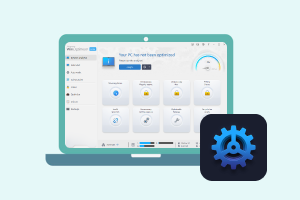
Ashampoo designs WinOptimizer as a system tune-up utility that aims to keep your PC running smoothly through a collection of cleanup and optimization tools.

What Can Ashampoo WinOptimizer Do?

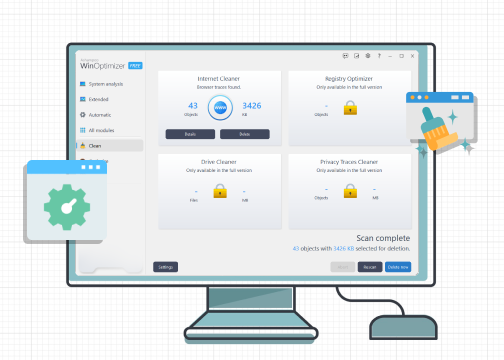
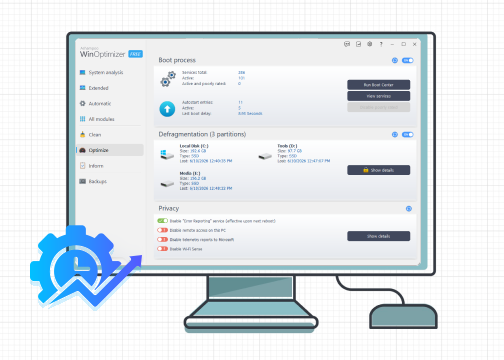
Ashampoo WinOptimizer keeps focuses on PC cleanup and performance enhancement. It analyzes for optimization through a full scan, helping you remove junk/temp files, fix invalid or outdated registry entries and disable useless startup programs for faster boot time. It is committed to privacy protection, not only available to delete browsing histories and traces, but turn off location tracking, Cortana listening, cloud syncing etc.
Ashampoo WinOptimizer Features

What Can You Benefit from Ashampoo WinOptimizer?

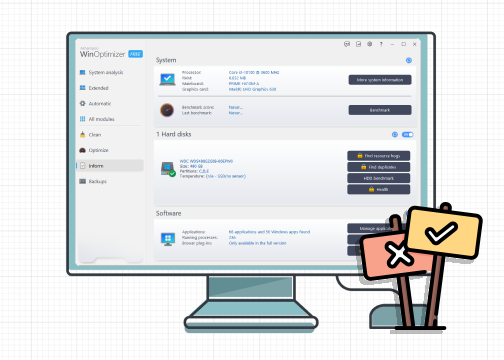
Ashampoo WinOptimizer delivers a streamlined process for PC maintenance. Its user-friendly control panel enables you to perform optimization tasks without technical skills. You can free up disk space, manage startup services and enhance privacy in a single click. It also provides automatic cleanup and tuning tools to ensure system stabilization regularly with minimal user intervention.
Ashampoo WinOptimizer Benefits

Is Ashampoo WinOptimizer Good for Using?

Ashampoo WinOptimizer is generally considered as a reliable optimization tool to keep your PC clean and organized. It combines multiple utilities into a single application, making routine maintenance more convenient. If you wan a simple and stress-free way to manage your PC’s health, Ashampoo WinOptimizer is a solid option to try.
Is Ashampoo WinOptimizer Good
Advanced SystemCare
- Best Alternative to Ashampoo WinOptimizer
An all-rounded Windows optimizer to boost performance, clean up junk files and troubleshoot common system issues.

Ashampoo WinOptimizer Review - Pros & Cons

Ashampoo WinOptimizer stands out for its comprehensive suite, although certain drawbacks probably influence users experience.
What's Not Good
  • Redundant Windows native features
  • Too limited free features
  • Require sign-up for using
  • Optimization results vary

Ashampoo WinOptimizer Pricing

Compare Ashampoo WinOptimizer Free vs. Pro. Unblock more power with paid version.
Ashampoo WinOptimizer Free
  • Basic internet and file cleaning
  • Manual registry defragment
  • Startup & process manager
  • Software uninstallation
Ashampoo WinOptimizer Pro
$20/One-Time License/1 Device
  • Full access to free features
  • Advanced drive/registry cleaning
  • Privacy traces cleaner
  • Auto cleanup & live tuneup
  • SSD optimization
  • Remove browser plug-ins
Verdict: Ashampoo Optimizer Free is sufficient for routine maintenance, while Ashampoo WinOptimizer Pro delivers automated and deep performance tuning. Choose a competent version that meets your need.

Listen to Users

Great UI, Ease of Use
Ashampoo WinOptimizer is a performance tool that should be given a look. It helps to enhance PC performance and is coupled with several other applications that are beneficial for your operating system. The UI looks great and allows for ease of use and simplicity reminiscent of some programs such as Avast.
Ashampoo WinOptimizer User 1
- From Joshua, G2 Reviewer
Powerful Tool for High Performance
The product provides powerful and in-dept tweaks for windows. There are a lot of options, major and minor tweaks. Security section is advanced and helpful for all level of users. But in demo mode, it doesn't let the user experience all its features.Many parts are locked or forwarding the user to buy a license page.
Ashampoo WinOptimizer User 2
- From Ali, G2 Reviewer
Complete Suite for System Maintenance
Ashampoo WinOptimizer has a lot of useful tools to keep the Windows system in a good shape and performance. It helps to clean temp files, fix errors, and is easy to use. But, I think the interface of the application needs some simplicity, maybe a cleaner visual, but not in flat style.
Ashampoo WinOptimizer User 3
- From André, G2 Reviewer
Great Program to Optimize Windows
Ashampoo WinOptimizer is a perfect tool if you find out that your system is running slowly and needs some fresh start without reinstallation. I really liked the interface - it's very intuitive. Also some added features like file shredder and backup tool are nice add-ons.
Ashampoo WinOptimizer User 4
- From Verified G2 Reviewer

Ashampoo WinOptimizer vs. Advanced SystemCare

Advanced SystemCare is a long-standing PC optimization suite that performs similar core functions to Ashampoo WinOptimzer. Which one is better? Have a quick look at the comparison of Ashampoo WinOptimizer vs. Advanced SystemCare.
Features Ashampoo WinOptimizer Advanced SystemCare
Interface Highly organized dashboard Modern, intuitive design
1-click Optimization Good Excellent
Automation Good Excellent
System Cleanup Good Excellent
Privacy Protection Excellent Good
System Analysis In-depth look Basic
Advanced Tuning Tools Extensive Moderate
Software Uninstallation Yes Not supported
Recommend IObit Uninstaller
Free Version Yes, an account needed Yes, no signup
Operating Systems Windows 11 and 10 Windows 11, 10, 8, 7, Vista, XP
More About Ashampoo WinOptimize Free Download Buy Pro
Verdict: Ashampoo WinOptimizer excels as a customizable suite that provides granular control and deep-dive technical modules for power users. Advanced SystemCare pays more attention on automated and "one-click" workflow, allowing every user to optimize PC for gaming, working and more, hassle-free.

Ashampoo WinOptimizer FAQs

Is Ashampoo WinOptimizer free?
Ashampoo WinOptimizer has a free version with blocked paid features. Download Ashampoo WinOptimizer Free, sign up an account and then you can get a free trial.
Is Ashampoo WinOptimizer safe?
Ashampoo WinOptimizer is a trusted program with no malicious or threatening things. Please download it from the official site or reliable download sites (for example CNET) to ensure security.
What are the system requirements for Ashampoo WinOptimizer?
Here are the recommended specifications to run Ashampoo WinOptimizer on your PC.
Operating system: Windows 11/10
Processor: Any CPU capable of running the supported Windows version. Systems with ARM processors are not supported.
Storage space: Apporimately 300-500 MB free disk space
Screen resolution: 1920 x 1080
Internet connection: Required to activate the program and verify the license.
Does Ashampoo WinOptimizer actually speed up PC?
Ashampoo WinOptimizer provides a set of helpful features - file cleanup, startup management, system settings optimization etc., - to make your PC run faster. But, the improvement is usually moderate rather than dramatic, especially on a modern, well-maintained PCs.
Advanced SystemCare - Fully Automated Solution for PC Optimization
Free download Advanced SystemCare and make your PC safer, cleaner and faster.