

- Support Center
- Multiple Languages
- Language
- Help Us Translate
Expert in
PC Health Solution

All-in-one PC health solution: clean, optimize and secure
Comprehensive PC cleaning, optimization and protection

Keep drivers always up-to-date

More stable performance with less system crashes

Protect millions of computers against malware
Top computer security with full-round protection

Protect against viruses & boost PC performance
Quick and deep system scanning throughout PC system.
Smart defense against all malicious infestations.
High-level security and privacy protection in real time.
Leading anti-malware and anti-virus engines.

Learn how to turn off Virus Protection on Windows 10. Follow step-by-step instructions, its core features, and free alternative for more protection.



How to Turn Off Virus Protection on Windows 10 Temporarily
Can You Remove Virus Protection Feature on Windows 10
What Does Virus Protection Do
IObit Malware Fighter Gives More Protection
Virus Protection is a built-in feature on Windows 10 and Windows 11, pre-installed and active from the very beginning. It is also known as Microsoft Defender Antivirus, real-time virus scanning and malware enabled automatically by default.
If you are a Windows 11 PC, follow the same steps.
Step 1. Open Windows Security in Windows Settings, or search it in the search box at the bottom.
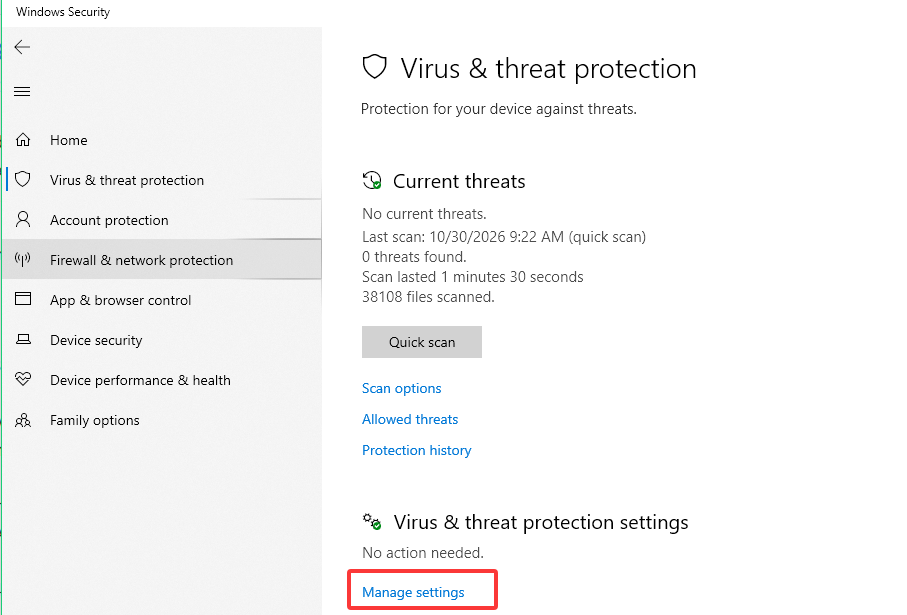
Step 2. And Virus & threat protection is on the right top. You can view your current protection status, and more in the section. Click Manage Settings and toggle off Real-time protection.
This method is for those users who receive blocking info from Microsoft Defender which flags a legitimate application or blocks files you trust.
Step 1. Open Windows Security > Virus & threat protection > Manage settings.
Step 2. Scroll to the Exclusions section and select Add or remove exclusions.
Step 3. Click Add an exclusion, choose File or Folder. Then select the one you want to exclude.
In this way, Microsoft Defender will no longer scan the excluded item.
No. You cannot remove Virus Protection from your Windows 10 as it is deeply integrated into the operating system.
Real-time scan and protection: Continuously scan files, downloads and applications when you take actions. If there is any threat detected, it will block it instantly.
Malware and virus removal: Detect and remove known viruses, trojans, spyware, and more.
Folder access setting: You can use its feature Controlled Folder Access to protect files from unauthorized changes.
Scheduled or manual scans: Scan your system automatically with scheduled timeline or choose to scan when you are available.
Some users may prefer additional security tools with more specialized protection, like IObit Malware FIgher, another approach to PC security. It detects, blocks, and removes malware, spyware, ransomware and more after real-time scanning.

Main features of the virus protection software:
Real-time protection: Monitor system activities and block suspicious processes, files, or other threats.
Malware scanning: Perform scans to identify viruses, spyware, Trojans, and more with its large database.
Ransomware protection: Prevent ransomware attacks and unauthorized access to important files and sensitive data.
Browser protection: Block malicious website visiting, prevent browser hijacking.
And enjoy more advanced protections for USB, camera, and others after upgrading to the PRO.
 People Also Ask
Learn how to save passwords in Chrome, manage saved logins, fix password-saving issues, and protect your accounts from malware and online threats.
Want to scan your PC for viruses online? Learn how online virus scanners work, their limitations, and how to protect your PC with IObit Malware Fighter.
Is Windows Defender good enough to keep your PC safe? Explore its real-world protection, key features, pros and cons, and see whether you need additional antivirus software for complete security