- Support Center
- Multiple Languages
- Language
- Help Us Translate
Expert in
PC Health Solution

All-in-one PC health solution: clean, optimize and secure

Comprehensive PC cleaning, optimization and protection

Keep drivers always up-to-date

More stable performance with less system crashes

Protect millions of computers against malware

Top computer security with full-round protection

Protect against viruses & boost PC performance
Complete forced uninstallation for stubborn programs.
Uninstall a batch of programs at once.
Scan and remove leftover files, folders, and registry entries.
Support the management of Universal Windows Platform apps.

Learn how to remove Chrome extensions installed by administrator and regain full control of your browser. Discover easy ways to remove extensions safely.



Extensions installed by your administrator cannot be removed through the standard Chrome settings.
Method 1. Use IObit Uninstaller to remove extensions from Chrome in one click.
Method 2. Remove extensions installed by administrator by deleting ExtensionInstallForcelist.
Method 3. Windows Pro/Enterprise users can delete extensions via Group Policy Editor.
Create a fresh Chrome profile if all the methods fail.
When you discover that extensions marked "Installed by administrator" cannot be removed through the standard Chrome interface, you may be unsure how to proceed. How to remove Chrome extensions installed by administrator? Try the following practical methods.
Google Chrome allows administrators to enforce extensions using Group Policy or managed devices. Extensions labeled “Installed by your administrator” cannot be removed through the standard Chrome settings. However, this is not unsolvable problem. Please try the following steps.
For a quicker, safer, and more user-friendly approach, IObit Uninstaller is a great tool to use.
How do I uninstall a Chrome extension in one click:
1. Download IObit Uninstaller, install and run it on your PC.
2. Switch to Browser Extensions tab, and click on Google Chrome, all your installed extensions are listed here. Select which you want to uninstall and click on Remove.
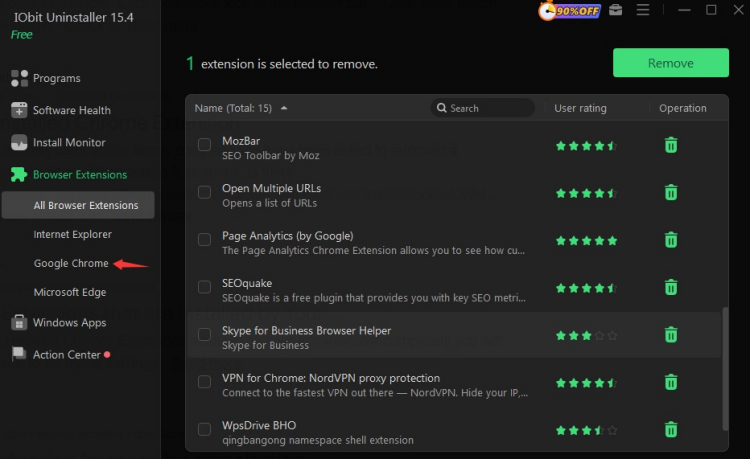
Why choose this extension uninstaller:
All-in-One Management: Lists both regular and administrator-installed extensions together.
One-Click Removal: Uninstall multiple extensions at once without navigating Chrome manually.
Beginner-Friendly: No technical knowledge of registry or policies needed.
Fast and Safe: Removes extensions cleanly without affecting your browser profile or system.

For personal Windows 11 devices, this is a reliable way how to remove an extension from Chrome installed by administrator.
1. Press Windows + R to open the box, type regedit, and press Enter.
2. Navigate to:
HKEY_LOCAL_MACHINE\SOFTWARE\Policies\Google\Chrome\ExtensionInstallForcelist
3. On the right panel, you will see numbered entries (1, 2, 3…). Each corresponds to a forced extension ID.
4. Delete the entry for the unwanted extension.
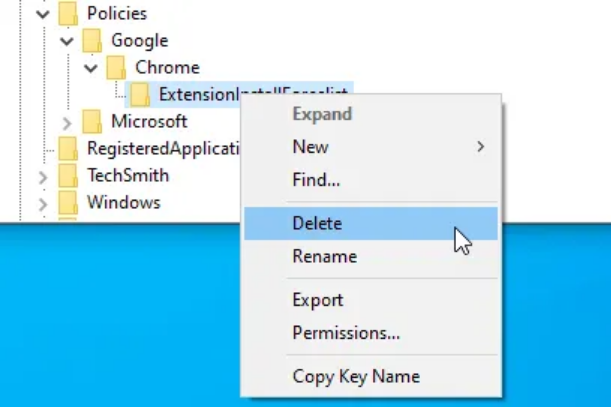
5. Close Registry Editor and restart Chrome.
Friendly Reminder: Editing the registry incorrectly can harm your system. Always back up the registry before making changes.
If you have Windows 11 Pro or Enterprise, you can deal with how to remove extensions from Chrome installed by administrator easily.
1. Press Windows + R, type gpedit.msc, and press Enter.
2. Navigate to:
Computer Configuration > Administrative Templates > Google > Google Chrome > Extensions.
3. Remove or disable policies enforcing the extension.
4. Restart Chrome to apply changes.
If none of the above methods are an option (for example, on a heavily restricted school computer), you can work around the problem rather than removing it directly:
1. Click your profile icon in Chrome’s top-right corner.
2. Select Add (a new profile).
3. Name it something like “Clean Profile.”
4. Do not sync your old settings.
Force-installed extensions are often tied to the specific profile that was added to a domain. A new local profile may completely bypass the enforced extensions. While this does not technically answer how do I uninstall a chrome extension globally, it gives you a usable, extension-free browsing environment.
Learning how to remove Chrome extensions installed by administrator is key to maintaining a clean, efficient browser. By following the methods above, you can manage all extensions safely and effectively.
IObit Uninstaller simplifies extension management by consolidating all Chrome extensions in one place and allowing one-click removal, making it beginner-friendly while ensuring fast, safe, and thorough cleanup.
 People Also Ask
Yes. You can uninstall and reinstall Realtek audio driver to solve the problem that PC sound is not working generally. Try the 3 ways to fix now.
If you uninstall Steam, what happens to your games and saves? Learn whether your games are deleted, where files are stored, and how to keep your progress safe.
Need to uninstall NPM package safely? Learn how to uninstall NPM package locally and globally, fix NPM uninstall not working issues step by step.